- Home
- /
- Programming
- /
- ODS Reports
- /
- Re: ODS TAGSETS TABLEEDITOR
- RSS Feed
- Mark Topic as New
- Mark Topic as Read
- Float this Topic for Current User
- Bookmark
- Subscribe
- Mute
- Printer Friendly Page


- Mark as New
- Bookmark
- Subscribe
- Mute
- RSS Feed
- Permalink
- Report Inappropriate Content
Hello,
I am using ods tableeditor tagsets to create an excel pivot table from sas.
I am using sashelp.shoes dataset for my example.
I have region and product as my pivotrow variables. For my pivotdata variables I am using stores and inventory and I am using pivotdata_stats = "sum".
Now the problem I am having is the sum for stores and inventory appear in the rows in the excel spreadsheet. I would like these stats to appear in the column.
Is there a way to do this directly from sas?
Thank you,
Here is the code:
ods tagsets.tableeditor file="C:\exampleaa.html"
options(
button_text = "Create Pivot"
auto_excel = "yes"
pivotrow = "region,product"
pivotdata="stores,inventory"
pivotdata_stats="sum"
pivot_format="light10"
sheet_name="TEST"
quit="NO"
);
proc print data=sashelp.shoes;
run;
ods tagsets.tableeditor close;
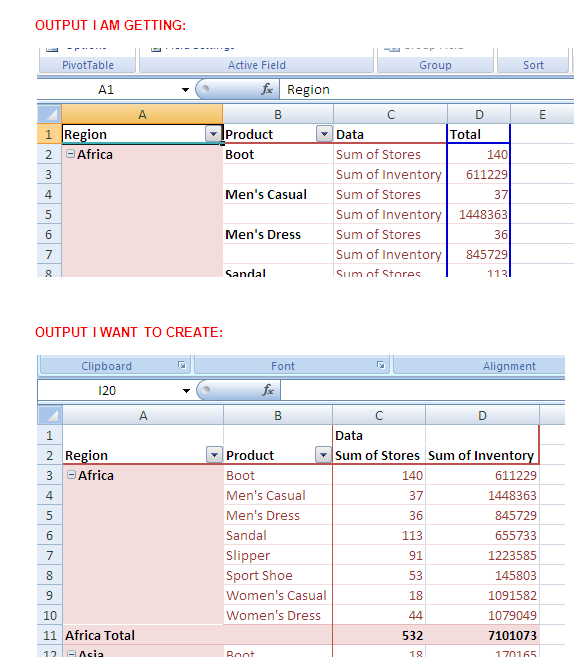
Accepted Solutions


- Mark as New
- Bookmark
- Subscribe
- Mute
- RSS Feed
- Permalink
- Report Inappropriate Content
To have this appear as columns rather than rows, add the PIVOTDATA_TOCOLUMNS="yes" option which should do this.


- Mark as New
- Bookmark
- Subscribe
- Mute
- RSS Feed
- Permalink
- Report Inappropriate Content
SAS support Can you please help I have the same problem!!!!!
- Mark as New
- Bookmark
- Subscribe
- Mute
- RSS Feed
- Permalink
- Report Inappropriate Content
To have this appear as columns rather than rows, add the PIVOTDATA_TOCOLUMNS="yes" option which should do this.
- Mark as New
- Bookmark
- Subscribe
- Mute
- RSS Feed
- Permalink
- Report Inappropriate Content
Works !!!. Thanks Chevell@sas.

- Mark as New
- Bookmark
- Subscribe
- Mute
- RSS Feed
- Permalink
- Report Inappropriate Content
Hi Chevell,
I saw your post on tagset table editor. I was wondering if I could directly create Pivot table from sas instead of creating a HTML file with a " Create Pivottable " button on it.
The reason i ask is that I need to export the SAS data into a Pivot in Unix and upload it at a certain location.
Also, the data I am dealing with is huge and opening a HTML file is taking a lot of time , let alone the time it takes to create the Pivot Table
Second question: Is there any option that can be used to just retain the excel tab with Pivot table and delete the rest of the sheets ( including data sheet).
Thanks


- Mark as New
- Bookmark
- Subscribe
- Mute
- RSS Feed
- Permalink
- Report Inappropriate Content
Post your question in a new thread.
- Mark as New
- Bookmark
- Subscribe
- Mute
- RSS Feed
- Permalink
- Report Inappropriate Content
I am not able to open a new thread !
- Mark as New
- Bookmark
- Subscribe
- Mute
- RSS Feed
- Permalink
- Report Inappropriate Content
The link below doesn't work?
- Mark as New
- Bookmark
- Subscribe
- Mute
- RSS Feed
- Permalink
- Report Inappropriate Content
Thanks Reeza, I have now posted it as a new question.

Catch up on SAS Innovate 2026
Nearly 200 sessions are now available on demand in the Innovate Hub.
Watch Now →Learn how use the CAT functions in SAS to join values from multiple variables into a single value.

Find more tutorials on the SAS Users YouTube channel.
SAS Training: Just a Click Away
Ready to level-up your skills? Choose your own adventure.
-
8 replies
-
10-18-2012 12:14 PM
-
10187 views
-
1 like
-
5 in conversation
-


