- Home
- /
- Programming
- /
- ODS Reports
- /
- ODS PDF with option startpage=no/new, generates a BLANK page, how can ...
- RSS Feed
- Mark Topic as New
- Mark Topic as Read
- Float this Topic for Current User
- Bookmark
- Subscribe
- Mute
- Printer Friendly Page


- Mark as New
- Bookmark
- Subscribe
- Mute
- RSS Feed
- Permalink
- Report Inappropriate Content
Hi I have been trying to produce two reports with PROC tabulate on two seperate pages of PDF report, using startpage option. However, in the final pdf output, there is a BLANK page appearing on first page. Can you please guide how can we avoid the blank page from appearing on first page of report? Below is the sample code being used:
ods noproctitle;
ods pdf file = '...path/filename.pdf' startpage=never style=printer pdftoc=1;
title1 'title1';
proc tabulate data=xyx contents=' ';
......
run;
ods pdf startpage=now;
ods proclable = 'ABC';
title1 'title2';
proc tabulate data=xyx contents=' ';
......
run;
ods pdf close;


- Mark as New
- Bookmark
- Subscribe
- Mute
- RSS Feed
- Permalink
- Report Inappropriate Content
Hi:
Given the code you've posted, and given that you did not post full code or data, it is hard to replicate what you say you see. When I tried code the way I usually get 2 page output, I do not get a blank page, as you describe. Here are two tests that I ran:
1: NOT using STARTPAGE, as it does not seem needed for the situation you describe
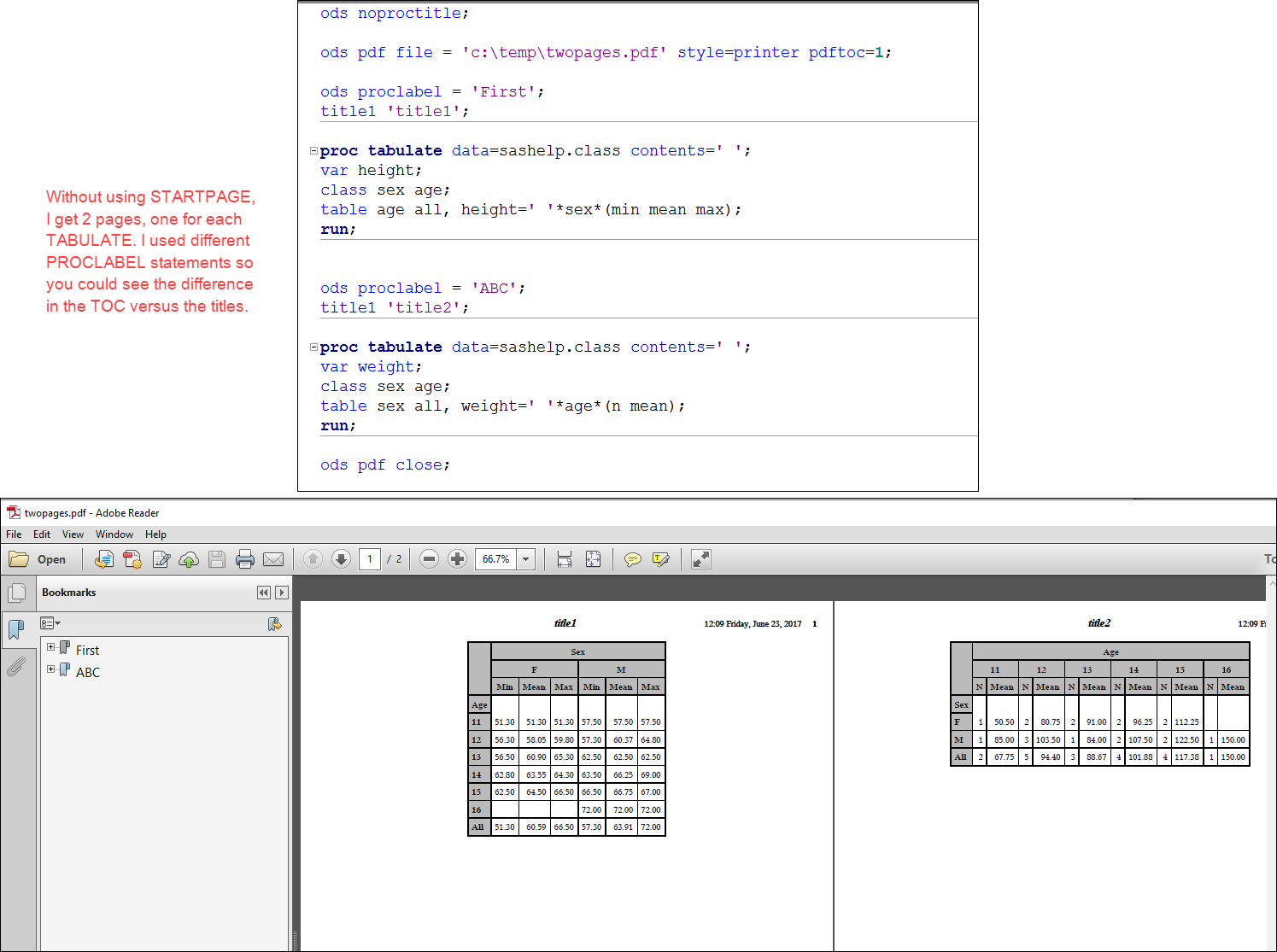
2: Using STARTPAGE=NO at the beginning, have 2 procs on page 1 and then using STARTPAGE=NOW for page 2:
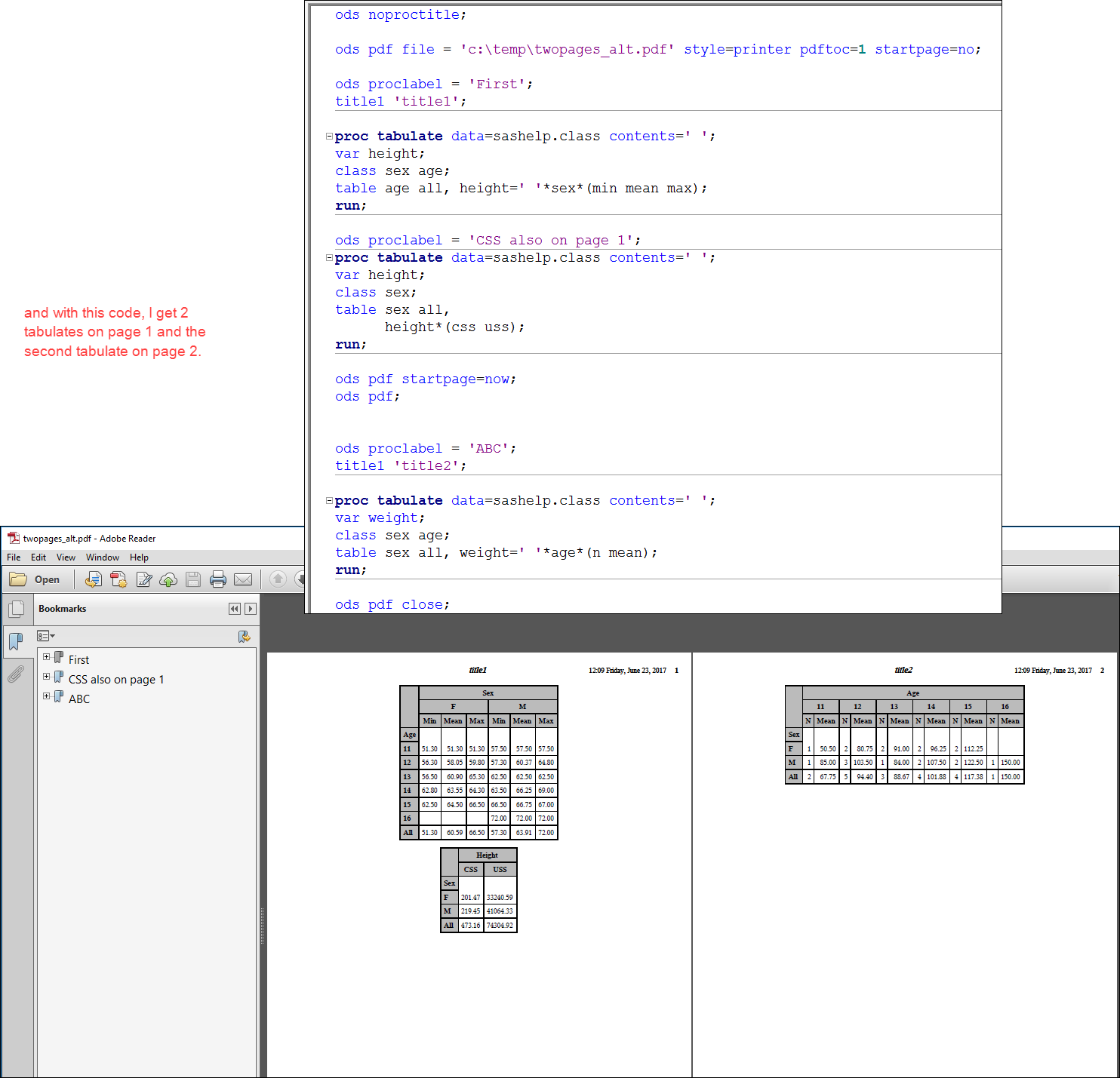
If I use STARTPAGE=NEVER instead of STARTPAGE=NO for the 2nd example, I still get the same results.
You might want to open a track with Tech Support if you can't figure it out. It might come down to your version of SAS and your other settings.
cynthia
- Mark as New
- Bookmark
- Subscribe
- Mute
- RSS Feed
- Permalink
- Report Inappropriate Content
Thank you for the detailed reply Cynthia, Actually when I too generated a second report with lesser variables in the proc tabulate, no blank page was generated. However, when my report had a lot of variables (~20) a blank page was showing up in front(as first page) of the pdf report. I am using SAS version 9 on UNIX plateform.


- Mark as New
- Bookmark
- Subscribe
- Mute
- RSS Feed
- Permalink
- Report Inappropriate Content
Did you ever find a solution to this problem? I am having the same problem with my PDF output.

Catch up on SAS Innovate 2026
Nearly 200 sessions are now available on demand in the Innovate Hub.
Watch Now →Learn how use the CAT functions in SAS to join values from multiple variables into a single value.

Find more tutorials on the SAS Users YouTube channel.
SAS Training: Just a Click Away
Ready to level-up your skills? Choose your own adventure.
-
3 replies
-
06-23-2017 11:47 AM
-
16276 views
-
0 likes
-
3 in conversation
-


