
BookmarkSubscribeRSS Feed
CurtisER
Obsidian | Level 7

In 9.4M3, ODS EXCEL is new.


Previously, ODS Tagsets.ExcelXP has been the mainstay for generating Excel spreadsheet.  I would like to refer to SAS KB #44126 "ASIS=ON does not maintain leading or trailing blanks in the output generated by the ExcelXP tagset".


It appears that ODS EXCEL still does not honor ASIS=ON or PRETEXT options in the CALL DEFINE statement.  If so, I would have to continue to use Tagsets.ExcelXP?  Thanks.

1 REPLY 1
SuzanneDorinski
Lapis Lazuli | Level 10

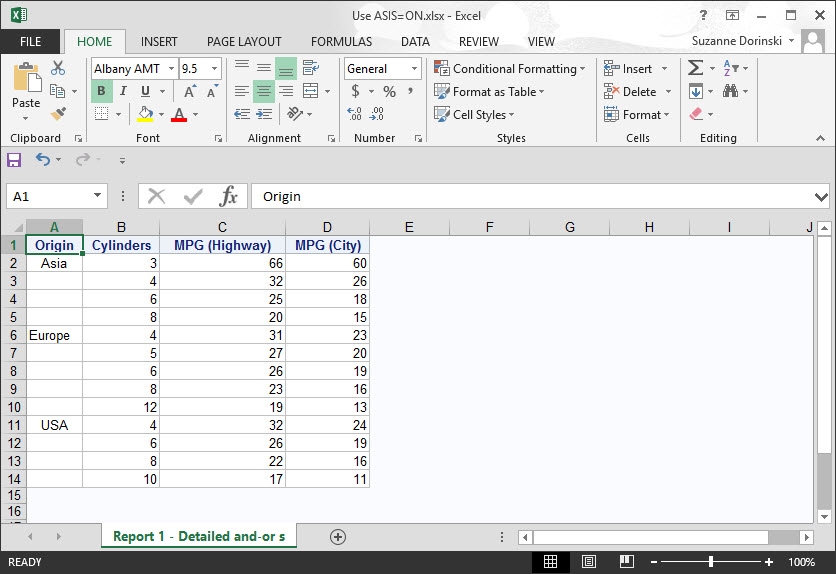
I used the code from that SAS Knowledge Base note you referenced.  The note suggests a workaround using the MSOffice2K tagset. I ran that PROC REPORT code using the ODS Excel destination in SAS University Edition, and it works!  Smiley Happy


This is the code I tried: 


%let path=/folders/myfolders/ODS Excel examples;

ODS EXCEL FILE="&path/Use ASIS=ON.xlsx";
 
proc report data=sashelp.cars nowd;  
   col origin cylinders mpg_highway mpg_city;
   define origin        / group;
   define cylinders     / group;
   define mpg_highway   / mean format=4.; 
   define mpg_city      / mean format=4.;  
                            
   compute origin;    
      if origin ne "Europe" then do; 
         call define(_col_,"style","style={pretext='   ' asis=on}"); 
      end; 
   endcomp; 
run;

ODS EXCEL CLOSE;

And this is the output:


Use ASIS=ON in ODS Excel.jpg


Catch up on SAS Innovate 2026

Nearly 200 sessions are now available on demand with the SAS Innovate Digital Pass.

Explore Now →
How to Concatenate Values

Learn how use the CAT functions in SAS to join values from multiple variables into a single value.

Find more tutorials on the SAS Users YouTube channel.

SAS Training: Just a Click Away

 Ready to level-up your skills? Choose your own adventure.

Browse our catalog!

Discussion stats
  • 1 reply
  • 3119 views
  • 0 likes
  • 2 in conversation