- Home
- /
- Programming
- /
- ODS Reports
- /
- Re: ODS EXCEL cell borders
- RSS Feed
- Mark Topic as New
- Mark Topic as Read
- Float this Topic for Current User
- Bookmark
- Subscribe
- Mute
- Printer Friendly Page


- Mark as New
- Bookmark
- Subscribe
- Mute
- RSS Feed
- Permalink
- Report Inappropriate Content
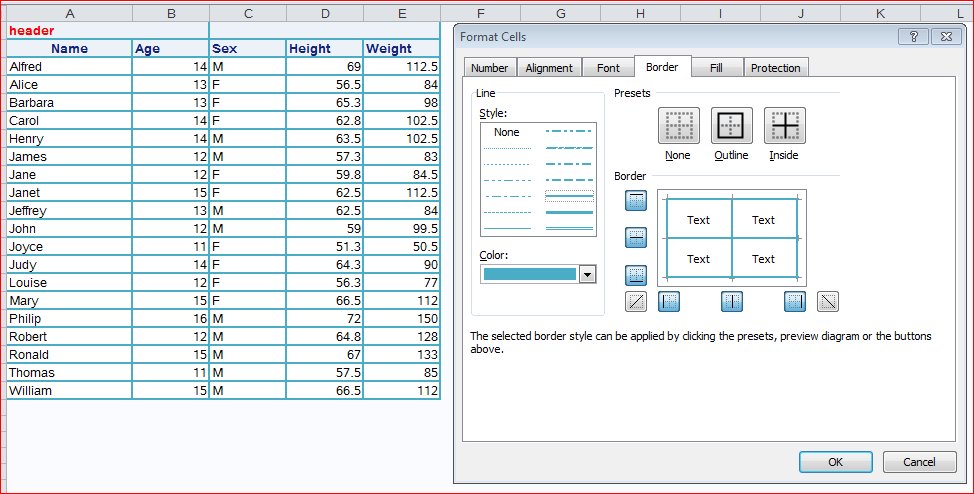
I want to modify the attributes of cell borders as would be done in EXCEL with the menu shown in the attachment. Are there style attributes that control this? Is it TAGATTR? Something else?


- Mark as New
- Bookmark
- Subscribe
- Mute
- RSS Feed
- Permalink
- Report Inappropriate Content
Are you working with a style template or predefined style?


- Mark as New
- Bookmark
- Subscribe
- Mute
- RSS Feed
- Permalink
- Report Inappropriate Content
Hi data_null_,
I used the example near the end of Eric Gebhart's 2008 paper to create my own custom style template and then use the styles in my Proc Report compute blocks. See http://www2.sas.com/proceedings/forum2008/036-2008.pdf
Paul

- Mark as New
- Bookmark
- Subscribe
- Mute
- RSS Feed
- Permalink
- Report Inappropriate Content
If it is a procedure like proc print, report or tabulate then style overrides for Borderwidth (bordertopwidth, borderbottomwidth, borderleft width or borderrightwidth to address them individually) and/or bordercolor (bordertopcolor etc) generally worked for me. The fun part is getting width unit as a simple number can get pretty large changes so something like Borderwidth=3px or borderwidth=0.1cm.
A brief example with proc print:
proc print data=sashelp.class;
   var name /style={borderwidth=1};
   var age  /style={borderwidth=2};
   var height / style={borderwidth=3};
run;
Each variable witll have a different thickness of line around the values.

Catch up on SAS Innovate 2026
Nearly 200 sessions are now available on demand with the SAS Innovate Digital Pass.
Explore Now →Learn how use the CAT functions in SAS to join values from multiple variables into a single value.

Find more tutorials on the SAS Users YouTube channel.
SAS Training: Just a Click Away
Ready to level-up your skills? Choose your own adventure.
-
3 replies
-
11-07-2016 05:04 PM
-
6264 views
-
1 like
-
4 in conversation
-


