- Home
- /
- Programming
- /
- ODS Reports
- /
- How to output special symbols by proc report using ods rtf
- RSS Feed
- Mark Topic as New
- Mark Topic as Read
- Float this Topic for Current User
- Bookmark
- Subscribe
- Mute
- Printer Friendly Page


- Mark as New
- Bookmark
- Subscribe
- Mute
- RSS Feed
- Permalink
- Report Inappropriate Content
Hi all,
Сould you please say how to output special symbols by proc report using ods rtf?
Accepted Solutions
- Mark as New
- Bookmark
- Subscribe
- Mute
- RSS Feed
- Permalink
- Report Inappropriate Content
it seems I have found this solution:
~{unicode 03BB}zand in the define:
define var11 / page " *~{unicode 03BB}z" style(header)=[just=c cellwidth=11.16%] left;


- Mark as New
- Bookmark
- Subscribe
- Mute
- RSS Feed
- Permalink
- Report Inappropriate Content
Does the symbol appear like that in the actual RTF text? Open the rtf file in a text editor, something like notepad++, and look for it. If it looks like that in the raw text file then that is one issue, if it is fine in the plain text file, then the software you are using to render the rtf (propbably Word thats most common) is changing it. Assuming your SAS session is setup for UTF 98 or 16) it should be able to process that character.
- Mark as New
- Bookmark
- Subscribe
- Mute
- RSS Feed
- Permalink
- Report Inappropriate Content
it seems I have found this solution:
~{unicode 03BB}zand in the define:
define var11 / page " *~{unicode 03BB}z" style(header)=[just=c cellwidth=11.16%] left;
- Mark as New
- Bookmark
- Subscribe
- Mute
- RSS Feed
- Permalink
- Report Inappropriate Content

- Mark as New
- Bookmark
- Subscribe
- Mute
- RSS Feed
- Permalink
- Report Inappropriate Content
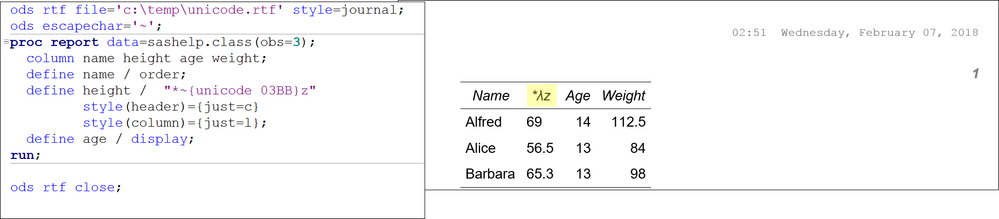
Hi:
It worked for me in ODS RTF in SAS 9.4 M3 without needing any RTF control strings. I used SASHELP.CLASS since you only wanted to focus on the column headers, the data did not matter.
cynthia

Catch up on SAS Innovate 2026
Nearly 200 sessions are now available on demand in the Innovate Hub.
Watch Now →Learn how use the CAT functions in SAS to join values from multiple variables into a single value.

Find more tutorials on the SAS Users YouTube channel.
SAS Training: Just a Click Away
Ready to level-up your skills? Choose your own adventure.
-
4 replies
-
02-07-2018 06:47 AM
-
5578 views
-
0 likes
-
3 in conversation
-


