- Home
- /
- Programming
- /
- ODS Reports
- /
- How to make table size same for different procedures in ODS PDF
- RSS Feed
- Mark Topic as New
- Mark Topic as Read
- Float this Topic for Current User
- Bookmark
- Subscribe
- Mute
- Printer Friendly Page


- Mark as New
- Bookmark
- Subscribe
- Mute
- RSS Feed
- Permalink
- Report Inappropriate Content
Hi All,
I have different procedures in my ODS PDF. Its PDF with 5 pages and several procedures like proc report, proc print, proc tabulate and proc univariate. When we see output, it looks really scattered. Below is code.
data cars;
set sashelp.cars (obs=10);
run;
options papersize=(21in 15in) leftmargin=1.05in rightmargin=1.05in;
ods escapechar = '~'
noresults
noproctitle ;
options symbolgen;
ODS LISTING CLOSE;
ods _all_ close;
ods pdf file="/sasdata/Shared/test.pdf" gtitle gfootnote;
ods pdf startpage=now;
proc report data=cars;
run;
ods pdf startpage=no;
proc print data=cars;
run;
ods pdf close;
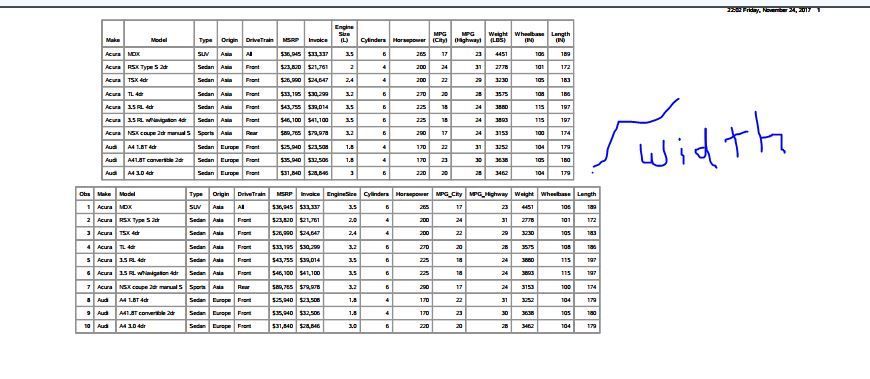
Problem is the width of these 2 results in pdf differs. While I do understand that these are 2 different procedures and would differ in appearance when executed . still Is there a way we can make it aligned at least in terms of width? see the screen below
Any help is really appreciated


- Mark as New
- Bookmark
- Subscribe
- Mute
- RSS Feed
- Permalink
- Report Inappropriate Content
Hi:
For PRINT, REPORT and TABULATE, you can make width=100% or width=8in as a style= override. But you can only change that in UNIVARIATE with a TABLE template change. Since you did not post any UNIVARIATE code, I used SASHELP.CARS, and SASHELP.HEART for this example, below.
cynthia
options papersize=(21in 15in) leftmargin=1.05in rightmargin=1.05in;
ods escapechar = '~';
ods noproctitle ;

ods _all_ close;
ods pdf file="c:\temp\test.pdf" uniform;
ods pdf startpage=now;
proc report data=sashelp.cars(obs=10)
     style(report)={width=18in};
run;

ods pdf startpage=no;
proc print data=sashelp.heart(obs=10) noobs
     style(table)={width=18in};
run;

proc tabulate data=sashelp.cars;
  class make origin;
  var msrp mpg_city mpg_highway cylinders;
  table origin,
        msrp*(mean max) mpg_city*(mean max) mpg_highway*(mean max)
		cylinders*(mean max)
     /style={width=18in};
run;
ods pdf close;

- Mark as New
- Bookmark
- Subscribe
- Mute
- RSS Feed
- Permalink
- Report Inappropriate Content
I got them to align by adding style=, noobs, and label options
data cars;
set sashelp.cars (obs=10);
run;
options papersize=(21in 15in) leftmargin=1.05in rightmargin=1.05in;
ods escapechar = '~'
 noresults
 noproctitle ;

ODS LISTING CLOSE;
ods _all_ close;
ods pdf file="&sasforum.\reports\test.pdf" gtitle gfootnote;
ods pdf startpage=now;
proc report data=cars style(report)={outputwidth=17in};
run;

ods pdf startpage=no;
proc print data=cars noobs label style(table)={outputwidth=17in};
run;
ods pdf close;

Catch up on SAS Innovate 2026
Nearly 200 sessions are now available on demand with the SAS Innovate Digital Pass.
Explore Now →Learn how use the CAT functions in SAS to join values from multiple variables into a single value.

Find more tutorials on the SAS Users YouTube channel.
SAS Training: Just a Click Away
Ready to level-up your skills? Choose your own adventure.
-
2 replies
-
11-24-2017 10:20 PM
-
3669 views
-
1 like
-
3 in conversation
-


