- Home
- /
- Programming
- /
- ODS Reports
- /
- Color excel files using calculations
- RSS Feed
- Mark Topic as New
- Mark Topic as Read
- Float this Topic for Current User
- Bookmark
- Subscribe
- Mute
- Printer Friendly Page


- Mark as New
- Bookmark
- Subscribe
- Mute
- RSS Feed
- Permalink
- Report Inappropriate Content
Hi,
---------------Background -----------------------------------------------------------------
I have 2 files (A. Current year and B. Previous year) in which I am tracking courses offered by Location and the pass/fail ratio
---------------Requirement -----------------------------------------------------------------
in the current year file, I want to show progress with colors using following criteria
1) if the % Pass in both the years are > 80%, then, mark it green in the current year file
2) if the % Pass in both the years are < 80%, then, mark it red in the current year file
3) if the % Pass in any one year is < 80% and the other is > 80%, then, mark it yellow in the current year file
Example
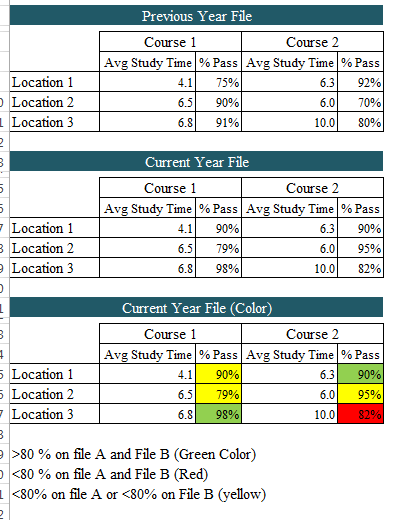
Please note that the excel files for both the files are identifcal, only the values change
Please advise how to accomplish it
Thanks
Accepted Solutions


- Mark as New
- Bookmark
- Subscribe
- Mute
- RSS Feed
- Permalink
- Report Inappropriate Content
I'm assuming you have the data in SAS.
Are you using ODS EXCEL, or TAGSETS to create the tables currently, or some other method?
Traffic lighting is possible, the paper below works through examples. Note that the code is available for the paper as well.
http://support.sas.com/resources/papers/proceedings14/SAS050-2014.pdf
- Mark as New
- Bookmark
- Subscribe
- Mute
- RSS Feed
- Permalink
- Report Inappropriate Content
I'm assuming you have the data in SAS.
Are you using ODS EXCEL, or TAGSETS to create the tables currently, or some other method?
Traffic lighting is possible, the paper below works through examples. Note that the code is available for the paper as well.
http://support.sas.com/resources/papers/proceedings14/SAS050-2014.pdf

Catch up on SAS Innovate 2026
Nearly 200 sessions are now available on demand with the SAS Innovate Digital Pass.
Explore Now →Learn how use the CAT functions in SAS to join values from multiple variables into a single value.

Find more tutorials on the SAS Users YouTube channel.
SAS Training: Just a Click Away
Ready to level-up your skills? Choose your own adventure.
-
1 reply
-
05-10-2017 04:40 PM
-
1225 views
-
0 likes
-
2 in conversation
-


