- Home
- /
- Programming
- /
- ODS Reports
- /
- Re: Blank Spaces lost in ods tagest excelxp
- RSS Feed
- Mark Topic as New
- Mark Topic as Read
- Float this Topic for Current User
- Bookmark
- Subscribe
- Mute
- Printer Friendly Page


- Mark as New
- Bookmark
- Subscribe
- Mute
- RSS Feed
- Permalink
- Report Inappropriate Content
Hi All,
I have below sample data and i want to create report in .xml .But when i output the report blank spaces are not visible.
Below is the sample data, proc report code and screenshot attached.
data new;
input text $1 -20;
datalines;
1000
  Fever
  ;
data new;
 set new;
 if _n_=2 then text="         "||text;
run;

ods Tagsets.ExcelXP style=sasweb
file='\\C:Users\Desktop\Table.xml'
options(orientation='landscape' sheet_name="Index" embedded_titles='yes'  );
proc report data=new split='*' headskip spanrows spacing=0 nowd style(header)=[fontweight=bold ];
columns text ;
 define text /"Sample data" style(column)=[cellwidth=150 just=left];
run;
ods Tagsets.ExcelXP close;Accepted Solutions


- Mark as New
- Bookmark
- Subscribe
- Mute
- RSS Feed
- Permalink
- Report Inappropriate Content
Hi:
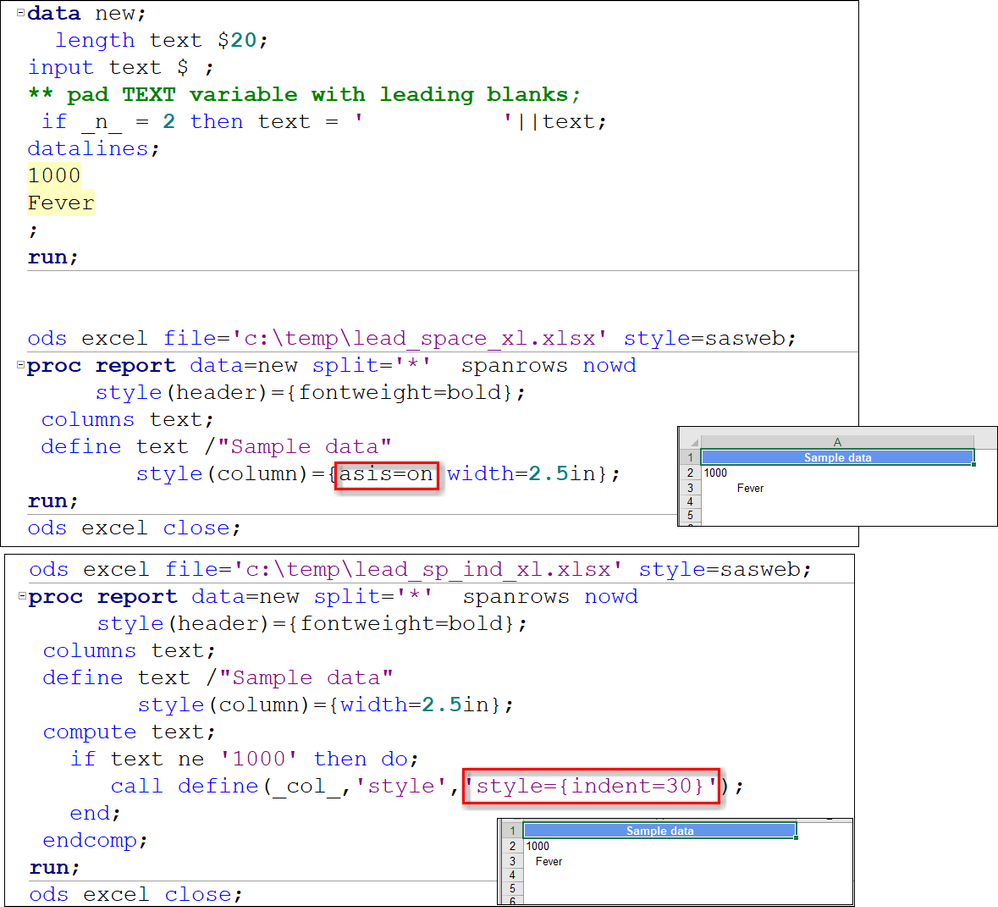
My recommendation is to switch to ODS EXCEL, if possible. Either ASIS=ON or INDENT= works with ODS EXCEL, as shown below.
Cynthia


- Mark as New
- Bookmark
- Subscribe
- Mute
- RSS Feed
- Permalink
- Report Inappropriate Content
Usage Note 44126: ASIS=ON does not maintain leading or trailing blanks in the output generated by th... shows a modification to the tagset that you can use.
- Mark as New
- Bookmark
- Subscribe
- Mute
- RSS Feed
- Permalink
- Report Inappropriate Content
I think that ODS EXCEL does respect ASIS=ON. You can also use indent= with ODS EXCEL.
Cynthia
- Mark as New
- Bookmark
- Subscribe
- Mute
- RSS Feed
- Permalink
- Report Inappropriate Content
Hi Cyntia,
Indent option is not working for ods tagset excelxp.Please suggest if by any way i can achieve the desired output.
Regards,
Rajesh
- Mark as New
- Bookmark
- Subscribe
- Mute
- RSS Feed
- Permalink
- Report Inappropriate Content
Hi Suzzane,
Thanks for the solution but seems same is not working in my case.
While i tried for ods tagset excelxp code from documentaion , it is giving unresolved macro variable error.
Regards,
Rajesh
- Mark as New
- Bookmark
- Subscribe
- Mute
- RSS Feed
- Permalink
- Report Inappropriate Content
Hi:
My recommendation is to switch to ODS EXCEL, if possible. Either ASIS=ON or INDENT= works with ODS EXCEL, as shown below.
Cynthia
- Mark as New
- Bookmark
- Subscribe
- Mute
- RSS Feed
- Permalink
- Report Inappropriate Content
Thanks a lot Cynthia.
It worked with ODS Excel.
Regards,
Rajesh

Catch up on SAS Innovate 2026
Nearly 200 sessions are now available on demand in the Innovate Hub.
Watch Now →Learn how use the CAT functions in SAS to join values from multiple variables into a single value.

Find more tutorials on the SAS Users YouTube channel.
SAS Training: Just a Click Away
Ready to level-up your skills? Choose your own adventure.
-
6 replies
-
05-27-2018 03:30 AM
-
4573 views
-
0 likes
-
3 in conversation
-


