- RSS Feed
- Mark Topic as New
- Mark Topic as Read
- Float this Topic for Current User
- Bookmark
- Subscribe
- Mute
- Printer Friendly Page


- Mark as New
- Bookmark
- Subscribe
- Mute
- RSS Feed
- Permalink
- Report Inappropriate Content
i have a csv file with 9.1M rows
its first column name is time and values' format is datetime
ex) 2023-11-29 05:17:14
ex) 2023-10-29 23:19:11
but when I import the file, SASDataExplorer recognize it as varchar.
i want use the datetime value for Time Axis, but it is not datetime format 😞
How to import as Datetime OR transform from varchar to datetime?
Accepted Solutions


- Mark as New
- Bookmark
- Subscribe
- Mute
- RSS Feed
- Permalink
- Report Inappropriate Content
There is a way to specify additional options when importing a local .csv in the SASDataExplorer. See this screen shot below:
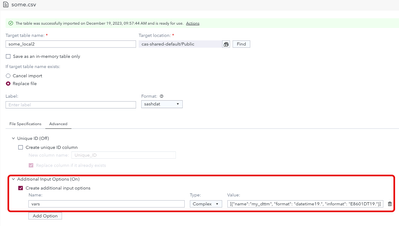
Here is the text to enter under "Create additional input options":
name: vars
type: complex
value: [{"name":"my_dttm", "format": "datetime19.", "informat": "E8601DT19."}]
You can get more details on the options to enter when click on the ? symbol to the right of "Additional Input Options", it will lead you to https://documentation.sas.com/?cdcId=pgmsascdc&cdcVersion=default&docsetId=caspg&docsetTarget=compg-...
select filetype=csv
switch the display to Python syntax (default is CASL)
Then you will see "vars":[{casvarcsvdesc-1} <, {casvarcsvdesc-2}, ...>]
So vars is the option name and the value is as shown above, there are more options for a variable that can be specified.
Give it a try


- Mark as New
- Bookmark
- Subscribe
- Mute
- RSS Feed
- Permalink
- Report Inappropriate Content
SAS/SAS users are in the transition from SAS9 to Viya. Please be always very clear in your questions which version you're using.
Assuming it's a rather recent Viya 4 version: How exactly are you importing the .csv? Via code or via some GUI/wizard?
If code:
Are you using action table.loadTable? Please share your code.
If possible ideally also share the first 10 lines of your .csv as attachment.
"but when I import the file, SASDataExplorer recognize it as varchar."
The import process first parses a part of your source .csv to determine a matching data type. If only one "cell" in your source can't be a date time then SAS Viya will use VARCHAR(*).
Depending on how you import there might be options to instruct SAS how to import this specific column and what data type to use.
- Mark as New
- Bookmark
- Subscribe
- Mute
- RSS Feed
- Permalink
- Report Inappropriate Content
thanks for quick reply.
I use sas viya LTS 2023.03, SAS® Data Explorer
trying to import via GUI
- Mark as New
- Bookmark
- Subscribe
- Mute
- RSS Feed
- Permalink
- Report Inappropriate Content
First time I've tried it this way on my Viya journey. The GUI doesn't give you a lot of options.
If your .csv has a header row then make sure you set reading data to line 2 (and not 1).
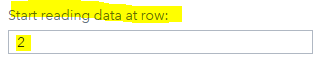
If that's not working then it looks to me there isn't much more you can do using this import wizard and there is likely a string in your data that can't be a date.
The import using a .csv as below returned SAS dates (=numerical variable and not varchar).
my_dttm
2023-11-29 05:17:14
2023-11-29 05:17:14
To determine the data type SAS will only parse as many rows as you define for guessing rows. Look into these rows to find what's not a datetime string.

Looking a bit further into this:
The import wizard just generates Proc Import code as below
PROC IMPORT DATAFILE=REFFILE
  DBMS=CSV
  OUT=WORK.IMPORT1;
  GETNAMES=YES;
  DATAROW=2;
RUN;
And same as already in SAS9 Proc Import then generates a SAS data step with Infile/Input
112      data WORK.IMPORT1    ;
113      %let _EFIERR_ = 0; /* set the ERROR detection macro variable */
114      infile REFFILE delimiter = ',' MISSOVER DSD  firstobs=2 ;
115         informat my_dttm anydtdtm40. ;
116         format my_dttm datetime. ;
117      input
118                  my_dttm
119      ;
120      if _ERROR_ then call symputx('_EFIERR_',1);  /* set ERROR detection macro variable */
121      run;
What you can do to get a more flexible way for reading your .csv source isn to use this generated SAS data step, amend it to your needs and then run it as a SAS datastep.
Or if this is an exercise then may-be it's purpose is to demonstrate the limitations of the import wizard as well as train you to "know your data" meaning to look into the .csv to understand why a Varchar gets created.


- Mark as New
- Bookmark
- Subscribe
- Mute
- RSS Feed
- Permalink
- Report Inappropriate Content
At least in SAS 9.4, the E8601DT19. informat will read such a string correctly, so I prefer it to the ANY... informats.
- Mark as New
- Bookmark
- Subscribe
- Mute
- RSS Feed
- Permalink
- Report Inappropriate Content
There is a way to specify additional options when importing a local .csv in the SASDataExplorer. See this screen shot below:
Here is the text to enter under "Create additional input options":
name: vars
type: complex
value: [{"name":"my_dttm", "format": "datetime19.", "informat": "E8601DT19."}]
You can get more details on the options to enter when click on the ? symbol to the right of "Additional Input Options", it will lead you to https://documentation.sas.com/?cdcId=pgmsascdc&cdcVersion=default&docsetId=caspg&docsetTarget=compg-...
select filetype=csv
switch the display to Python syntax (default is CASL)
Then you will see "vars":[{casvarcsvdesc-1} <, {casvarcsvdesc-2}, ...>]
So vars is the option name and the value is as shown above, there are more options for a variable that can be specified.
Give it a try
- Mark as New
- Bookmark
- Subscribe
- Mute
- RSS Feed
- Permalink
- Report Inappropriate Content
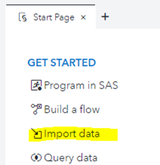
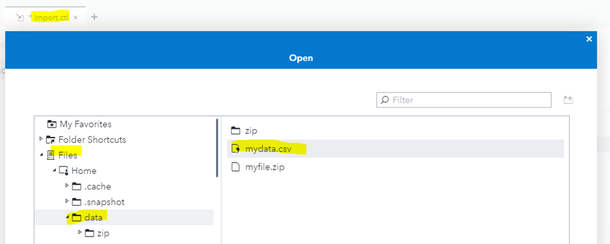
@BrunoMueller Are you using a more recent version or a different wizard? Below what I have, do and see.

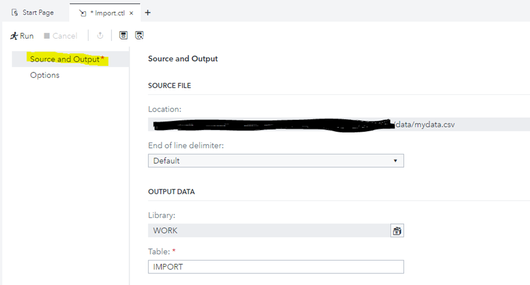
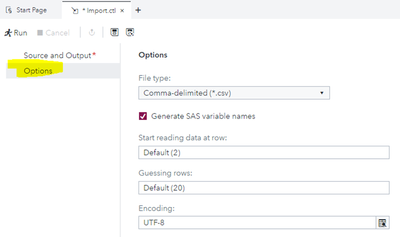
- Mark as New
- Bookmark
- Subscribe
- Mute
- RSS Feed
- Permalink
- Report Inappropriate Content
@Patrick the original question was using SAS Data Explorer to import a local (to the browser) file
- Mark as New
- Bookmark
- Subscribe
- Mute
- RSS Feed
- Permalink
- Report Inappropriate Content
@BrunoMueller I see! Quite a different import from what I understood with my SAS9 EG8 lense. Thanks for pointing that out. Consulted now the docu about the SAS Data Explorer.
- Mark as New
- Bookmark
- Subscribe
- Mute
- RSS Feed
- Permalink
- Report Inappropriate Content
it works best and it is easiest way.
in my case i used value:
[{"name":"time", "format": "datetime19.", "informat": "E8601DT19."}]
imported usable dataset 'LOCALFIELTEST' has
row time (type: double, print type: DATETIME)!
- Mark as New
- Bookmark
- Subscribe
- Mute
- RSS Feed
- Permalink
- Report Inappropriate Content
@kimsixsue glad I could help.
If there is a way to change which answer solved the problem, I would change it. This will help others with the same question, in case they do not scroll down all the way.
Thanks

Catch up on SAS Innovate 2026
Nearly 200 sessions are now available on demand in the Innovate Hub.
Watch Now →- Live Webinar: Unlocking Value With Managed Cloud Services | 16-Jun-2026
- Ask the Expert: Can Agents Reduce Planning Friction in CPG Supply Chains? | 16-Jun-2026
- Ask the Expert: Mit KI zur Höchstleistung: SAS Studio Copilot in Aktion! | 25-Jun-2026
- Ask the Expert: Get Meaningful Results With New Features in SAS Customer Intelligence 360 | 25-Jun-2026
- Ask the Expert: Modern, offen, skalierbar: Datenarchitektur mit SAS®Viya | 09-Jul-2026
- MinnSUG 2026 Annual SAS Conference | 22-Jul-2026
SAS' Charu Shankar shares her PROC SQL expertise by showing you how to master the WHERE clause using real winter weather data.

Find more tutorials on the SAS Users YouTube channel.
-
10 replies
-
12-18-2023 02:00 AM
-
7369 views
-
5 likes
-
4 in conversation
-


