PROC REPORT DATA=FINAL_RESULT nowd spanrows
style(report)=[JUST=CENTER OUTPUTWIDTH=95% CELLSPACING=2 BORDERCOLOR=BLACK BORDERWIDTH=2]
STYLE(HEADER)={BORDERCOLOR=BLACK FOREGROUND=WHITE BACKGROUND=MAROON FONT=("zurich BT",11pt)}
STYLE(COLUMN)={TAGATTR="WRAP" JUST=CENTER FONT=("zurich BT",08pt) OUTPUTWIDTH=0.05IN BACKGROUND=LIGHTYELLOW
FOREGROUND=BLACK BORDERCOLOR=BLACK};
TITLE FONT="Zurich BT" bold height=6 "<U>Date wise :</U>" JUSTIFY=LEFT;


column Emp_Code DATE_OF_APPROVAL N TOTAL_COUNT;


define Emp_Code/DISPLAY "Employee Code" width=20  group order order=data style(column)=[font=("zurich BT",11pt)];
define DATE_OF_APPROVAL/DISPLAY "DOA" width=10 style(column)=[font=("zurich BT",11pt)];
define N/ANALYSIS "Count datewise" format=comma11. style(column)=[TAGATTR="WRAP" JUST=RIGHT font=("zurich BT",11pt)];
define TOTAL_COUNT/ANALYSIS "Total Qr Deployed" format=comma11. style(column)=[TAGATTR="WRAP" JUST=RIGHT font=("zurich BT",11pt)];


rbreak after /summarize ol skip;
compute after;
       if _BREAK_ eq '_RBREAK_' then do;
        RESPYM = 'Total';
        CALL DEFINE(_ROW_ ,"style","style=[BACKGROUND=MAROON FOREGROUND=WHITE]");
    end;
endcomp;
run;
I was using the above code to get the desired result but it didn't work the way I wanted it to be.

The output I want is something like this:
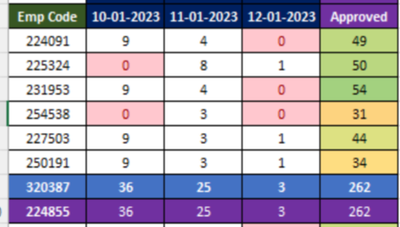
So How can I get those dates up there as columns in proc report? Can someone help......
Thanks in advance to all the contributors.





