I am new to manipulating data with SAS. I have a file with several field delimited with a semi-colon. However, I need to make them separate rows. Examples of how the data is currently set up and what I want it to look like are as follows:
Data have:
ID Var1 Var1Count
1 abc; bde; cf 1; 2; 5
2 x; yz 3; 1
3 a; x 2; 7
4 cf; bdx; yz 6; 3; 2
5 . .
6 x 1
7 abc 3
8 xz; adk 2; 8
9 a 3
10 bc; bd 2; 1
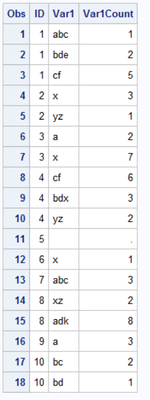
Data want:
ID Var1 Var1Count
1 abc 1
1 bde 2
1 cf 5
2 x 3
2 yz 1
3 a 2
3 x 7
4 cf 6
4 bdx 3
4 yz 2
5 . .
6 x 1
7 abc 3
8 xz 2
8 adk 8
9 a 3
10 bc 2
10 bd 1
Some of the "Var 1" values between the delimiters are are long (I counted 61 characters for the longest) and there are many for each (12 is the largest, but in future data pulls there could be more and I don't have a sense of what the upper limit would be).
I think I want to use some combination of count and/or transpose, but I have found anything that works quite how I would like it to. Any suggestions on how to do this?
Thanks in advance for your assistance!
Use COUNTW().
First let's convert your listing into an actual dataset.
data have;
input ID Var1 :$40. Var1Count :$20.;
cards4;
1 abc;bde;cf 1;2;5
2 x;yz 3;1
3 a;x 2;7
4 cf;bdx;yz 6;3;2
5 . .
6 x 1
7 abc 3
8 xz;adk 2;8
9 a 3
10 bc;bd 2;1
;;;;
You will need to decide how long to make the NEW var1 variable. For this example let's set the old one to length $40 and the new on to $20. Let's make the new count variable numeric instead of character.
Now just use a DO loop to output each pair of values.
data want;
set have;
length _var1 $20 count 8 ;
do index=1 to countw(var1,';');
_var1 = scan(var1,index,';');
count = input(scan(var1count,index,';'),32.);
output;
end;
keep id _var1 count;
rename _var1=Var1 count=Var1Count ;
run;
Result
If your original string actually have those extra spaces after the semicolons then you will probably want to add in a LEFT() function call to remove them.
_var1 = left(scan(var1,index,';'));
You might want to also keep the INDEX variable so you know the original order the values were in inside the character strings.
Use COUNTW().
First let's convert your listing into an actual dataset.
data have;
input ID Var1 :$40. Var1Count :$20.;
cards4;
1 abc;bde;cf 1;2;5
2 x;yz 3;1
3 a;x 2;7
4 cf;bdx;yz 6;3;2
5 . .
6 x 1
7 abc 3
8 xz;adk 2;8
9 a 3
10 bc;bd 2;1
;;;;
You will need to decide how long to make the NEW var1 variable. For this example let's set the old one to length $40 and the new on to $20. Let's make the new count variable numeric instead of character.
Now just use a DO loop to output each pair of values.
data want;
set have;
length _var1 $20 count 8 ;
do index=1 to countw(var1,';');
_var1 = scan(var1,index,';');
count = input(scan(var1count,index,';'),32.);
output;
end;
keep id _var1 count;
rename _var1=Var1 count=Var1Count ;
run;
Result
If your original string actually have those extra spaces after the semicolons then you will probably want to add in a LEFT() function call to remove them.
_var1 = left(scan(var1,index,';'));
You might want to also keep the INDEX variable so you know the original order the values were in inside the character strings.
This worked perfectly! Thank you so much!
Nearly 200 sessions are now available on demand in the Innovate Hub.
Watch Now →SAS' Charu Shankar shares her PROC SQL expertise by showing you how to master the WHERE clause using real winter weather data.

Find more tutorials on the SAS Users YouTube channel.