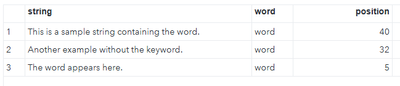
I am attempting to find the location of a word within a string, not the character position, but where in the string the word appears. For example, the following code:
data example;
input string $50.;
word = 'word';
position = find(string, word);
datalines;
This is a sample string containing the word.
Another example without the keyword.
The word appears here.
;
run;Has the output of
However, the position I am seeking is:
OBS1 position 8
OBS2 position 0
OBS3 position 2
Reason being the actual data will have wildcards scattered within the string that could be replaced with any number of characters and this value will later be used in a scan function to find specific matches in a delimited variable value.
Hope that makes sense...
data example;
input string $50.;
word = 'word';
position = findw(compress(string, '.,;!?'), word, ' ', 'e');
datalines;
This is a sample string containing the word.
Another example without the keyword.
The word appears here.
;
run;
Note that this will only find whole words, so, for example, it won't find "word" in "keyword". Annoyingly, it also doesn't consider a word that ends with punctuation, like "word." to be a word either - the compress part is a workaround for that.
data example;
input string $50.;
word = 'word';
position = findw(compress(string, '.,;!?'), word, ' ', 'e');
datalines;
This is a sample string containing the word.
Another example without the keyword.
The word appears here.
;
run;
Note that this will only find whole words, so, for example, it won't find "word" in "keyword". Annoyingly, it also doesn't consider a word that ends with punctuation, like "word." to be a word either - the compress part is a workaround for that.
Annoyingly, it also doesn't consider a word that ends with punctuation, like "word." to be a word either
That is what the delimiter parameter is for. Also consider the use of the I and T options. And the S option is useful with T to make sure that the space does to get removed from the delimiter list.
524 data example; 525 input string $50.; 526 word = 'word'; 527 position = findw(string, word, '.?!,:;','site'); 528 put position= string=; 529 datalines; position=8 string=This is a sample string containing the word. position=0 string=Another example without the keyword. position=2 string=The word appears here.
Using E option to find nth word ,not the position of word,
and using P option to add punctuation as a delimiter character.
data example;
input string $50.;
word = 'word';
position = findw(string,strip(word),' ','pe');
datalines;
This is a sample string containing the word.
Another example without the keyword.
The word appears here.
;
run;
proc print;run;
April 27 – 30 | Gaylord Texan | Grapevine, Texas
Walk in ready to learn. Walk out ready to deliver. This is the data and AI conference you can't afford to miss.
Register now and lock in 2025 pricing—just $495!
SAS' Charu Shankar shares her PROC SQL expertise by showing you how to master the WHERE clause using real winter weather data.

Find more tutorials on the SAS Users YouTube channel.