- RSS Feed
- Mark Topic as New
- Mark Topic as Read
- Float this Topic for Current User
- Bookmark
- Subscribe
- Mute
- Printer Friendly Page


- Mark as New
- Bookmark
- Subscribe
- Mute
- RSS Feed
- Permalink
- Report Inappropriate Content
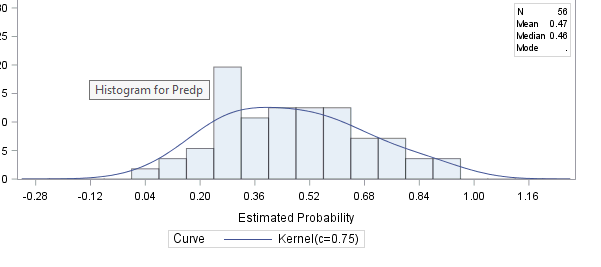
Trying to create something similar to the following whereby the legend for the red and green line is within the box.

However, using the code I have, the legend for the line still appears by itself:
proc univariate data=Score noprint plot;
var Predp;
class AAA;
histogram Predp /
kernel (k=normal color=green c = 0.75 l=1);
inset n ='N' (comma6.0) mean ='Mean' (6.2)
median ='Median' (6.2) mode ='Mode'(6.2)/ position=NE;
run;


- Mark as New
- Bookmark
- Subscribe
- Mute
- RSS Feed
- Permalink
- Report Inappropriate Content
I see you are using
CLASS AAA;
Is this part of a comparative histogram that appears in a panel?
- Mark as New
- Bookmark
- Subscribe
- Mute
- RSS Feed
- Permalink
- Report Inappropriate Content
Yes, so there are two stacked histograms and I want to compare between the two.
- Mark as New
- Bookmark
- Subscribe
- Mute
- RSS Feed
- Permalink
- Report Inappropriate Content
But then where do you want the legend?
My advice is to suppress the legend by using the NOCURVELEGEND option and then add the kernel C= value to the inset. Here is an example:
proc univariate data=Sashelp.class noprint plot;
var height;
class sex;
histogram height / NOCURVELEGEND
        kernel (k=normal color=green c = 0.75 l=1);
inset n ='N' (comma6.0) mean ='Mean' (6.2)
        median ='Median' (6.2) mode ='Mode'(6.2)
        KERNEL(C) / position=NE;
run;
- Mark as New
- Bookmark
- Subscribe
- Mute
- RSS Feed
- Permalink
- Report Inappropriate Content
I want the legend for the curve to be inside the legend box together with other estimates (N, Mean, Median etc.). Actually, it doesn't make too much of a difference where that curve legend is but I am trying to follow an output template that requires it to be inside the box.


- Mark as New
- Bookmark
- Subscribe
- Mute
- RSS Feed
- Permalink
- Report Inappropriate Content
You could go for proc sgplot (more graphing options, fewer estimation options)
proc sgplot data=sashelp.heart;
histogram cholesterol;
density cholesterol / group=sex type=kernel;
keylegend / position=topright location=inside across=1;
run;

Catch up on SAS Innovate 2026
Nearly 200 sessions are now available on demand in the Innovate Hub.
Watch Now →- Ask the Expert: R and SAS Working Seamlessly Together: Unlocking PROC R in Viya for Life Sciences | 11-Jun-2026
- Ask the Expert: Can Agents Reduce Planning Friction in CPG Supply Chains? | 16-Jun-2026
- Ask the Expert: Get Meaningful Results With New Features in SAS Customer Intelligence 360 | 25-Jun-2026
SAS' Charu Shankar shares her PROC SQL expertise by showing you how to master the WHERE clause using real winter weather data.

Find more tutorials on the SAS Users YouTube channel.
-
5 replies
-
02-18-2019 11:00 AM
-
4687 views
-
2 likes
-
3 in conversation
-


