Hello,
I'm a new user.
I've run a code, and the results gave me a table I want to work at in python.
the problem is, that I don't know who to export the table. I managed to export the code (which I don't need anymore).
is anyone knows how to export the table?
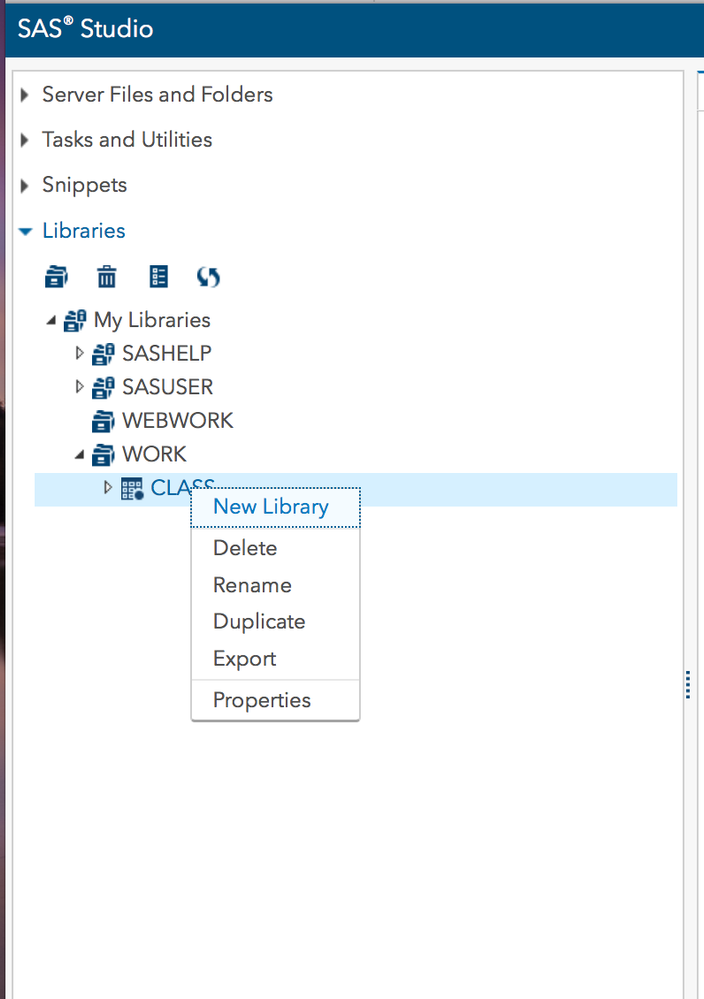
(screenshot is added)
Thanks a lot,
Guy
I've tried to go through a guide on the internet but it seems that when I'm pressing the right button I'm getting a different result then it should.
How should I proceed from here?
I have already pressed "download file" but I'm getting the .sas which is not helpful.
@Reeza said to right-click the data set in LIBRARIES (lower left), but you instead are showing an attempt to right-click a file in "Server Files an Folders". It's probably your program file, but your image covers it name.
The log will tell you in which library the data set is and the name of the data set you created. Open libraries, find the library of interest, and inside that will be the data set you want. Right click that.
Click Libraries, Click Work, Click the dataset you want to export. Right click the data set with the name in your original screenshot.
EDIT:
Oh, there are restrictions on removing data from Wharton if that's what you're using by the way so verify your usage restrictions as well. That's also why I can't just offer a code solution. The program won't have access to your local drives so it's more complicated. You could export it to a file on your server and download it after though. Wharton may have restrictions on the download sizes as well.
April 27 – 30 | Gaylord Texan | Grapevine, Texas
Walk in ready to learn. Walk out ready to deliver. This is the data and AI conference you can't afford to miss.
Register now and lock in 2025 pricing—just $495!
SAS' Charu Shankar shares her PROC SQL expertise by showing you how to master the WHERE clause using real winter weather data.

Find more tutorials on the SAS Users YouTube channel.