BookmarkSubscribeRSS Feed
MariaD
Barite | Level 11

Hi folks, 


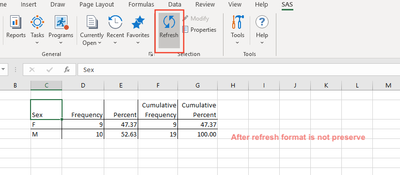
We have a simple process to execute and show a results directly on Excel using SAS AddIn. The user apply table format (Excel option) to present the results but after refreshing SAS, the style is not preserve.


Any idea how to preserve Excel styling when refresh?

 
Screen Shot 2020-10-27 at 09.47.23.png

 Screen Shot 2020-10-27 at 09.47.41.png


Screen Shot 2020-10-27 at 09.47.47.png


Screen Shot 2020-10-27 at 09.48.01.png


Regards,

1 REPLY 1
fifthand57th
SAS Employee

@MariaD 


What is the full version of SAS Add-in for MS Office installed? Go to Help -> About SAS Add-in on the SAS ribbon in Excel for this information. For example, 8.2 Update 5 (8.2.5.842) (32-bit).


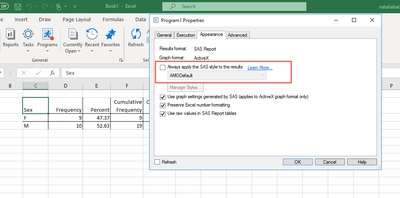
Please post a screen shot of the Results options in the "SAS Results" section:

fifthand57th_0-1603892434767.png


sas-innovate-2026-white.png


April 27 – 30 | Gaylord Texan | Grapevine, Texas

Registration is open

Walk in ready to learn. Walk out ready to deliver. This is the data and AI conference you can't afford to miss.
Register now and lock in 2025 pricing—just $495!

Register now

Discussion stats
  • 1 reply
  • 1129 views
  • 0 likes
  • 2 in conversation