- Home
- /
- Programming
- /
- Graphics
- /
- Re: how to place 2 tables horizontally for easy comparison
- RSS Feed
- Mark Topic as New
- Mark Topic as Read
- Float this Topic for Current User
- Bookmark
- Subscribe
- Mute
- Printer Friendly Page


- Mark as New
- Bookmark
- Subscribe
- Mute
- RSS Feed
- Permalink
- Report Inappropriate Content
title " actual_rev" ;
proc tabulate data=have;
   class decile agegroup ;
   var actual_rev;
   table decile=' ',
        agegroup *EXP_RPP=''*mean=''
         /misstext=' ' box=decile;
run;

title "proj_rev" ;
proc tabulate data=have;
   class decile agegroup ;
   var proj_rev;
   table decile=' ',
       agegroup *proj_rev=''*mean=''
         /misstext=' ' box=decile ;
run;
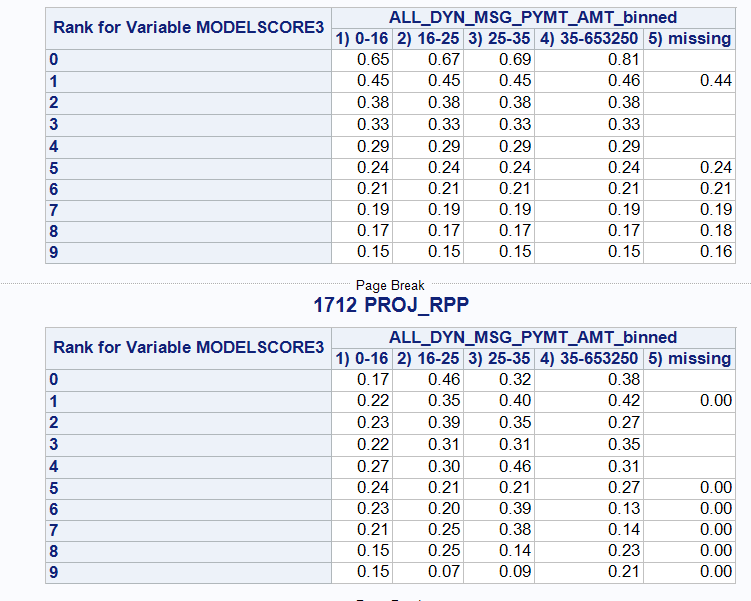
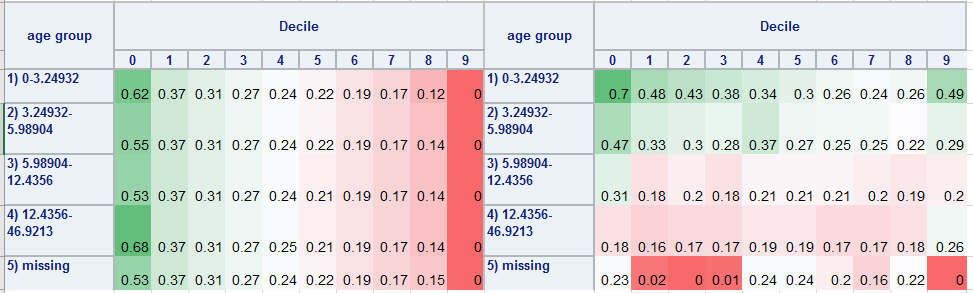
I have to compare 2 tables here. projected revenue and actual revenue (table is by decile and age group).
When i run in SAS, I get tables one after another vertically.
My boss wants it placed horizontally to each other for easy comparison. in this one i went to excel and used pivot table.. (please ignore the values inside and the name of the variables)


- Mark as New
- Bookmark
- Subscribe
- Mute
- RSS Feed
- Permalink
- Report Inappropriate Content
Something like the following should work for you:
ods _all_ close;
ods html;
ods layout gridded columns=2;
ods region;
proc print data=sashelp.class; run;
ods region;
proc print data=sashelp.class; run;
ods layout end;
ods html close;
Hope this helps!
Dan

- Mark as New
- Bookmark
- Subscribe
- Mute
- RSS Feed
- Permalink
- Report Inappropriate Content
To expand on Dan's suggestion, see

Catch up on SAS Innovate 2026
Nearly 200 sessions are now available on demand with the SAS Innovate Digital Pass.
Explore Now →Learn how use the CAT functions in SAS to join values from multiple variables into a single value.

Find more tutorials on the SAS Users YouTube channel.
SAS Training: Just a Click Away
Ready to level-up your skills? Choose your own adventure.
-
2 replies
-
09-10-2019 02:37 PM
-
2818 views
-
2 likes
-
3 in conversation
-


