- Home
- /
- Programming
- /
- Graphics
- /
- Re: customizing x-axis label
- RSS Feed
- Mark Topic as New
- Mark Topic as Read
- Float this Topic for Current User
- Bookmark
- Subscribe
- Mute
- Printer Friendly Page


- Mark as New
- Bookmark
- Subscribe
- Mute
- RSS Feed
- Permalink
- Report Inappropriate Content
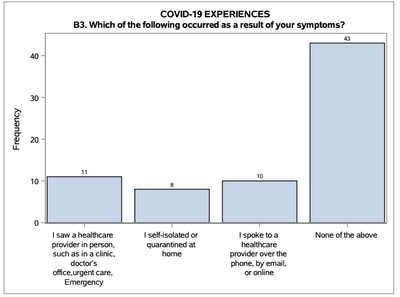
I have X variables with very long names. How can I customize the labels so that the text can wrap instead of long slanted words? I only have 5 types of variables for X and then frequency for Y, something like below. I'm using PROC TEMPLATE + PROC SGRENDER to make the barchart because I have a large amount of data and it's much easier to get a total for each X variable than creating the frequency of each observation.


- Mark as New
- Bookmark
- Subscribe
- Mute
- RSS Feed
- Permalink
- Report Inappropriate Content
X variables with "long names"? Limit on a variable name is 32 characters so that can not be the issue.
If you are showing the Value of the variables then you can create custom format to show less text. Then in the SGrender apply the format to the variable. If you are showing the Label associated with the variable the assign a different label in the Sgrender call.
Don't really see anything that really needs GTL though, looks like a basic Vbar chart with a data label. If you have 4 variables holding the response to a single question then you may have a poor data structure.


- Mark as New
- Bookmark
- Subscribe
- Mute
- RSS Feed
- Permalink
- Report Inappropriate Content
Can you provide some example data, and the code you're currently using?
- Mark as New
- Bookmark
- Subscribe
- Mute
- RSS Feed
- Permalink
- Report Inappropriate Content
I got it figured out now, thanks.


- Mark as New
- Bookmark
- Subscribe
- Mute
- RSS Feed
- Permalink
- Report Inappropriate Content
First of all, this example should be simple to do with Proc SGplot. The code would look something like the following:
Proc SGplot data=symptom_data;
axis fitpolicy=split;
vbar symptoms / datalabel;
run;
In GTL, the option you want for your axis values is TICKVALUEFITPOLICY=SPLIT.
Hope this helps!
Dan

Call for content now open!
It's your turn to help shape SAS Innovate 2027. Share your expertise and inspire the SAS community.
Learn how use the CAT functions in SAS to join values from multiple variables into a single value.

Find more tutorials on the SAS Users YouTube channel.
SAS Training: Just a Click Away
Ready to level-up your skills? Choose your own adventure.
-
4 replies
-
08-18-2021 08:52 PM
-
2832 views
-
2 likes
-
4 in conversation
-


