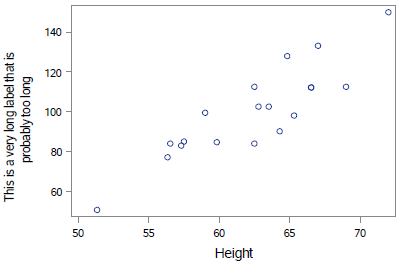
I am trying to create a plot via PROC SGPLOT. The variable on the Y-axis has a very long label, which SAS splits to make it fit. I want to control where the split happens, rather than let SAS control the split. The ODS ESCAPECHAR and `{newline 1} in the code produces a message in the log that I can't do it that way. Is there some other way I can cause this label to be split where I want it to be split?
1262 ods escapechar = '`';
1263 ods pdf file="&pers\test.pdf";
NOTE: Writing ODS PDF output to DISK destination "g:\MillerP\test.pdf", printer "PDF".
1264 proc sgplot data=sashelp.class;
1265 scatter x=height y=weight;
1266 yaxis label='This is a very long label `{newline 1} that is probably too long';
1267 run;
NOTE: PROCEDURE SGPLOT used (Total process time):
real time 0.72 seconds
cpu time 0.34 seconds
NEWLINE FUNCTION NOT DEFINED IN THIS TAGSET
NOTE: There were 19 observations read from the data set SASHELP.CLASS.
1268 ods pdf close;
This produces the following plot where the label is split where SAS wants to split it and not where I want to split it.
Perhaps:
proc sgplot data=sashelp.class;
scatter x=height y=weight;
yaxis label="This is a very long label (*ESC*){unicode '000A'x} that is probably too long";
run;
000A is linefeed, so might be OS and or file dependent. Did not test with PDF
Perhaps:
proc sgplot data=sashelp.class;
scatter x=height y=weight;
yaxis label="This is a very long label (*ESC*){unicode '000A'x} that is probably too long";
run;
000A is linefeed, so might be OS and or file dependent. Did not test with PDF
April 27 – 30 | Gaylord Texan | Grapevine, Texas
Walk in ready to learn. Walk out ready to deliver. This is the data and AI conference you can't afford to miss.
Register now and save with the early bird rate—just $795!
Learn how use the CAT functions in SAS to join values from multiple variables into a single value.

Find more tutorials on the SAS Users YouTube channel.
Ready to level-up your skills? Choose your own adventure.