- Home
- /
- Programming
- /
- Graphics
- /
- Re: Proc sgplot Waterfall graph "Double" Waterfall
- RSS Feed
- Mark Topic as New
- Mark Topic as Read
- Float this Topic for Current User
- Bookmark
- Subscribe
- Mute
- Printer Friendly Page


- Mark as New
- Bookmark
- Subscribe
- Mute
- RSS Feed
- Permalink
- Report Inappropriate Content
Hello. I am using the waterfall option in proc sgplot.
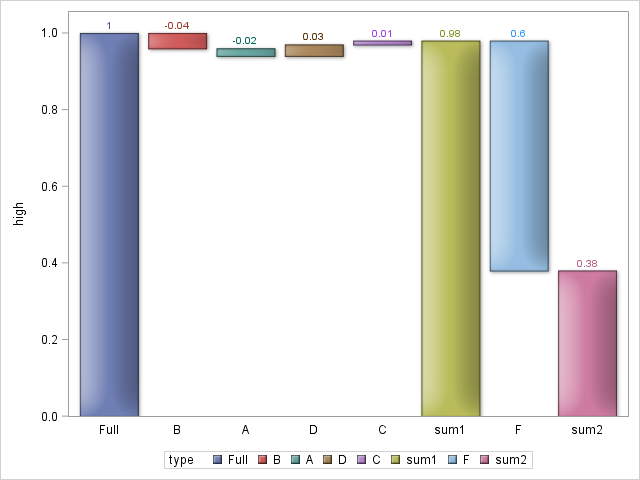
I have an initial value (Full) and then several additions/subtractions A-E, resulting in 'Leftover'. The code below does this perfectly. However, I wish to further decompose 'Leftover' to attain 'Leftover2'. I want to do this by introducing a new value F=.6. Is there a way to do this? My code is below, here is a link to a picture of the desired output data Pictures, data Images, data Photos, data Videos - Image - TinyPic - Free Image Hosting, Photo S....
data have;
input category $ type $ percent order;
datalines;
X Full 1 1
X B -.04 .
X A -.02 .
X E 0 .
X D .03 .
X C .01 .
;
run;
/*additional data point*/
/*X F .6 .*/
proc sort data=have(where=(percent<0))
out=neg;
by percent;
run;
data neg;
set neg;
order=_N_+1;
run;
proc sql noprint;
select max(order) into :max_order from neg;
quit;
proc sort data=have(where=(percent>0 and type not in ("Full")))
out=pos;
by descending percent;
run;
data pos;
set pos;
order=_N_+&max_order.;
run;
data x_have;
set have(where=(type="Full")) neg pos;
run;
proc sort data=x_have;
by order;
run;
proc sgplot data=have(where=(percent ne 0)) noautolegend;
waterfall category=type response=percent / colorgroup=type dataskin=sheen datalabel name='a'
finalbartickvalue='Leftover';
;
xaxis display=(nolabel);
yaxis grid display=(nolabel) offsetmin=0;
run;
Accepted Solutions


- Mark as New
- Bookmark
- Subscribe
- Mute
- RSS Feed
- Permalink
- Report Inappropriate Content
Do you want another value F=0.6 after the leftover to get a second leftover? Waterfall does not support that.
However, you could compute the low and high value of each bar yourself in datastep, including the Leftover value, followed by F=0.6 and the final Leftover2 value. Then, use HIGHLOW plot to draw your own custom waterfall chart.
- Mark as New
- Bookmark
- Subscribe
- Mute
- RSS Feed
- Permalink
- Report Inappropriate Content
Do you want another value F=0.6 after the leftover to get a second leftover? Waterfall does not support that.
However, you could compute the low and high value of each bar yourself in datastep, including the Leftover value, followed by F=0.6 and the final Leftover2 value. Then, use HIGHLOW plot to draw your own custom waterfall chart.
- Mark as New
- Bookmark
- Subscribe
- Mute
- RSS Feed
- Permalink
- Report Inappropriate Content
Thanks, Sanjay. I took your advice and worked through this in data steps and highlow.
data have;
input category $ type $ percent order;
datalines;
X Full 1 1
X B -.04 .
X A -.02 .
X E 0 .
X D .03 .
X C .01 .
X F .6 .
X sum1 . .
X sum2 . .
;
run;
proc sql noprint;
select sum(percent)
into :sum
from have
where type in ('A','B','C','D','E');
select percent
into :F
from have
where type='F';
select percent
into :maxperc
from have
where type="Full";
quit;
data have_mod;
set have;
if type='sum1' then percent=1+&sum.;
if type='sum2' then percent=1+&sum.-&F.;
run;
proc sort data=have_mod(where=(percent<0))
out=neg;
by percent;
run;
data neg;
set neg;
order=_N_+1;
run;
proc sql noprint;
select max(order) into :max_neg from neg;
quit;
proc sort data=have_mod(where=(percent>0 and type not in ("Full","sum1","sum2","F")))
out=pos;
by descending percent;
run;
data pos;
set pos;
order=_N_+&max_neg.;
run;
proc sql noprint;
select max(order) into :max_pos from pos;
quit;
data x_have;
set have_mod(where=(type in ("Full", "F", "sum1", "sum2"))) neg pos;
if type='sum1' then order=1+&max_pos.;
if type='F' then order=2+&max_pos.;
if type='sum2' then order=3+&max_pos.;
run;
proc sort data=x_have;
by order;
run;
proc sql noprint;
select percent, order
into :sum1, :ordersum1
from x_have
where type='sum1';
quit;
data want;
set x_have;
by category;
if first.category then sumpercent=0;
sumpercent+percent;
if type in ('sum1','F','sum2') then sumpercent=percent;
if type in ('Full','sum1','sum2') then high=sumpercent;
else if type='F' then high=&sum1.;
else if order=&ordersum1.-1 then high=&sum1.;
else if order=2 then high=&maxperc.;
else if percent>0 then high=sumpercent;
else if percent<0 then high=sumpercent+abs(percent);
if type in ('Full','sum1','sum2') then low=0;
else if percent<0 then low=sumpercent;
else if type='F' then low=high-sumpercent;
else if percent>0 then low=sumpercent-percent;
run;
proc sgplot data=want;
highlow x=type high=high low=low / group=type type=bar
groupdisplay=cluster highlabel=percent lineattrs=graphoutlines
dataskin=matte;
xaxis display=(nolabel noticks);
yaxis offsetmin=0;
run;
- Mark as New
- Bookmark
- Subscribe
- Mute
- RSS Feed
- Permalink
- Report Inappropriate Content
Cool. Did you get what you wanted? You can overlay a step plot or a series plot to join the end and start points for each bar segment.
- Mark as New
- Bookmark
- Subscribe
- Mute
- RSS Feed
- Permalink
- Report Inappropriate Content
Yes! The highlow plot was excellent. I may take your advice on the line plot as well. Thanks again.

Call for content now open!
It's your turn to help shape SAS Innovate 2027. Share your expertise and inspire the SAS community.
Learn how use the CAT functions in SAS to join values from multiple variables into a single value.

Find more tutorials on the SAS Users YouTube channel.
SAS Training: Just a Click Away
Ready to level-up your skills? Choose your own adventure.
-
4 replies
-
04-08-2015 06:32 PM
-
3407 views
-
0 likes
-
2 in conversation
-

