- Home
- /
- Programming
- /
- Graphics
- /
- Re: Pie Gchart Percent Rounding
- RSS Feed
- Mark Topic as New
- Mark Topic as Read
- Float this Topic for Current User
- Bookmark
- Subscribe
- Mute
- Printer Friendly Page


- Mark as New
- Bookmark
- Subscribe
- Mute
- RSS Feed
- Permalink
- Report Inappropriate Content
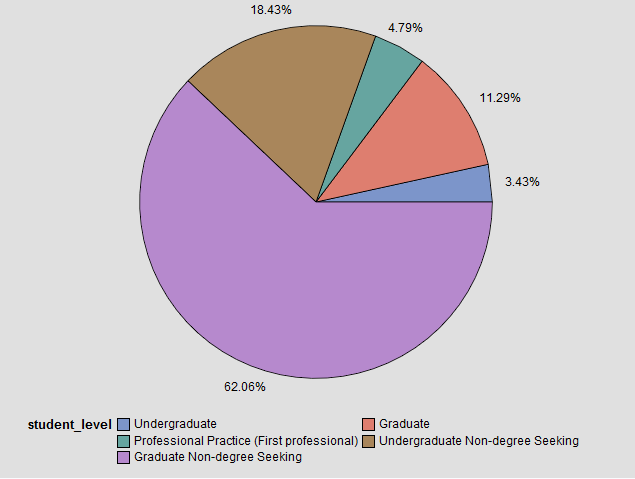
Is there a way to format percent in proc gchart with a pie chart in SAS 9.2? All of the examples that I see online do not use a format statement. My format statement does not seem to take effect.
proc gchart data=enrollment;
pie col1 /
sumvar=col2
legend=legend1 percent=outside discrete;
format col1 percent10.;
run;
quit;
- Mark as New
- Bookmark
- Subscribe
- Mute
- RSS Feed
- Permalink
- Report Inappropriate Content
Just found this.
24877 - Format percentage values on a pie chart with PROC GCHART
- Mark as New
- Bookmark
- Subscribe
- Mute
- RSS Feed
- Permalink
- Report Inappropriate Content
The example works if I run just the example however I have a second format clause for using a value clause. It seems that with them both the example breaks.
- Mark as New
- Bookmark
- Subscribe
- Mute
- RSS Feed
- Permalink
- Report Inappropriate Content
For example:
proc format;
value Rankinga
1 = 'Undergraduate'
2 = 'Graduate'
3 = 'Professional Practice (First professional)'
4 = 'Undergraduate Non-degree Seeking'
5 = 'Graduate Non-degree Seeking';
run;
proc sql noprint;
CREATE TABLE testTable(
Units int,
student_level int
);
INSERT INTO TestTable (Units, student_level)
VALUES (11, 1);
INSERT INTO TestTable (Units, student_level)
VALUES (23, 1);
INSERT INTO TestTable (Units, student_level)
VALUES (4, 1);
INSERT INTO TestTable (Units, student_level)
VALUES (43, 2);
INSERT INTO TestTable (Units, student_level)
VALUES (54, 2);
INSERT INTO TestTable (Units, student_level)
VALUES (28, 2);
INSERT INTO TestTable (Units, student_level)
VALUES (38, 3);
INSERT INTO TestTable (Units, student_level)
VALUES (11, 3);
INSERT INTO TestTable (Units, student_level)
VALUES (4, 3);
INSERT INTO TestTable (Units, student_level)
VALUES (57, 4);
INSERT INTO TestTable (Units, student_level)
VALUES (48, 4);
INSERT INTO TestTable (Units, student_level)
VALUES (99, 4);
INSERT INTO TestTable (Units, student_level)
VALUES (110, 5);
INSERT INTO TestTable (Units, student_level)
VALUES (243, 5);
INSERT INTO TestTable (Units, student_level)
VALUES (334, 5);
quit;
%Stpbegin;
proc format;
picture pctfmt (round) 0-high='000%';
run;
title1 &titleText;
proc gchart data=testTable;
pie student_level /
sumvar=units
legend=legend1 percent=outside discrete;
format units pctfmt.;
format student_level Rankinga.;
run;
quit;
%Stpend;

Call for content now open!
It's your turn to help shape SAS Innovate 2027. Share your expertise and inspire the SAS community.
Learn how use the CAT functions in SAS to join values from multiple variables into a single value.

Find more tutorials on the SAS Users YouTube channel.
SAS Training: Just a Click Away
Ready to level-up your skills? Choose your own adventure.
-
3 replies
-
04-03-2015 08:35 AM
-
2831 views
-
0 likes
-
1 in conversation
-
