BookmarkSubscribeRSS Feed
elitebook
Calcite | Level 5

img.png

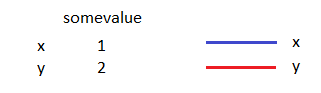
Please refer to the above image (i.e. the legend).

In proc gplot I have this:

proc gplot data=mydata;

plot y*x=id / legend=legend1;

run;

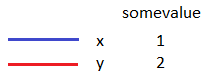
So in the output graph I have my plot and my legend below it. I want the red and blue bars to go right next to x and y, like this:

img2.png

Basically how do I go from the first image to the second? I'm thinking left-aligning the group values but I'm not sure how to do that in the legend.

1 REPLY 1
ballardw
Super User

It would helpt to show 1) your curent legend1 statement and if possible what you want the whole graph to look like.

You may end up in the world of Annotate data depending on what you want.

I'm not quite understanding your overall question as pictures need pictures as a base.

sas-innovate-2026-white.png


April 27 – 30 | Gaylord Texan | Grapevine, Texas

Registration is open

Walk in ready to learn. Walk out ready to deliver. This is the data and AI conference you can't afford to miss.
Register now and lock in 2025 pricing—just $495!

Register now

How to Concatenate Values

Learn how use the CAT functions in SAS to join values from multiple variables into a single value.

Find more tutorials on the SAS Users YouTube channel.

SAS Training: Just a Click Away

 Ready to level-up your skills? Choose your own adventure.

Browse our catalog!

Discussion stats
  • 1 reply
  • 1253 views
  • 0 likes
  • 2 in conversation