- Home
- /
- Programming
- /
- Graphics
- /
- Re: How to add superscript to sgplot labels (to the power 6?)
- RSS Feed
- Mark Topic as New
- Mark Topic as Read
- Float this Topic for Current User
- Bookmark
- Subscribe
- Mute
- Printer Friendly Page


- Mark as New
- Bookmark
- Subscribe
- Mute
- RSS Feed
- Permalink
- Report Inappropriate Content
What is the unicode to add a label with superscript 10 to the power 6?
- Tags:
- superscript


- Mark as New
- Bookmark
- Subscribe
- Mute
- RSS Feed
- Permalink
- Report Inappropriate Content
The Unicode value for superscript 6 is 0x2076. However, you need to be sure you're using a "full-featured" Unicode font to show it, as most fonts do not contain that glyph. I would using "Arial Unicode MS" for san-serif text and "Times New Roman Uni" for serif text. Setting 10^6 on an axis label (for example) would look something like the following (on the correct axis statement):
label="10(*ESC*){unicode '2076'x}"
The INSET statement and annotation text supports using superscripts and subscript without using the Unicode values. You can use {sup '6'} in those cases.
Hope this helps!
Dan


- Mark as New
- Bookmark
- Subscribe
- Mute
- RSS Feed
- Permalink
- Report Inappropriate Content
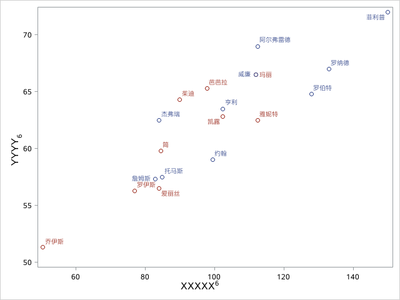
/*用于加X轴Y轴标签的上下标*/
data _anno;
length label $ 200;
 drawspace="layoutpercent"; function="text"; textweight="normal"; textsize=12;textcolor="black"; width=200;
 x1=50; y1=2.5;label="XXXXX(*ESC*){sup '6'}"; output;
 x1=2.5;  y1=50;rotate=90;label="YYYY(*ESC*){sub '6'}"; output;
 run;
/*****画散点图*****/
proc sgplot data=sashelp.class sganno=_anno noautolegend ;
scatter x=weight y=height/group=sex datalabel=name;
xaxis label=' ';
yaxis label=' ';
run;

Call for content now open!
It's your turn to help shape SAS Innovate 2027. Share your expertise and inspire the SAS community.
Learn how use the CAT functions in SAS to join values from multiple variables into a single value.

Find more tutorials on the SAS Users YouTube channel.
SAS Training: Just a Click Away
Ready to level-up your skills? Choose your own adventure.
-
2 replies
-
05-17-2023 03:04 PM
-
3124 views
-
4 likes
-
3 in conversation
-

