
BookmarkSubscribeRSS Feed
TomiKong
Fluorite | Level 6

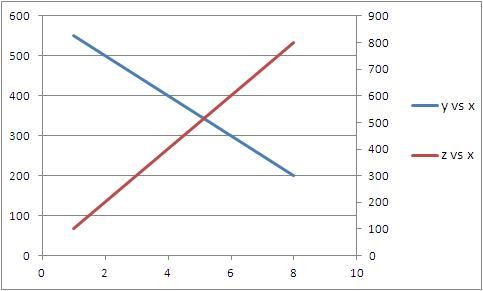
For example, I have one dataset as below. Because y and z have different dimensions, I have to use two vertical axis to represent y*x and z*x plots respectively. It is easy to do in excel (please see the attached figure), but how to do it using sas? Thanks!

data mydata;

input x y z;

datalines;

1          550          100

2          500          200

3          450          300

4          400          400

5          350          500

6          300          600

7          250          700

8          200          800

;

run;

symbol1 v=none INTERPOL=join c=blue width=5;

symbol2 v=none INTERPOL=join c=red width=5;

proc gplot data=mydata;

plot y*x

     z*x/overlay;

run;

quit;


test.JPG
1 REPLY 1
DanH_sas
SAS Super FREQ

Change the proc to say:

proc gplot data=mydata;

plot y*x;

plot2 z*x;

run;

quit;

sas-innovate-2026-white.png


April 27 – 30 | Gaylord Texan | Grapevine, Texas

Registration is open

Walk in ready to learn. Walk out ready to deliver. This is the data and AI conference you can't afford to miss.
Register now and lock in 2025 pricing—just $495!

Register now

How to Concatenate Values

Learn how use the CAT functions in SAS to join values from multiple variables into a single value.

Find more tutorials on the SAS Users YouTube channel.

SAS Training: Just a Click Away

 Ready to level-up your skills? Choose your own adventure.

Browse our catalog!

Discussion stats
  • 1 reply
  • 1178 views
  • 0 likes
  • 2 in conversation