- Home
- /
- Programming
- /
- Graphics
- /
- How can I create Boundaries/Polygons from Points for use in PROC SGMAP...
- RSS Feed
- Mark Topic as New
- Mark Topic as Read
- Float this Topic for Current User
- Bookmark
- Subscribe
- Mute
- Printer Friendly Page


- Mark as New
- Bookmark
- Subscribe
- Mute
- RSS Feed
- Permalink
- Report Inappropriate Content
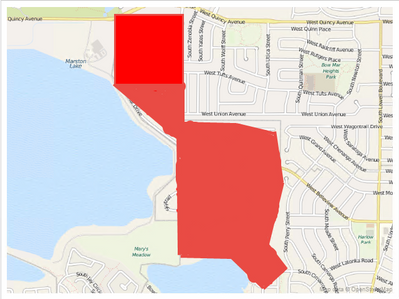
I am trying to create a dataset of geographic (Lat& Long based) polygon boundaries similar to the mapsgfk.us_counties data set. With the goal of displaying polygons of the resulting polygons using a choromap statement in PROC SGMAP.
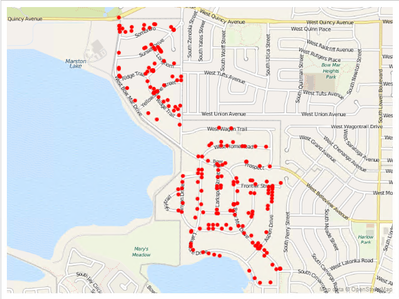
The data I have to start with are individual latitude and longitude variables for data points within a given polygon. How can i use these individual Lat & Long datapoints to generate the boundry information necessary to use the choromap statement to create a polygon that overlays the area containing the individual data points.
Basically I am trying to take the plot data from the top image and create the boundry polygon on the bottom image:


- Mark as New
- Bookmark
- Subscribe
- Mute
- RSS Feed
- Permalink
- Report Inappropriate Content
Please do not post essentially Identical questions on this forum.
I leads to confused responses across threads, duplicate or similar comments by different folks unaware of the "other thread" and makes others searching the forum have more difficulty finding solutions on similar topics.


- Mark as New
- Bookmark
- Subscribe
- Mute
- RSS Feed
- Permalink
- Report Inappropriate Content
You could perhaps start with the polygons for a Census block map, and then use Proc Ginside to determine what Census blocks your points are 'inside' of, and then color those Census blocks red. Or, one step further, you could run Proc Gremove (to remove internal Census block boundaries) and create a single polygon for the area.

Catch up on SAS Innovate 2026
Nearly 200 sessions are now available on demand in the Innovate Hub.
Watch Now →Learn how use the CAT functions in SAS to join values from multiple variables into a single value.

Find more tutorials on the SAS Users YouTube channel.
SAS Training: Just a Click Away
Ready to level-up your skills? Choose your own adventure.
-
2 replies
-
11-07-2018 12:13 PM
-
1881 views
-
0 likes
-
3 in conversation
-


