- Home
- /
- Programming
- /
- Graphics
- /
- Re: Graphing the probit procedure
- RSS Feed
- Mark Topic as New
- Mark Topic as Read
- Float this Topic for Current User
- Bookmark
- Subscribe
- Mute
- Printer Friendly Page


- Mark as New
- Bookmark
- Subscribe
- Mute
- RSS Feed
- Permalink
- Report Inappropriate Content
Greetings! As a toxicologist I run the probit procedure in order to estimate the LC50 (the chemical concentration which is lethal to 50% of my test microscopic organisms). I get the output in both concentration units and log-transformed. I am interested in generating a graph showing the lethality curve for the log-transformed data. I don't know what code I can add into the proc to get such a graph. Could anyone help? I am copying my code with datalines below. Thank you very much!
data MAB111;
input form $ dead total conc @@;
prop = dead/total;
datalines;
A 1 30 0
A 15 35 1000
A 21 32 3000
A 34 39 5000
A 34 34 7000
A 36 36 9000
;
ods rtf;
proc sort;
by form;
run;
proc probit log10 inversecl lackfit;
model dead/total = conc/d = normal itprint;
output out=p p=prob std=std xbeta=xbeta;
by form;
run;
ods rtf close;


- Mark as New
- Bookmark
- Subscribe
- Mute
- RSS Feed
- Permalink
- Report Inappropriate Content
Have you looked at the plots=all option and the default plots?
proc probit log10 inversecl lackfit plots=all;
model dead/total = conc/d = normal itprint;
output out=p p=prob std=std xbeta=xbeta;
by form;
run;
- Mark as New
- Bookmark
- Subscribe
- Mute
- RSS Feed
- Permalink
- Report Inappropriate Content
No plots came up when I tried that. Does that require Java? There was no Java on the machine I used. Thanks.
- Mark as New
- Bookmark
- Subscribe
- Mute
- RSS Feed
- Permalink
- Report Inappropriate Content
No idea. One thing to try is an ODS destination instead of listing,
Also, what version of SAS are you using?
ie
ods html;
your code goes here;
ods html close;
- Mark as New
- Bookmark
- Subscribe
- Mute
- RSS Feed
- Permalink
- Report Inappropriate Content
I am using SAS 9.3
No plots came up when using the html option.
Thanks so much for trying! I'll chart the data generated by SAS in Excel.
Best regards.


- Mark as New
- Bookmark
- Subscribe
- Mute
- RSS Feed
- Permalink
- Report Inappropriate Content
Normally, the code
proc probit log10 inversecl lackfit plots=predpplot;
model dead/total = conc/ d = normal ;
output out=p p=prob std=std xbeta=xbeta;
by form;
run;
should produce the requested graph (it does for me)
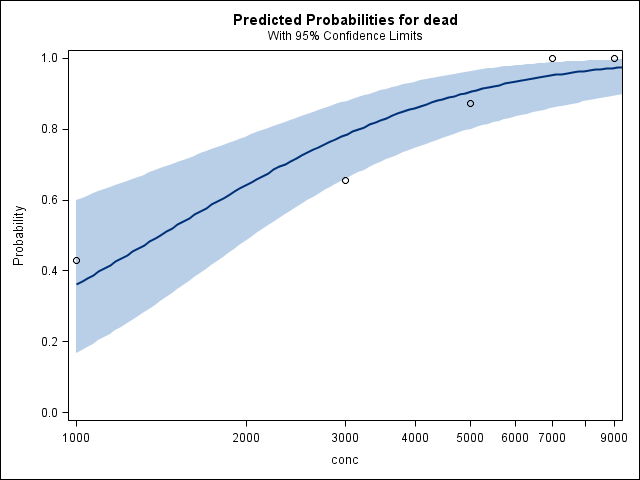
ODS graphics definitely require Java. Look at the diagnostics from:
proc javainfo; run;
Also look seriously at the fit diagnostics from the procedure.
PG

Call for content now open!
It's your turn to help shape SAS Innovate 2027. Share your expertise and inspire the SAS community.
Learn how use the CAT functions in SAS to join values from multiple variables into a single value.

Find more tutorials on the SAS Users YouTube channel.
SAS Training: Just a Click Away
Ready to level-up your skills? Choose your own adventure.
-
5 replies
-
09-01-2014 02:54 PM
-
3435 views
-
0 likes
-
3 in conversation
-


