Turn on suggestions
Auto-suggest helps you quickly narrow down your search results by suggesting possible matches as you type.
Showing results for
- Home
- /
- Programming
- /
- Graphics
- /
- Re: Can we create a pie to bar graph in sas
Options
- RSS Feed
- Mark Topic as New
- Mark Topic as Read
- Float this Topic for Current User
- Bookmark
- Subscribe
- Mute
- Printer Friendly Page


Quartz | Level 8
- Mark as New
- Bookmark
- Subscribe
- Mute
- RSS Feed
- Permalink
- Report Inappropriate Content
Posted 04-23-2018 07:39 PM
(2992 views)
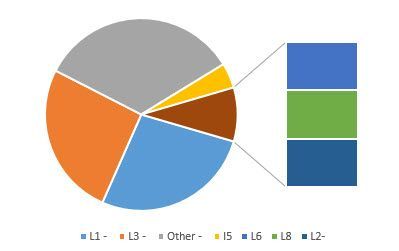
How to create a pie to bar graph using below data.
| L1 - | 23 |
| L2 - | 124 |
| L3 | 33 |
| L4 | 7 |
| L5 | 5 |
| test1 | 5 |
| test2 | 5 |
4 REPLIES 4


Meteorite | Level 14
- Mark as New
- Bookmark
- Subscribe
- Mute
- RSS Feed
- Permalink
- Report Inappropriate Content
Hi,
Here is the simple syntax for bar chart. There are many options your can use to customize your graph.
data have;
infile datalines ;
input name :$ var;
datalines;
L1 23
L2 124
L3 33
L4 7
L5 5
test1 5
test2 5
;
run;

PROC GCHART DATA=WORK.have;
VBAR name/ SUMVAR=var;
run;
Thanks,
Suryakiran
Suryakiran
Quartz | Level 8
- Mark as New
- Bookmark
- Subscribe
- Mute
- RSS Feed
- Permalink
- Report Inappropriate Content
I am looking for exact pie to bar graph as below.
.


SAS Super FREQ
- Mark as New
- Bookmark
- Subscribe
- Mute
- RSS Feed
- Permalink
- Report Inappropriate Content
PROC GCHART has this concept of a "detail" pie that can convey similar information to your examples. Check out this example and see what you think:
Hope this helps!
Dan


Tourmaline | Level 20
- Mark as New
- Bookmark
- Subscribe
- Mute
- RSS Feed
- Permalink
- Report Inappropriate Content

Catch up on SAS Innovate 2026
Nearly 200 sessions are now available on demand in the Innovate Hub.
Watch Now →How to Concatenate Values
Learn how use the CAT functions in SAS to join values from multiple variables into a single value.

Find more tutorials on the SAS Users YouTube channel.
SAS Training: Just a Click Away
Ready to level-up your skills? Choose your own adventure.
Discussion stats
-
4 replies
-
04-23-2018 07:39 PM
-
2993 views
-
0 likes
-
4 in conversation
-


