- Home
- /
- Programming
- /
- Graphics
- /
- Bar plot, To present symbol (Star, Plus sign) on X-axis For specific b...
- RSS Feed
- Mark Topic as New
- Mark Topic as Read
- Float this Topic for Current User
- Bookmark
- Subscribe
- Mute
- Printer Friendly Page


- Mark as New
- Bookmark
- Subscribe
- Mute
- RSS Feed
- Permalink
- Report Inappropriate Content
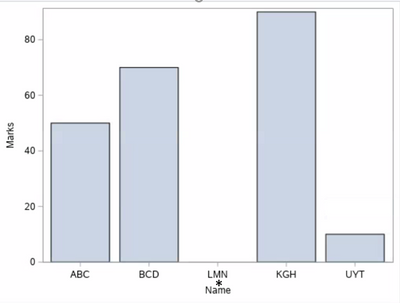
I am having simple Bar plot. See below code. In SCORE dataset for name "LMN" doesn't have any marks. I want to present star(*) at the x-axis below tickvalues (I can hide tickvalues).
Any thoughts How to present Star(*) at axis, indicating it is different from dataset row having no values.
data score;
input name $1-3 marks 5.;
datalines;
abc 50
bcd 70
LMN
kgh 90
uyt 10
;
run;
proc template;
define statgraph temp;
begingraph;
layout overlay;
barchart x=name y=score;
endlayout;
endgraph;
end;
run;
proc sgrender data=score template=temp;
run;
Accepted Solutions


- Mark as New
- Bookmark
- Subscribe
- Mute
- RSS Feed
- Permalink
- Report Inappropriate Content
You can use the XAXISTABLE statement for this. Why not simply use Proc SGPLOT for the graph. See example below
data score;
  infile cards dlm="," dsd missover;
  input name $ marks ;
  if missing(marks) then do;
    marker = "*";
  end;
  datalines;
ABC,50
BCD,
LMN,
KGH,90
UYT,10
;

proc sgplot data=score tmplout="c:\temp\sgplot2gtl.sas";
  vbarbasic name / response=marks;
  xaxistable marker / nolabel location=inside valueattrs=(size=15pt color=red) ;
  xaxistable marker / nolabel location=outside valueattrs=(size=15pt color=red) ;
run;
- Mark as New
- Bookmark
- Subscribe
- Mute
- RSS Feed
- Permalink
- Report Inappropriate Content
You can use the XAXISTABLE statement for this. Why not simply use Proc SGPLOT for the graph. See example below
data score;
  infile cards dlm="," dsd missover;
  input name $ marks ;
  if missing(marks) then do;
    marker = "*";
  end;
  datalines;
ABC,50
BCD,
LMN,
KGH,90
UYT,10
;

proc sgplot data=score tmplout="c:\temp\sgplot2gtl.sas";
  vbarbasic name / response=marks;
  xaxistable marker / nolabel location=inside valueattrs=(size=15pt color=red) ;
  xaxistable marker / nolabel location=outside valueattrs=(size=15pt color=red) ;
run;

- Mark as New
- Bookmark
- Subscribe
- Mute
- RSS Feed
- Permalink
- Report Inappropriate Content
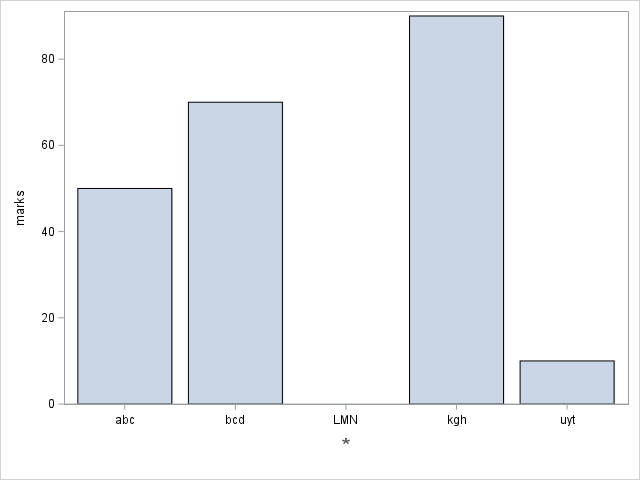
Another way would be to annotate the * character:
data score;
input name $1-3 marks 5.;
datalines;
abc 50
bcd 70
LMN
kgh 90
uyt 10
;
run;
data score_anno; set score (where=(marks=.));
length label $300 anchor x1space y1space function textcolor $50;
layer='front';
x1space='datavalue'; xc1=name;
y1space='graphpercent'; y1=7;
function='text'; label='*';
textcolor='gray55'; textsize=15;
width=100; widthunit='percent'; anchor='center';
run;
proc sgplot data=score pad=(bottom=10pct) sganno=score_anno;
vbarparm category=name response=marks;
xaxis display=(nolabel);
run;

Call for content now open!
It's your turn to help shape SAS Innovate 2027. Share your expertise and inspire the SAS community.
Learn how use the CAT functions in SAS to join values from multiple variables into a single value.

Find more tutorials on the SAS Users YouTube channel.
SAS Training: Just a Click Away
Ready to level-up your skills? Choose your own adventure.
-
2 replies
-
05-07-2021 05:33 AM
-
2487 views
-
3 likes
-
3 in conversation
-


