Greetings,
First off kindly point me to an existing topic in the community if the subject has already been discussed, but from what i searched so far did not find one (maybe i missed it).
Closest i found is:
Product: SAS Studio Engineer / Version : 2024.03
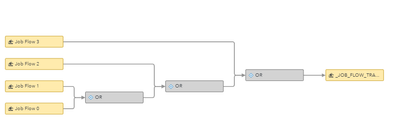
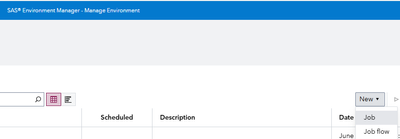
Context: i have a job flow in Environment Manager which consists in Flows (.flw) from SAS Studio deployed as jobs (all of them used here in the flow) and some Logic Gates. See Below.
Job Flow Name : JF_RUN
Now, this Job Flow is scheduled to run daily at 12:00 pm. In case the Job Flow fails with an error, the person responsible with the process will investigate, take necessary measures, and need to execute the Flow again.
BUT, Job Flow 2, one of the flows from SAS studio used in this flow in Environment Manager, works with some input parameters, and, from the investigations made, it turns out that some of them need to be altered, only for the next run iteration. Since the parameters are read from csv's on the server and loaded into tables, we would like to avoid user interaction with the CSV, especially since the parameters modification is only for next execution.
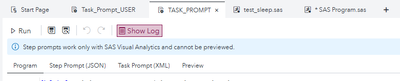
And so we considered generating a Job->Task Prompt from SAS Studio where the user will input parameters (into an XML form) with altered values for Job Flow 2 and then trigger the existing Job Flow in Environment Manager.
The question : How can i trigger the execution of my flow JF_RUN in Environment Manager from the Program Tab using SAS code in a Task Prompt, ?
Thank you in advance.
Regards,
Alex.
Good day sir,
First off, you need the job request id from Environment Manager.
In the Task Prompt/Program section you use the following:
filename jobresp temp;
%let viyaHost = %sysfunc(getoption(SERVICESBASEURL));
proc http
url="&viyahost./jobExecution/jobRequests/e703d46b-7798-4c81-9fee-fe18f72b31db/jobs"
method="POST"
out=jobresp
oauth_bearer = sas_services;
run;
/*you can assign a lib to see the API response if you run all the above as a program, maybe as a test before prod */
libname jobresp json fileref=jobresp;
Hope this helps!
Best.
Good day sir,
First off, you need the job request id from Environment Manager.
In the Task Prompt/Program section you use the following:
filename jobresp temp;
%let viyaHost = %sysfunc(getoption(SERVICESBASEURL));
proc http
url="&viyahost./jobExecution/jobRequests/e703d46b-7798-4c81-9fee-fe18f72b31db/jobs"
method="POST"
out=jobresp
oauth_bearer = sas_services;
run;
/*you can assign a lib to see the API response if you run all the above as a program, maybe as a test before prod */
libname jobresp json fileref=jobresp;
Hope this helps!
Best.
OMG this was EXACTLY what i was looking for! Thank you so much !
Regards.
LE: The solution works for the execution of Jobs in Environment Manager.
Similar, for the programmatic execution of Job Flows you need to access the specific API and obtain the Flow ID. One option ( that i found so far) is to manually get the Flow ID, meaning:
%let viyaHost = %sysfunc(getoption(SERVICESBASEURL));
Go to url: &viyahost./jobFlowScheduling/flows/
Scroll, if you haven't filtered in the URL, and find the name of your flow in Environment Manager. EG:
Mine is named "JF_API" (very clever, duuh)
So i get the ID from the URL.
{
"creationTimeStamp": "2025-06-02T15:56:28.497377Z",
"createdBy": "sasuser",
"modifiedTimeStamp": "2025-06-02T15:56:28.497378Z",
"modifiedBy": "sasuser",
"version": 1,
"id": "fa3202f7-342d-4a5b-b9cf-85f628d59477",
"name": "JF_API",
"links": [And with the PATCH method (that you also see in the "links" when accessing the Flow API - above) you execute the Job Flow:
filename jobresp temp;
%let viyaHost = %sysfunc(getoption(SERVICESBASEURL));
proc http
url="&viyahost./jobFlowScheduling/flows/fa3202f7-342d-4a5b-b9cf-85f628d59477/scheduled"
method="PATCH"
out=jobresp
oauth_bearer = sas_services;
run;
/*you can assign a lib to see the API response if you run all the above as a program, maybe as a test before prod */
libname jobresp json fileref=jobresp;
The SAS Users Group for Administrators (SUGA) is open to all SAS administrators and architects who install, update, manage or maintain a SAS deployment.
SAS technical trainer Erin Winters shows you how to explore assets, create new data discovery agents, schedule data discovery agents, and much more.

Find more tutorials on the SAS Users YouTube channel.