- Home
- /
- Administration
- /
- Admin & Deploy
- /
- Re: SAS Deployment Wizard hanging when attempting to start install aft...
- RSS Feed
- Mark Topic as New
- Mark Topic as Read
- Float this Topic for Current User
- Bookmark
- Subscribe
- Mute
- Printer Friendly Page


- Mark as New
- Bookmark
- Subscribe
- Mute
- RSS Feed
- Permalink
- Report Inappropriate Content
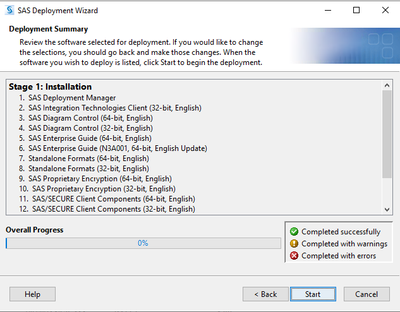
I tried to install SAS 9.4 using SAS Deployment Wizard but the installation seems to stuck here at SAS Deployment Manager step.
It gets stuck and does not move past the "start" button. I usually will click and it will progress and turn to a "stop" button.
When initially installing, ran into an error and was required to cancel out but am now having this issue after. Initial error was related to "Integration Technologies". Needed a reboot to clear up file in use and now will not progress.


- Mark as New
- Bookmark
- Subscribe
- Mute
- RSS Feed
- Permalink
- Report Inappropriate Content
Please attach the specific error window and open the log file that shown on the error prompt, the log usually shows you the hint of why the installation is failed.
- Mark as New
- Bookmark
- Subscribe
- Mute
- RSS Feed
- Permalink
- Report Inappropriate Content
reply above this line. No attachments. -##
- Mark as New
- Bookmark
- Subscribe
- Mute
- RSS Feed
- Permalink
- Report Inappropriate Content
Please check if your anti-virus is completed disabled, the some of the Windows background process associate with your anti-virus can also cause the hanging of the installation, can you also check the following folders and all files in C:\Users\your-user-id\AppData\Local\SAS\SASDeploymentWizard and attach the logs here.

- Spring 2026 ESUG Meeting - Social Celebration | 02-Jun-2026
- Spring 2026 ESUG Meeting | 03-Jun-2026
Learn how to explore data assets, create new data discovery agents, schedule data discovery agents, and much more.

Find more tutorials on the SAS Users YouTube channel.
-
3 replies
-
07-10-2024 07:33 PM
-
2593 views
-
0 likes
-
2 in conversation
-


