|
To view this email in your web browser, click here.
|
|
Highways at Sea: Mapping Europe’s Fishing Effort
Did you know that thousands of fishing vessels cross the English Channel and Bay of Biscay every single day — creating invisible “traffic jams at sea”? Check out Falko Schulz's bold new infographic, put together using data from Global Fishing Watch Data.
Dear Reader,
Happy 2026! This year is especially meaningful for SAS as we celebrate our 50th anniversary. SAS was founded in 1976, and five decades later, we’re still innovating, evolving, and empowering organizations worldwide. If you’d like to take a quick trip through our journey, why not explore the company’s history, milestones, and evolution?
We’re also gearing up for SAS Innovate, our biggest data and AI event of the year for customers, users, and partners. With more than 200 breakout sessions, 50 hands‑on workshops and labs, 20 certification opportunities, and much more, it’s shaping up to be our most ambitious program yet. Join us April 27–30 in Texas.
And for a limited time, our Ask the Expert webinar series is offering more than just great learning opportunities. Attendees have the chance to win SAS Innovate registration discount codes and even a complimentary pass just by participating. Check out the upcoming sessions and mark your calendar.
Let’s make this milestone year one to remember!
Thiago De Souza
Editor, SAS Tech Report
Someone forwarded you this edition of Tech Report? Subscribe to receive your own copy each month! Back issues “live” on the SAS Support Community.
|
|
SAS Tip: Always CLEAR Your LIBNAMEs and FILEREFs
When you finish working with a LIBNAME or FILENAME, make it a habit to explicitly free it with a CLEAR option:
libname mylib clear;
filename myfile clear;
Why bother?
- Prevents locked-resource errors. SAS keeps libraries and file handles open until you explicitly release them. It can be especially important when using a SAS library to access a database, some of which support only a certain number of simultaneous connections.
- Ensures clean reruns. In iterative development, old filerefs and librefs can linger and block your next run or distort the results as you test.
- It's just good SAS hygiene. Clearing unused references keeps your session tidy, avoids ambiguous assignments, and reduces the chance of subtle bugs.
Think of CLEAR as closing the door behind you—simple, fast, and it keeps your SAS environment running smoothly. I know that many SAS macro coders take a similar approach with macro variables (clearing or deleting when done with them). What's your favorite SAS hygiene tip? Let me know!
|
Tips & tricks
|
|
12 blog posts from 2025 that deserve a second look
Rick Wicklin highlights a curated set of standout SAS blog posts from 2025 that go beyond popularity to share technical depth and practical value, from SAS programming tricks to statistical visualization and numerical computation insights.
Uploading and visualizing custom shapefiles in SAS Viya
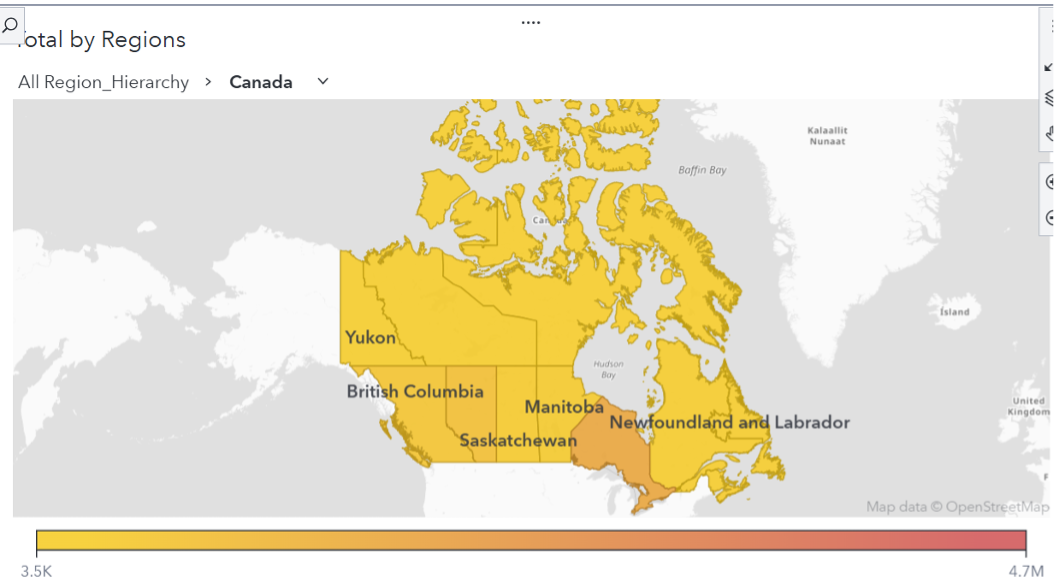
This guide walks through bringing custom geographic shapefiles into SAS Viya and Visual Analytics, showing how to prepare, import, and visualize non-standard regions alongside built-in maps.
AI Governance in practice: How synthetic data prepares you for what’s next
Sophia Rowland explains why AI governance starts with trustworthy data and shows how synthetic data (especially via tools like SAS Data Maker) balances privacy with robust model training and testing.
Unlocking agentic AI potential with MCP tools in SAS Retrieval Agent Manager
This deep dive describes how the Model Context Protocol (MCP) enhances SAS Retrieval Agent Manager, enabling AI agents to do more than retrieve information. They can trigger workflows, integrate with systems, and operate securely at enterprise scale.
Engage for Managed Cloud Services: Strategic automation for the future
John Conoley outlines how the Engage automation framework underpins SAS Managed Cloud Services, accelerating cloud delivery with Infrastructure as Code, self-service workflows, and scalable lifecycle management.
SAS Agentic AI – Deploy and Score Models – Kubernetes
A community tutorial walks through deploying and scoring SAS-wrapped AI models on Kubernetes for scalable, secure inferencing, covering best practices for certificates, pods, services, and ingress (based on related SAS Community guidance).
Creating Synthetic Data using PROC SMOTE, PROC SIMNORMAL, and PROC TABULARGAN
This SAS Communities post compares approaches to generate synthetic data, from multivariate normal via PROC SIMNORMAL to non-parametric SMOTE and model-based TabularGAN, illustrating pros, limitations, and examples of each.
Implement the Burr distribution in SAS
Rick Wicklin shows how to implement the flexible, three-parameter Burr XII distribution in SAS (via PROC FCMP) for modeling skewed positive data, complete with functions for PDF, CDF, quantile, and random draws.
Nine ways to visualize a continuous univariate distribution in SAS
This first part of a series demonstrates nine techniques (e.g., histogram, KDE, box plot, ECDF) using PROC SGPLOT to visualize continuous distributions in SAS and explains when each visualization is most informative.
|
|
Real-time, real impact: Cloud and AI move logistics and deliveries forward
Posten Bring modernized its logistics operations by migrating to SAS Viya and implementing SAS SpeedyStore, enabling real-time data access, faster decisioning and greater resilience across its always‑on delivery network. This cloud‑native overhaul now powers smarter routing, improved customer communication and a more agile analytics foundation for long‑term growth.
|
For developers
|
|
Unlocking agentic AI potential with MCP tools in SAS Retrieval Agent Manager
Enterprise AI is moving beyond simple retrieval. Organizations now need AI systems that can reason, call tools, interact with internal systems, and execute real business workflows. The Model Context Protocol (MCP) enables this, and SAS Retrieval Agent Manager (RAM) now brings these capabilities directly into enterprise environments. In this article, SAS’s Ramya Mopidevi breaks it all down.
SAS Bowl LIX, Integrating SAS and Git
Typically, SAS users interact with Git in one of two ways: through a command-line interface (CLI) or through the point-and-click GUI in SAS Viya. While both these approaches are superior for most use cases, when working with scheduled jobs, flows, or automated pipelines, neither is perfect. February's SAS Bowl is to Git you excited about SAS.
|
Upcoming learning events
|
|
(Each is one hour and complimentary unless stated otherwise.)
Ask the Expert: How to Supercharge Enterprise Agentic Workflows With SAS Retrieval Agent Manager
Join SAS' Daniele Cazzari and Josh Anderson on Thursday, February 5 at 11:00 AM EST to learn how SAS® Retrieval Agent Manager helps enterprises securely deploy and manage AI agents, thereby enhancing decision-making and automating domain-specific workflows. You will learn more about:
- Optimizing knowledge retrieval. Integrate diverse data sources with a human-in-the-loop RAG pipeline for precise, citation-backed responses.
- AI-powered agents. Enable no-code or code-based agents to use plug-and-play generative AI services in creating flexible and scalable agentic workflows.
- Automating secure workflows. Seamlessly connect knowledge, agents and tools to create context-rich automated workflows.
Ask the Expert: Implementing a Digital Twin for the Monopoly Board Game Using SAS® Viya®
Join SAS' Gerhard Svolba on Thursday, February 12 at 10:00 AM EST to explore the use of digital twins to better understand the specifics of real-world environments. You will learn more about:
- How the powerful SAS Viya platform creates Monte Carlo Simulations to create digital twins.
- Tips and tricks for using SAS data step, procedures, arrays, formats and more.
- How to combine the digital twin with SAS Visual Analytics to make your results more actionable.
Ask the Expert: SAS Customer Intelligence 360 Tips and Tricks: Quick Wins, Shortcuts and Hidden Feat...
Join SAS' Sam Padda, Mark Korey, and Adolf von Moltke on Tuesday, February 17 at 9:00 AM EST to learn how to unlock greater productivity and higher campaign quality with SAS Customer Intelligence 360. You will learn how to:
- Boost your accuracy and consistency by sidestepping pitfalls.
- Unlock hidden features to streamline your workflow and gain greater flexibility.
- Supercharge what you can do with your data and drive smarter decisioning.
- Adopt best practices from seasoned users.
Ask the Expert: Welcome to SAS® Viya®
Join SAS' Stacey Syphus on Thursday, February 19 at 10:00 AM EST to explore and learn how to make the most of your data and AI investment. You will learn how to:
- Understand the core qualities and basic architecture of SAS Viya.
- Use the suite of SAS Viya applications to manage and explore data, develop models and deploy insights.
- Develop code using either SAS or Python in SAS Viya.
Ask the Expert: How Can SAS Viya Copilot Help Me Build Better Models?
Join SAS' Peyton Cuccia, Sean Mealin, and Thomas Wileman on Tuesday, February 24 at 11:00 AM EST to explore how the integration of AI into SAS Viya enables users to build and improve modeling workflows. You will learn more about:
- How SAS Viya Copilot makes modeling, coding and building reports faster and easier.
- What you can do with SAS Viya Copilot in SAS Model Studio versus code.
- How you can get access to SAS Viya Copilot in SAS Model Studio.
|
|
This email was sent to %%ONPREM.root.Contact Email%%.
|
| © SAS Institute Inc. SAS Campus Drive, Cary NC 27513 USA. |
|
|
|
|
|