BookmarkSubscribeRSS Feed
Jeove74
Obsidian | Level 7


Hi all,


Please come up with a quick fix on this simple tasks.


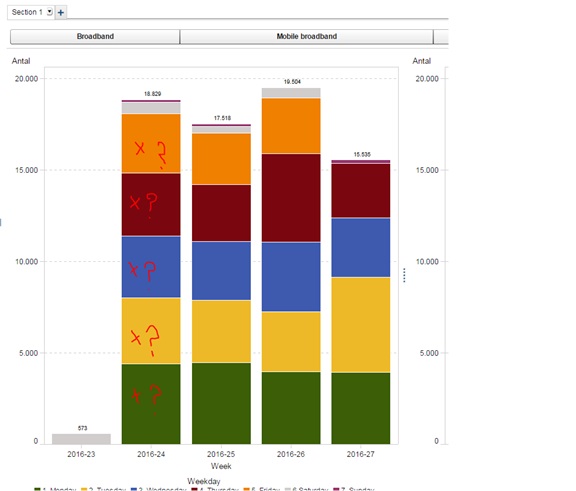
We have build a simple bar charts and have stacked the chart with different by-groups. How do we put specifik data labels on the graph (as we can easily do in Excel) by each group and not just the data value for the full stacked bar?


SAS VA labels.jpg


Please tell me that this is possible - as I have not been able to figure out the way to do it myself


Kind regards

Jesper

1 REPLY 1
meredithbailey
SAS Employee

Hello Jesper, 


When having stacked bar charts with two categories, you will only be able to see the data label as a total for the entire stacked bar. In order to display the data label for each individual group, click on Grouping Style within the Properties tab and change the option to cluster. If you have the Show data labels checkbox already selected, you will be able to see the value for each individual bar within that group. Hope this helps! 


Best, 
Meredith Bailey 

sas-innovate-2026-white.png


April 27 – 30 | Gaylord Texan | Grapevine, Texas

Registration is open

Walk in ready to learn. Walk out ready to deliver. This is the data and AI conference you can't afford to miss.
Register now and lock in 2025 pricing—just $495!

Register now

Tips for filtering data sources in SAS Visual Analytics

See how to use one filter for multiple data sources by mapping your data from SAS’ Alexandria McCall.

Find more tutorials on the SAS Users YouTube channel.

Discussion stats
  • 1 reply
  • 2265 views
  • 2 likes
  • 2 in conversation