- Home
- /
- Programming
- /
- SAS Studio
- /
- Re: Cannot show read results
- RSS Feed
- Mark Topic as New
- Mark Topic as Read
- Float this Topic for Current User
- Bookmark
- Subscribe
- Mute
- Printer Friendly Page


- Mark as New
- Bookmark
- Subscribe
- Mute
- RSS Feed
- Permalink
- Report Inappropriate Content
libname project "/home/ydu180/project";
title1"Project";

data project.ydu_18;
   infile "/home/ydu180/project/housing.data" dlm='09'x dsd truncover;
   input CRIM ZN INDUS CHAS NOX RM AGE DIS RAD TAX PTRATIO B LSTAT MEDV;
   format CRIM 8.5
          ZN 5.2
          INDUS 6.3
          CHAS 1.0
          NOX 6.4
          RM 6.4
          AGE 5.2
          DIS 7.4
          RAD 2.0
          TAX 5.1
          PTRATIO 5.2
          B 6.2
          LSTAT 5.2
          MEDV 5.2;
   Label CRIM="per capita crime rate by town"
         ZN="proportion of residential land zoned for lots over 25,000 sq.ft."
         INDUS="proportion of non-retail business acres per town"
         CHAS="Charles River dummy variable (= 1 if tract bounds river; 0 otherwise)"
         NOX="nitric oxides concentration (parts per 10 million)"
         RM="average number of rooms per dwelling"
         AGE="proportion of owner-occupied units built prior to 1940 "
         DIS="weighted distances to five Boston employment centres"
         RAD="index of accessibility to radial highways"
         TAX="full-value property-tax rate per $10,000"
         PTRATIO="pupil-teacher ratio by town"
         B="1000(Bk - 0.63)^2 where Bk is the proportion of blacks by town"
         LSTAT="% lower status of the population"
         MEDV="Median value of owner-occupied homes in $1000's";
run;

proc contents data=project.ydu_18;
run;

proc print data=project.ydu_18 label noobs;
   var CRIM ZN INDUS CHAS NOX RM AGE DIS RAD TAX PTRATIO B LSTAT MEDV;
run;
There are 506 instances for every 14 variables, so the total observations should be 7084. I got 506 rows and 14 columns, but there were all dots, which is like the following.
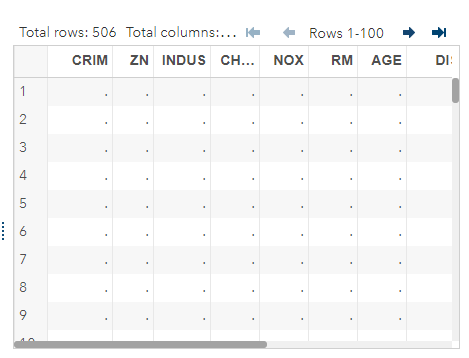
The content shows I only have 506 observations. The source data website is http://archive.ics.uci.edu/ml/machine-learning-databases/housing/housing.data
Could someone tell how I read this txt and can get those data shown on my results?
Accepted Solutions


- Mark as New
- Bookmark
- Subscribe
- Mute
- RSS Feed
- Permalink
- Report Inappropriate Content
Your code assumes that the file uses a tab as the delimiter. But the file uses spaces as the delimiter.
The DSD option in the infile statement will treat consecutive delimiters as a missing value. You don't want that, because the values in the file are separated by two or three spaces.
Try
infile "/home/ydu180/project/housing.data";instead.
Can you read this into SAS® for me? “Using INFILE and INPUT to Load Data Into SAS® has lots of examples of reading external files into SAS.
- Mark as New
- Bookmark
- Subscribe
- Mute
- RSS Feed
- Permalink
- Report Inappropriate Content
Your code assumes that the file uses a tab as the delimiter. But the file uses spaces as the delimiter.
The DSD option in the infile statement will treat consecutive delimiters as a missing value. You don't want that, because the values in the file are separated by two or three spaces.
Try
infile "/home/ydu180/project/housing.data";instead.
Can you read this into SAS® for me? “Using INFILE and INPUT to Load Data Into SAS® has lots of examples of reading external files into SAS.
- Mark as New
- Bookmark
- Subscribe
- Mute
- RSS Feed
- Permalink
- Report Inappropriate Content

Catch up on SAS Innovate 2026
Nearly 200 sessions are now available on demand in the Innovate Hub.
Watch Now →Get started using SAS Studio to write, run and debug your SAS programs.

Find more tutorials on the SAS Users YouTube channel.
SAS Training: Just a Click Away
Ready to level-up your skills? Choose your own adventure.
-
2 replies
-
07-07-2017 01:20 PM
-
2278 views
-
1 like
-
2 in conversation
-

