- Home
- /
- Programming
- /
- Programming
- /
- How to add reference lines per category in proc sgplot ?
- RSS Feed
- Mark Topic as New
- Mark Topic as Read
- Float this Topic for Current User
- Bookmark
- Subscribe
- Mute
- Printer Friendly Page


- Mark as New
- Bookmark
- Subscribe
- Mute
- RSS Feed
- Permalink
- Report Inappropriate Content
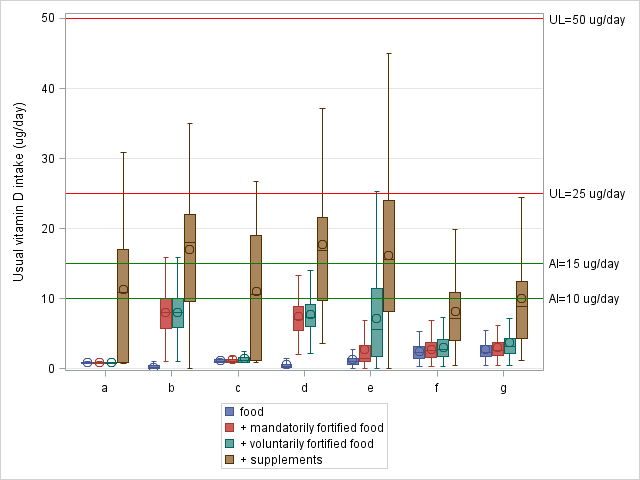
My dataset contains vitamin D intake from 4 different sources (bron) for 7 different subpopulations (a,b,c,d,e,f,g).
Is it possible to create reference lines that do not cover the entire width of a graph but with a limited to the concerned category.
proc format;
value formsubpop  1="a"
                  2="b"
			      3="c"
			      4="d"
			      5="e"
			      6="f"
			      7="g";
			      run;

proc sort data=VitD_aggr;
by subpop ;
run;

proc sgplot data=VitD_aggr;
  vbox VitD_tot/category=subpop group=bron grouporder=descending boxwidth=0.9 NOOUTLIERS;
    YAXIS LABEL = 'Usual vitamin D intake (ug/day)' GRID VALUES = (0 TO 50 BY 10);
  xaxis display=(nolabel) ;
  REFLINE 10 /label="AI=10 ug/day" lineattrs=(color=green);
  REFLINE 25 /label="UL=25 ug/day" lineattrs=(color=red);
  REFLINE 15 /label="AI=15 ug/day" lineattrs=(color=green);
  REFLINE 50 / label="UL=50 ug/day" lineattrs=(color=red);
  format subpop formsubpop. ;
  keylegend / location =outside position =bottom across=1;
  run;


- Mark as New
- Bookmark
- Subscribe
- Mute
- RSS Feed
- Permalink
- Report Inappropriate Content
How do you know if a refline applies to a certain category? If it is in the 95% confidence interval? If it is in the quartile range?
- Mark as New
- Bookmark
- Subscribe
- Mute
- RSS Feed
- Permalink
- Report Inappropriate Content
Thank you for your reply.
The reflines depend on the subpop (=subpopulations) I will probably have to define them by subpop?
refline 10 and 50 apply to subpop's a, b, c and d
refline 15 and 50 apply to subpop's e, f and g


- Mark as New
- Bookmark
- Subscribe
- Mute
- RSS Feed
- Permalink
- Report Inappropriate Content
It sounds like you are asking for something that likely is in the annotate facility. That will allow you do specify drawing a line between two coordinates over/under other elements. You would construct an appropriate data set with the drawing instructions and reference in the procedure with the SGANNO= option to indicate the set to use. There are a number of macros available to help such as %sgline to create the instructions given some parameters such as coordinates and line properties.

- Mark as New
- Bookmark
- Subscribe
- Mute
- RSS Feed
- Permalink
- Report Inappropriate Content
Instead of a reference line think of it is as a customized scatter plot, with the symbols being a straight line.
Add in the values for your individual reference to your data set, if it's not already included.
Then you can use SCATTER to include customized reference line.
@IsabelleM wrote:
My dataset contains vitamin D intake from 4 different sources (bron) for 7 different subpopulations (a,b,c,d,e,f,g).
Is it possible to create reference lines that do not cover the entire width of a graph but with a limited to the concerned category.
proc format;
value formsubpop  1="a"
                  2="b"
			      3="c"
			      4="d"
			      5="e"
			      6="f"
			      7="g";
			      run;

proc sort data=VitD_aggr;
by subpop ;
run;

proc sgplot data=VitD_aggr;
  vbox VitD_tot/category=subpop group=bron grouporder=descending boxwidth=0.9 NOOUTLIERS;
    YAXIS LABEL = 'Usual vitamin D intake (ug/day)' GRID VALUES = (0 TO 50 BY 10);
  xaxis display=(nolabel) ;
  REFLINE 10 /label="AI=10 ug/day" lineattrs=(color=green);
  REFLINE 25 /label="UL=25 ug/day" lineattrs=(color=red);
  REFLINE 15 /label="AI=15 ug/day" lineattrs=(color=green);
  REFLINE 50 / label="UL=50 ug/day" lineattrs=(color=red);
  format subpop formsubpop. ;
  keylegend / location =outside position =bottom across=1;
  run;
- Mark as New
- Bookmark
- Subscribe
- Mute
- RSS Feed
- Permalink
- Report Inappropriate Content
I have tried this out with polylines and polycont and it worked.
Thank you for your help!

Call for content now open!
It's your turn to help shape SAS Innovate 2027. Share your expertise and inspire the SAS community.
Learn how use the CAT functions in SAS to join values from multiple variables into a single value.

Find more tutorials on the SAS Users YouTube channel.
SAS Training: Just a Click Away
Ready to level-up your skills? Choose your own adventure.
-
5 replies
-
01-26-2018 09:29 AM
-
3637 views
-
2 likes
-
4 in conversation
-


