- Home
- /
- Programming
- /
- Programming
- /
- Help developing a macro with iterations
- RSS Feed
- Mark Topic as New
- Mark Topic as Read
- Float this Topic for Current User
- Bookmark
- Subscribe
- Mute
- Printer Friendly Page


- Mark as New
- Bookmark
- Subscribe
- Mute
- RSS Feed
- Permalink
- Report Inappropriate Content
if you go to sashelp.vtable you will see all the tables and their number of observations
It is a table you can process that as a table.
- Mark as New
- Bookmark
- Subscribe
- Mute
- RSS Feed
- Permalink
- Report Inappropriate Content
You can submit that code of Tom to your remote session.
Having a RLS working it will run. Is it an external RDBMS you need to have the count(*) approach.
Some RDBMS are supporting the retrieval of metadata information.


- Mark as New
- Bookmark
- Subscribe
- Mute
- RSS Feed
- Permalink
- Report Inappropriate Content
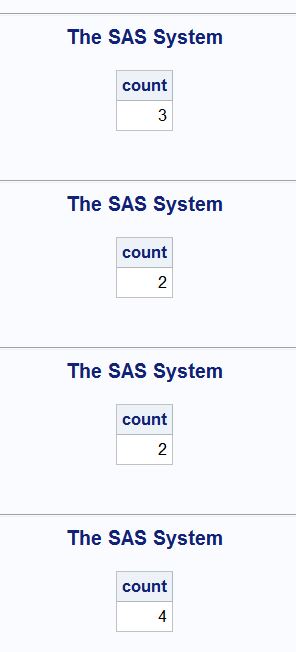
Here is the code you can use:
/*Creating Datasets*/
data a;
input name$ emp;
datalines;
aaa 121
bb 232
ccc 989
;
run;
data b;
input name$ emp;
datalines;
aaa 121
ccc 989
;
run;
data c;
input name$ emp;
datalines;
aaa 121
bb 232
;
run;
data d;
input name$ emp;
datalines;
aaa 121
bb 232
ccc 989
erf 455
;
run;
data testimportcont;
input testnumber $ table $;
datalines;
a1 a
a2 b
a3 c
a4 d
;
run;
proc sql inobs=50;
select trim(testnumber), trim(table) into :p1-:p4,:tab1-:tab4
from testimportcont;
quit;
options mprint mlogic symbolgen;
%macro counting;
proc sql;
%do i=1 %to 4;
select count(*) into :counting1-:counting4 from &&&tab&i.;
%end;
quit;
%mend;
%counting;
=====Output=====
Hope this helps.
- « Previous
-
- 1
- 2
- Next »

Call for content now open!
It's your turn to help shape SAS Innovate 2027. Share your expertise and inspire the SAS community.
Learn how use the CAT functions in SAS to join values from multiple variables into a single value.

Find more tutorials on the SAS Users YouTube channel.
SAS Training: Just a Click Away
Ready to level-up your skills? Choose your own adventure.
-
17 replies
-
09-09-2014 12:18 PM
-
8926 views
-
0 likes
-
6 in conversation
-


