proc template;
 define tagset tagsets.test;
 parent=tagsets.phtml;
 define event doc;
 start:
 put HTMLDOCTYPE NL NL NL;
 put '<html xmlns:o="urn:schemas-microsoft-com:office:office"' NL;
 put 'xmlns:x="urn:schemas-microsoft-com:office:excel"' NL;
 put 'xmlns="http://www.w3.org/TR/REC-html40">' NL;

 finish:
 put "</html>" NL;
 end;

 define event doc_head;
 start:
 put "<head>" NL;
 put VALUE NL;
 put "<style>" NL "<!--" NL;
 trigger alignstyle;
 put "-->" NL "</style>" NL;
 finish:

 put " <!--[if gte mso 9]><xml>" NL;
 put " <x:ExcelWorkbook>" NL;
 put " <x:ExcelWorksheets>" NL;
 put " <x:ExcelWorksheet>" NL;
 put " <x:Name>Sheet1</x:Name>" NL;
 put " <x:WorksheetOptions>" NL;
 put " <x:Zoom>100</x:Zoom>" NL;
 put " <x:Selected/>" NL;
 put " <x:Panes>" NL;
 put " <x:Pane>" NL;
 put " <x:Number>3</x:Number>" NL;
 put " <x:ActiveCol>1</x:ActiveCol>" NL;
 put " </x:Pane>" NL;
 put " </x:Panes>" NL;
 put " <x:ProtectContents>False</x:ProtectContents>" NL;
 put " <x:ProtectObjects>False</x:ProtectObjects>" NL;
 put " <x:ProtectScenarios>False</x:ProtectScenarios>" NL;
 put " </x:WorksheetOptions>" NL;
 put " </x:ExcelWorksheet> " NL;
 put " <x:WindowHeight>8070</x:WindowHeight> " NL;
 put " <x:WindowWidth>10380</x:WindowWidth> " NL;
 put " <x:WindowTopX>480</x:WindowTopX> " NL;
 put " <x:WindowTopY>120</x:WindowTopY> " NL;
 put " <x:ProtectStructure>False</x:ProtectStructure> " NL;
 put " <x:ProtectWindows>False</x:ProtectWindows>" NL;
 put " </x:ExcelWorkbook>" NL;
 put " </xml><![endif]--> " NL;
 put "</head>" NL;
 end;
 end;
run;
title j=left "Title1" j=right "Title 2";
ods markup file="report.html" tagset=tagsets.test    ;
proc report data=sashelp.class nowd   ;

run;
ods markup close;
title j=left "Title1" j=right "Title 2";
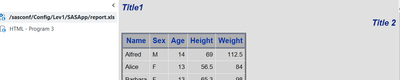
I want two titles on one line, with 'Title 1' aligned to the left and 'Title 2' aligned to the right.




