With the November 2022 stable release (2022.11) there is now the capability to Remove Duplicates in a SAS Studio Flow. This step is used to remove duplicate rows from an input table and create an output table with the unique rows. The duplicate row could be based on all columns or specified column(s).
I want to remove duplicate records from my customer data set.

Select any image to see a larger version.
Mobile users: To view the images, select the "Full" version at the bottom of the page.
I use the DQ – Match Code step from the public custom step repository to generate match codes for the Name, Address, and Zip fields to facilitate fuzzy matching on those fields when removing the duplicate records.

Next, I add the Remove Duplicates step from the Transform section to the flow.

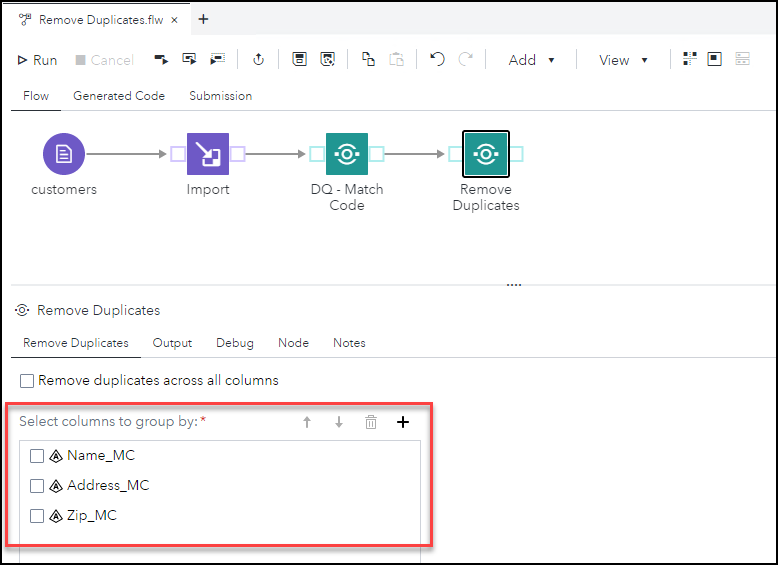
I uncheck the option to Remove duplicates across all columns and add the condition to remove duplicates where the Name_MC, Address_MC, and Zip_MC columns contain the same values.
The Output tab has options to Replace existing output table with same name. If the output table is a CAS Table, then you have the option to promote and/or save the table. Also, if the output table is in PATH, DNFS, ADLS, or S3 CAS library, then you can specify the output format.

On the Debug tab, you have the option to select to Debug SAS macros. I check this option for my flow.

I save and run the flow and now my duplicate customer records have been removed.

I review the Log and confirm the number of duplicate rows removed from my customer list.

Summary
The Remove Duplicates step is now available in SAS Studio Flow.
For more information review its documentation: SAS Help Center: Removing Duplicates.
Find more articles from SAS Global Enablement and Learning here.


