In this article, we explore how to utilize manual alerts in SAS Alert Triage. We'll start with an overview of manual alerts and their use cases before walking through setting up Fraud Decisioning to facilitate it using our environment as an example.
What is Manual Alerting?
Let's begin with a brief overview of Fraud Decisioning. First, the institution sends transactions to the SAS Detection engine. This runtime environment uses models and rules to generate alert recommendations. Transactions with and without alert recommendations are passed to another component of Fraud Decisioning: the Alert Triage interface. This is a lightweight alert client that facilitates users to work alerts and route them for further investigation and actions as necessary.
Ideally, decisioning rules capture most or all suspicious transactions and generate an alert. In the event that the decisioning rules do not flag a transaction, but subsequent communication with the customer or other insights indicate that the activity should be flagged and triaged, an analyst can create a manual alert to identify and triage the activity.
For example, an analyst may receive a call from a customer to report a transaction they don't recognize immediately. The analyst can create an alert in order to look into this and identify whether the card is compromised. This has two benefits: for the analyst, it enables them to document their efforts, and for the rule-writers, it can eventually provide input with which to fine-tune rules.
In addition to alerts originating from model- and rule-generated alert recommendations, Alert Triage supports the creation of alerts manually from the transaction grid as of 2025.06. A user may select a transaction, then select an appropriate alert type.

You can create manual alerts on particular transactions from transaction grids on alert pages
Select any image to see a larger version.
Mobile users: To view the images, select the "Full" version at the bottom of the page.
In this example, the user is viewing debit card transactions associated with a Debit Card Alert. They have the option to create a Customer Alert or a Debit Account alert. When a user creates a manual alert, it sends an alerting event to Kafka, which is then ingested by Alert Triage in the same way as any other alerting event. Then, the alert is generated and routed.
How do I set up Manual Alerting in my environment?
There are two main requirements to keep in mind when you are configuring manual alerting in your environment for the first time. Here are the key steps to configuring manual alerting in your environment:
- Ensure users have triage.alert.alert_creation capability
- Configure the transaction type and corresponding alert type(s).
User Capabilities
The triage.alert.alert_creation capability enables a user to create a manual alert. Without this capability, the user will not be able to access the icon on the transaction grid toolbar to create a manual alert. Any users that need to be able to create a manual alert must be in a group that has this capability. For this example, I'll want to ensure my Fraud Decisioning Investigator user can create a manual alert.
We can use Environment Manager to check which users and groups have this capability. I select Capabilities, then click the triage.alert.alert_creation capability.

The alert creation capability is shown under Alert Triage capabilities.
The properties panel shows the decisioning Investigator group and 3 other groups are associated with the Create alert capability.
Alert Type & Transaction Type
Next, let's look at the alert types and verify that there is at least one available for manual alert creation. As an administrator, you configure which alert types are available to the Decisioning Investigator user when they are creating an alert.
The alert types available depend on the transaction type. For example, we might want Decisioning Investigator to be able to create 3 different types of alert from debit card authorization messages: Debit Account, Check, or Customer, but only one alert type from credit card authorization messages: Credit Account.
This is designed so that you ensure alerts are only created when all the appropriate information is present. For example, you would likely not want a user to be able to create a Credit Card alert on a message type corresponding to a login event, as it would not likely contain enough information to create a meaningful credit card alert.
Let's say we want Decisioning Investigator to be able to create a Debit Account alert from a debit card authorization transaction. I'll use a REST API request to look at the current configuration for this transaction type.
curl --request GET \
  --url https://server.demo.sas.com/alertsTransaction/transactionTypes \
  --header 'accept: application/json, application/vnd.sas.collection+json' \
  --header 'authorization: Bearer <>'
This GET request returns a list of all transaction types. If you already know the ID of your transaction type, you can request just that definition.
I locate the JSON object corresponding to my transaction type. In the response, I search for the transaction type I am interested in using to create an alert
{
	      "version": 1,
	      "id": "DCCA",
	      "displayNameLocalizationKey": "f91f85be33cdb35e",
	      "defaultDisplayName": "Debit Card - Authorization",
	      "discriminators": {
	        "message.solution.activityType": [
	          "CA"
	        ],
	        "message.solution.originationType": [
	          "DC"
	        ]
	      },
	      "name": "Debit Card - Authorization",
	      "localizedName": "Debit Card - Authorization",
	      "indexableVariablePaths": "[\"message.customer.identifier\", \"message.creditcard.number\", \"message.debitcard.number\", \"message.debitaccount.number\", \"message.creditaccount.number\", \"message.merchant.identifier\", \"message.company.identifier\"]",
	      "transactionTypeTableName": "DCCA",
	      "transactionDatetimePath": "message.sas.system.messageDtTmUtc",
	      "transactionIdPath": "message.sas.system.messageIdentifier",
	      "retentionPeriod": 0,
	      "alertTypes": [
	        {
	          "id": "sfd_customer"
	        },
	        {
	          "id": "sfd_debitacc"
	        }
	      ],
	      "optLockVersion": 2,
	      "links": [
	        {
	          "method": "POST",
	          "rel": "self",
	          "href": "/alertsTransaction/transactionTypes",
	          "uri": "/alertsTransaction/transactionTypes",
	          "type": "application/vnd.sas.triage.transaction.type"
	        }
I notice the alertTypes object. It contains two items: sfd_customer, and sfd_debitacc. This indicates I can create an alert of Customer or Debit Account type from this transaction type. This can be setup when you configure Transaction Types for your environment initially.
Now I've verified that this alert type is enabled for this transaction type.
Let's finish by taking another look at our manual alert creation process, and confirm that our Fraud Decisioning user can create a manual alert from the Debit Card Transactions grid.
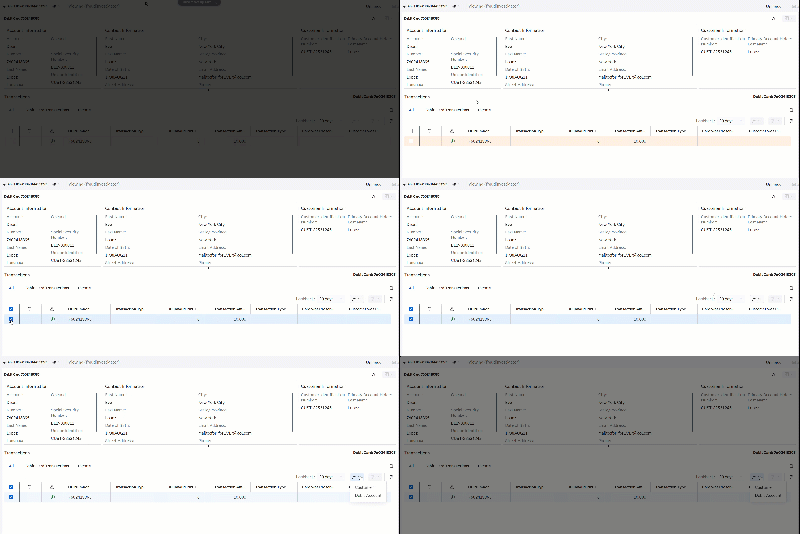
The fraudinvestigator user selects a transaction from the grid and
creates a manual alert on it.
Here, we can see that manual alerting is enabled for this transaction type, and the drop down menu gives us the same two options we saw in the triage type configuration: Customer and Debit Account.
What Next?
While Manual Alerts are currently available exclusively from the transaction grid as of this release, eventually analysts will be able to create alerts on entities themselves rather than messages related to an entity. You can reference the What's New section of the documentation to stay current with the latest Alert Triage features.
Hopefully, this article has informed and inspired you to utilize manual alerts in your Fraud Decisioning workflow. If you'd like to learn more about Alert Triage including details on this and other features, see the SAS Alert Triage User's Guide and Administrator's Guide.
Thank you to Paul Seymour and Luca Schaffhauser for their contributions.
Have a comment, question, or idea for an article? Please comment below or reach out via email.
Find more articles from SAS Global Enablement and Learning here.


