BookmarkSubscribeRSS Feed
Filipvdr
Pyrite | Level 9

thanks a lot RW9. I have put my max and increment into some macro variables. works fine!

ods graphics / reset=all height=15cm width=19cm noborder;

proc template;

  define statgraph barchart;

    begingraph;

      entrytitle  "&wafersource_list";

      layout overlay /

  yaxisopts=(offsetmin=0

             label="Conc (E10A/cm2)"

  tickstyle=across

  linearopts= (tickvaluesequence=(start=0 end=&max increment=&interval)));

        barchart x=element y=Conc / name='a'  fillattrs=(color=cxFFFF66)  ;

        scatterplot x=element y=WL / name='b' markerattrs=(symbol=HomeDown);

  scatterplot x=element y=SL / name='c' markerattrs=(symbol=HomeDownFilled);

        discretelegend 'a' 'b' 'c';

   endlayout;

  endgraph;

  end;

run;

GraphGuy
Meteorite | Level 14

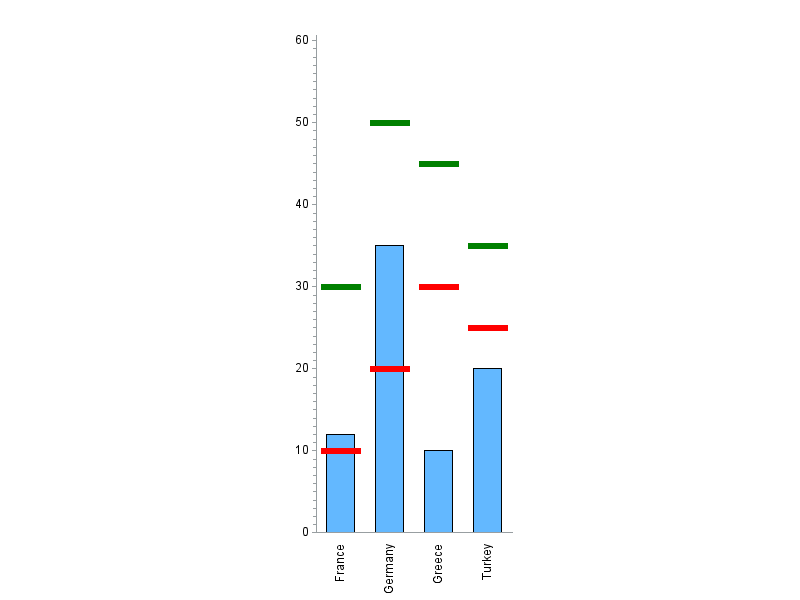
Here's one way to do it, using GChart & Annotate ...


data foo;
input country $ 1-10 value sl wl;
datalines;
France 12 10 30
Germany 35 20 50
Turkey 20 25 35
Greece 10 30 45
;
run;


data anno_lines; set foo;
length function color $8;
ysys='2'; hsys='3'; when='a';


function='move'; midpoint=country; xsys='2'; y=sl; output;
function='move'; x=-10; xsys='7'; output;
function='draw'; x=10*2; size=1.0; color='red'; output;


function='move'; midpoint=country; xsys='2'; y=wl; output;
function='move'; x=-10; xsys='7'; output;
function='draw'; x=10*2; size=1.0; color='green'; output;
run;


axis1 label=none value=(angle=90);
axis2 label=none order=(0 to 60 by 10);


pattern1 v=s c=cx63B8FF;


proc gchart data=foo anno=anno_lines;
vbar country / type=sum sumvar=value
maxis=axis1 raxis=axis2 noframe
width=4 space=3;
run;


foo.png

sas-innovate-2026-white.png


April 27 – 30 | Gaylord Texan | Grapevine, Texas

Registration is open

Walk in ready to learn. Walk out ready to deliver. This is the data and AI conference you can't afford to miss.
Register now and lock in 2025 pricing—just $495!

Register now

How to Concatenate Values

Learn how use the CAT functions in SAS to join values from multiple variables into a single value.

Find more tutorials on the SAS Users YouTube channel.

SAS Training: Just a Click Away

 Ready to level-up your skills? Choose your own adventure.

Browse our catalog!

Discussion stats
  • 16 replies
  • 4685 views
  • 6 likes
  • 4 in conversation