| |
Making Investigations More Consistent, Efficient and Explainable with Generative AI
What if investigators could spend less time searching and more time solving?
|
|
Investigations often require analysts to move quickly from scattered alerts to defensible conclusions. Time is key, whether you are combatting fraud or investigating misconduct, to ensure proper action is taken.
This impactful work is frequently slowed by day-to-day friction points. Time is lost searching across objects, entities, and relationships. Visual evidence must be interpreted manually, and, as a result, documentation and case handoffs may vary from one investigator to the next. Complex query structures and product learning curves can also delay the onboarding of new investigators.
Organizations face growing volumes of data, more complex networks of relationships and rising expectations for speed and accountability.
Investigators need support that fits naturally into their workflow. The ideal experience helps them find relationships, quickly understand unfamiliar objects or entities, and capture clear, repeatable narratives, without having to leave an application.
In this environment, the investigative experience becomes a strategic advantage. Technology must not only accelerate tasks but also strengthen the quality of investigations.
These are the gaps that SAS® Viya Copilot in SAS® Visual Investigator addresses.
SAS® Viya Copilot in SAS® Visual Investigator helps investigators deliver more consistent, explainable results faster, with capabilities such as AI-assisted search, image description, summarization, and conversational interaction using natural language. These capabilities help scale investigative capacity while maintaining trust and governance through human-in-the-loop AI embedded in existing workflows.
Users can focus their valuable expertise on judgment by leveraging SAS® Viya Copilot in SAS® Visual Investigator, which is available starting with the 2026.04 release.
|
Ready to activate SAS® Viya Copilot in your environment?
See our step-by-step Getting Started guide for administrators and investigators.
|
Getting Started Guide |
|
|
Product Documentation Q&A
|
|
SAS® Viya Copilot in SAS® Visual Investigator helps users interact with SAS® Visual Investigator software using natural language through an embedded chat pane. These interactions can include searching, viewing and interacting with data and objects, and retrieving information and guidance from documentation.
|

SAS® Viya Copilot in SAS® Visual Investigator helps users interact with SAS® Visual Investigator software using natural language through an embedded chat pane.
|
AI-Assisted Search: Natural Language Relationship Query
|
Investigators can use SAS® Viya Copilot in SAS® Visual Investigator to ask natural language questions that search across relationships.

Investigators can use SAS® Viya Copilot in SAS® Visual Investigator to ask natural language questions that search across relationships.
|
AI-Assisted Search with Location
|
Investigators can use SAS® Viya Copilot in SAS® Visual Investigator to ask natural language questions that search across locations.

Investigators can use SAS® Viya Copilot in SAS® Visual Investigator to ask natural language questions that search across locations.
SAS® Viya Copilot in SAS® Visual Investigator can generate a summary of data within objects, their related objects, and comments, driven by administrator defined prompts.

SAS® Viya Copilot in SAS® Visual Investigator can generate a summary of data within objects, their related objects, and comments, driven by administrator defined prompts.
SAS® Viya Copilot in SAS® Visual Investigator can create AI-generated image descriptions for uploaded images.
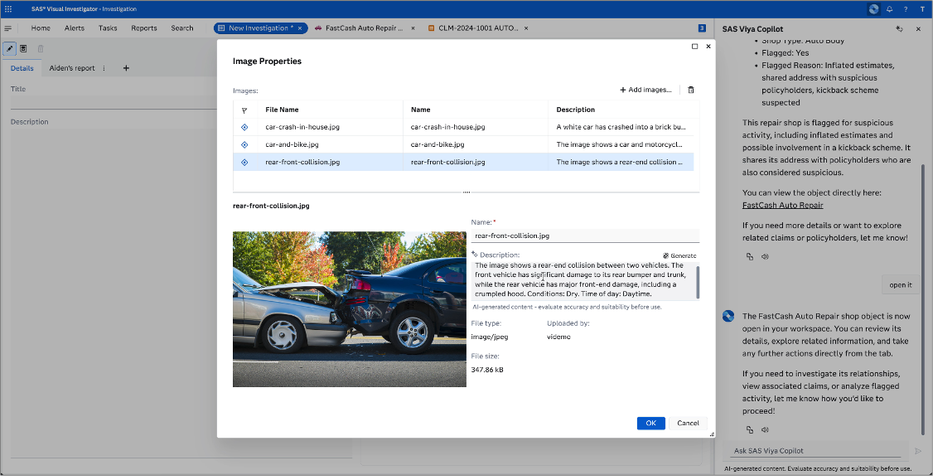
SAS® Viya Copilot in SAS® Visual Investigator can create AI-generated image descriptions for uploaded images.
|
Administrator note
SAS® Viya Copilot is not enabled by default and must be activated by a SAS® Administrator before it is available to users.
GenAI Image Description, GenAI Assisted Search, and GenAI Text Generation features must be enabled by a SAS® Administrator in the SAS® Environment Manager.
|
|
SAS® Visual Investigator resources
|
|
Getting started
Getting Started with SAS® Viya Copilot in SAS® Visual Investigator
Step-by-step activation guide for SAS® Administrators and investigators.
Read more → |
|
|
Documentation
SAS® Help Center
Official SAS® documentation for SAS® Visual Investigator and SAS® Viya Copilot setup.
Read more → |
|
|
Join the conversation
Have questions or feedback?
Share your thoughts, questions, or experiences with SAS® Viya Copilot in the comments below.
|
|


