BookmarkSubscribeRSS Feed
☑ This topic is solved. Need further help from the community? Please sign in and ask a new question.
u41146773
Fluorite | Level 6

Hi,


I'm trying to call the SAS API via Postman after publishing a simple decision flow and I wish to test the how a data grid variable is communicated upon sending a request.


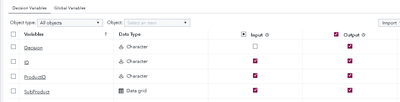
1. I created input and output variables with their corresponding data type, on which SubProduct variable is a data grid.

u41146773_1-1664267990688.png


2. Then I created a simple ruleset to count the records inside the data grid. If there is more than 1 record, then Decision = "No", else Decision = "Yes":

u41146773_2-1664268175475.png

3. I have published and validated the simple flow. And got the expected outputs:

u41146773_3-1664268886873.png

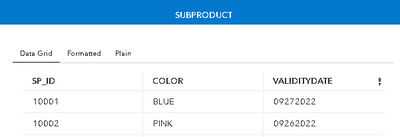
      a. Data Grid value from output variable -> DECISION = "No":          

          u41146773_5-1664269065544.png          

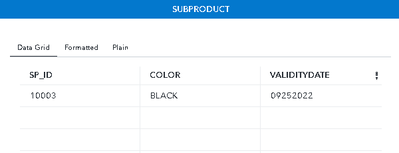
      b. Data Grid value from output variable -> DECISION = "Yes:

          u41146773_6-1664269109347.png

4. I have now copied the published URL to postman and set up the JSON request body for Item 3a.

{
   "inputs":[
      {
         "name":"ID_",
         "value":"A1"
      },
      {
         "name":"PRODUCTID_",
         "value":"car1"
      },
      {
         "name":"SUBPRODUCT_",
         "value": [
            {
                "metadata": [
                    {
                        "SP_ID": "string"
                    },
                    {
                        "COLOR": "string"
                    },
                    {
                        "VALIDITYDATE": "string"
                    }
                ]
            },
            {
                "data": [
                    [
                        "10001",
                        "BLUE",
                        "09272022"
                    ],
                    [
                        "10002",
                        "PINK",
                        "09262022"
                    ]
                ]
            }
        ]
      }
   ]
}

5. Upon sending the request, this is the response/error that I got.

{
    "errorCode": 0,
    "message": "Cannot execute the step \"execute_skel\" of the module \"sub_flow_dg1_0\".",
    "details": [
        "traceId: 3aaf89e6bbb63491",
        "path: /microanalyticScore/modules/sub_flow_dg1_0/steps/execute_skel",
        "Cannot assign the value [{metadata=[{SP_ID=string}, {COLOR=string}, {VALIDITYDATE=string}]}, {data=[[10001, BLUE, 09272022], [10002, PINK, 09262022]]}] to the parameter \"\"SubProduct_\"\" of type string."
    ],
    "links": [],
    "version": 2,
    "httpStatusCode": 400
}

I am confused on why I did not get the expected output as I did from Item 3 once I did the testing in runtime environment. Any thoughts on why this is happening? Thanks in advance!


1 ACCEPTED SOLUTION

Accepted Solutions
alexal
SAS Employee
Send the same payload to /microanalyticScore/modules/sub_flow_dg1_0/steps/execute, and it will work just fine.

View solution in original post

3 REPLIES 3
alexal
SAS Employee
Send the same payload to /microanalyticScore/modules/sub_flow_dg1_0/steps/execute, and it will work just fine.
u41146773
Fluorite | Level 6

Thanks @alexal, the URL worked. Great help!


I am wondering if this is the default template expected for the URL?


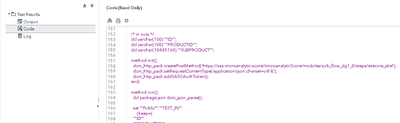
I only got the one with "_skel" from the path given from the published code of the decision flow (Scoring tab -> Publishing Validation -> Code):

u41146773_0-1664334122330.png

I thought I had to depend on the URL here, from /microanalyticScore/..., but apparently _skel should be removed as well when testing via Postman.

sas-innovate-2026-white.png


April 27 – 30 | Gaylord Texan | Grapevine, Texas

Registration is open

Walk in ready to learn. Walk out ready to deliver. This is the data and AI conference you can't afford to miss.
Register now and lock in 2025 pricing—just $495!

Register now

Discussion stats
  • 3 replies
  • 4219 views
  • 2 likes
  • 2 in conversation