BookmarkSubscribeRSS Feed
🔒 This topic is solved and locked. Need further help from the community? Please sign in and ask a new question.
Zhteh
Calcite | Level 5

Hi,


I have successfully set up the connection to the cas server, fetch the data and also display the data using python script. I use the code as follows:


flag = conn.CASTable ('lalala' ,caslib = 'public')

flag = flag.table.fetch()
print(flag)

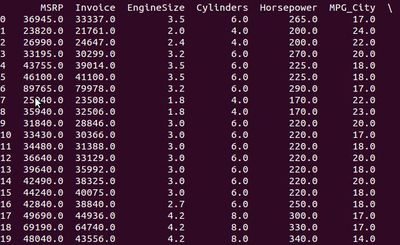
and it gives me the output as follows:


Output.jpg 


However, I can't access the specific row and column of the table data (eg. row=0,col=1, value = 36945.0).


Can anyone tell me how to do it?


Thanks


1 ACCEPTED SOLUTION

Accepted Solutions
alexal
SAS Employee

@Zhteh,

However, I can't access the specific row and column of the table data (eg. row=0,col=1, value = 36945.0).


You can:


flag = conn.CASTable ('lalala' ,caslib = 'public')
print(flag['MSRP'].get(0))

View solution in original post

2 REPLIES 2
alexal
SAS Employee

@Zhteh,

However, I can't access the specific row and column of the table data (eg. row=0,col=1, value = 36945.0).


You can:


flag = conn.CASTable ('lalala' ,caslib = 'public')
print(flag['MSRP'].get(0))

sas-innovate-2026-white.png


April 27 – 30 | Gaylord Texan | Grapevine, Texas

Registration is open

Walk in ready to learn. Walk out ready to deliver. This is the data and AI conference you can't afford to miss.
Register now and lock in 2025 pricing—just $495!

Register now

Discussion stats
  • 2 replies
  • 2122 views
  • 0 likes
  • 2 in conversation