- Home
- /
- SAS Viya
- /
- Visual Analytics
- /
- Re: Need to color
- RSS Feed
- Mark Topic as New
- Mark Topic as Read
- Float this Topic for Current User
- Bookmark
- Subscribe
- Mute
- Printer Friendly Page


- Mark as New
- Bookmark
- Subscribe
- Mute
- RSS Feed
- Permalink
- Report Inappropriate Content
Can you please help me in colour the duplicate values using sas. Please see the attachment if index I'd is duplicate then code should compare the row and colour the non duplicate columns in duplicate rows.
- Mark as New
- Bookmark
- Subscribe
- Mute
- RSS Feed
- Permalink
- Report Inappropriate Content


- Mark as New
- Bookmark
- Subscribe
- Mute
- RSS Feed
- Permalink
- Report Inappropriate Content
Hello @shiv999 ,
I played a little with my VA 8.5 and got this as a results:

If this fits your needs fully or partially then here's how I did it. I think this should be doable also with VA8.3 and newer versions.
- To find the duplicate rows we will create a new data aggregation
In the Data pane, select a data source SAS_SAMPLE. Clickthe icon on right looking like database and then select New data from aggregation of data-source. The New Aggregated Data window is displayed. Edit it to look the same as below. The reasoning here is that we should get Frequence=1 when there is only one row with specific Index_id and tax. If the pair exist more than once then Frequency>1. We will use this in the List table to spot the duplicate rows.
-
Now add the results from step before to original data
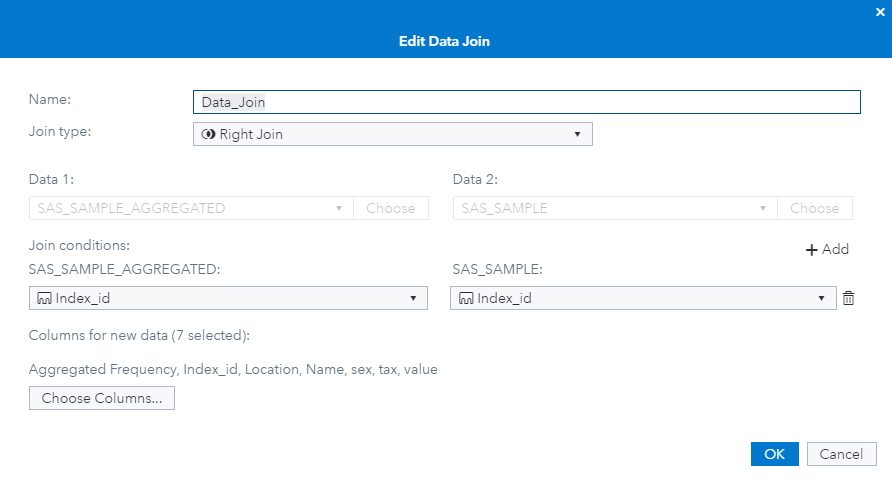
Create a custom data source join to add the Frequency column to SAS_SAMPLE. In the Data pane, select a data source SAS_SAMPLE_AGGREGATED. Click the icon on right looking like database and then select New data from join with SAS_SAMPLE_AGGREGATED. Note that VA will create the Join with default settings first and you need to edit it after creation to get what we need: - Finally we create rules to highlight cells in the list table
My List table roles are as below. The variable Aggregated Frequency I have used in Hidden role is the one we created in the first step and added to SAS_SAMPLE in the data join step.
Use display rules to highlight cells:


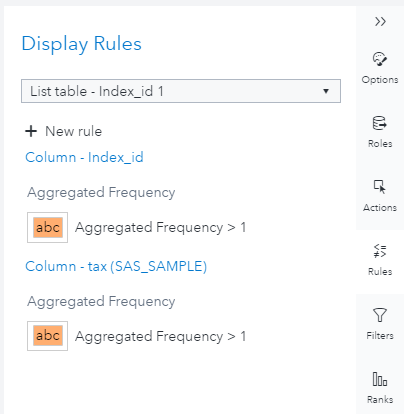
Let me know if you have any questions.
Best regards,
Petri

Catch up on SAS Innovate 2026
Nearly 200 sessions are now available on demand in the Innovate Hub.
Watch Now →See how to use one filter for multiple data sources by mapping your data from SAS’ Alexandria McCall.

Find more tutorials on the SAS Users YouTube channel.
-
2 replies
-
04-01-2020 07:34 AM
-
2795 views
-
0 likes
-
2 in conversation
-


