- Home
- /
- Programming
- /
- SAS Studio
- /
- Upload files tap in Explorer is disabled - SAS Studio 5.2
- RSS Feed
- Mark Topic as New
- Mark Topic as Read
- Float this Topic for Current User
- Bookmark
- Subscribe
- Mute
- Printer Friendly Page


- Mark as New
- Bookmark
- Subscribe
- Mute
- RSS Feed
- Permalink
- Report Inappropriate Content
Hello,,
I am new to SAS Studio and I have been working in the Trial. I am trying to upload a csv file from my computer to SAS Studio but the Upload files tap in Explorer is disabled.
Can someone explain how to upload my files ?
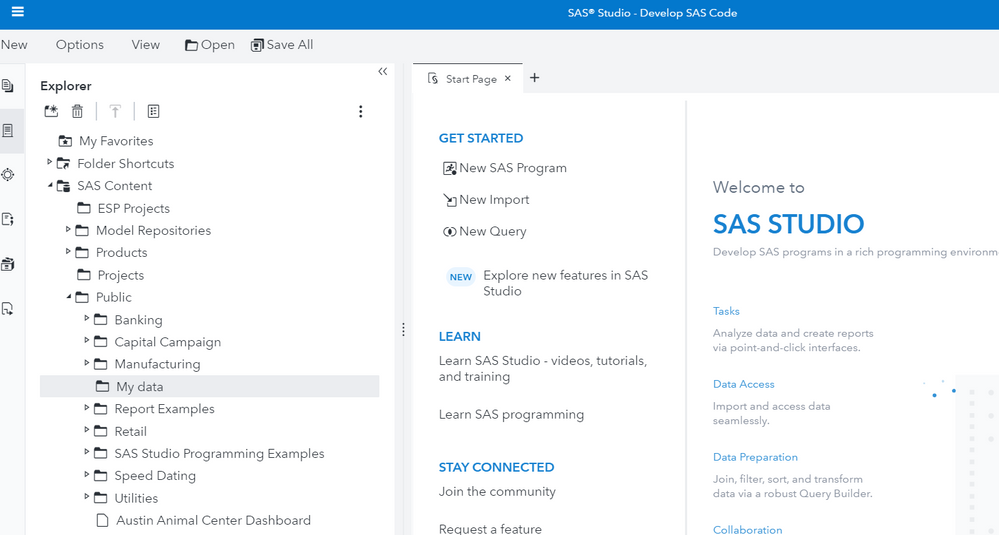
Thanks.
Accepted Solutions
- Mark as New
- Bookmark
- Subscribe
- Mute
- RSS Feed
- Permalink
- Report Inappropriate Content
The Solution I figured is by uploading local files through SAS Data Explorer - Manage Data, then load the data to caslib. After that, run below code in SAS Studio to create a reference pointing to your data in caslib. For example my data in casuser library
libname casuser cas caslib='casuser';


- Mark as New
- Bookmark
- Subscribe
- Mute
- RSS Feed
- Permalink
- Report Inappropriate Content
Do you have access rights to the folder you are trying to upload to?
Is the right-click upload menu available?
- Mark as New
- Bookmark
- Subscribe
- Mute
- RSS Feed
- Permalink
- Report Inappropriate Content
Hi @japelin
I double checked from Manage Environment in the Administration window and Yes I have access rights to the folder. And I cant see any update option on the the folder right click.
- Mark as New
- Bookmark
- Subscribe
- Mute
- RSS Feed
- Permalink
- Report Inappropriate Content
The Solution I figured is by uploading local files through SAS Data Explorer - Manage Data, then load the data to caslib. After that, run below code in SAS Studio to create a reference pointing to your data in caslib. For example my data in casuser library
libname casuser cas caslib='casuser';

Catch up on SAS Innovate 2026
Nearly 200 sessions are now available on demand in the Innovate Hub.
Watch Now →Get started using SAS Studio to write, run and debug your SAS programs.

Find more tutorials on the SAS Users YouTube channel.
SAS Training: Just a Click Away
Ready to level-up your skills? Choose your own adventure.
-
3 replies
-
04-26-2021 07:38 AM
-
2158 views
-
0 likes
-
2 in conversation
-


