- Home
- /
- Programming
- /
- SAS Studio
- /
- SAS University Edition Studio "physical file does not exist" error aft...
- RSS Feed
- Mark Topic as New
- Mark Topic as Read
- Float this Topic for Current User
- Bookmark
- Subscribe
- Mute
- Printer Friendly Page


- Mark as New
- Bookmark
- Subscribe
- Mute
- RSS Feed
- Permalink
- Report Inappropriate Content
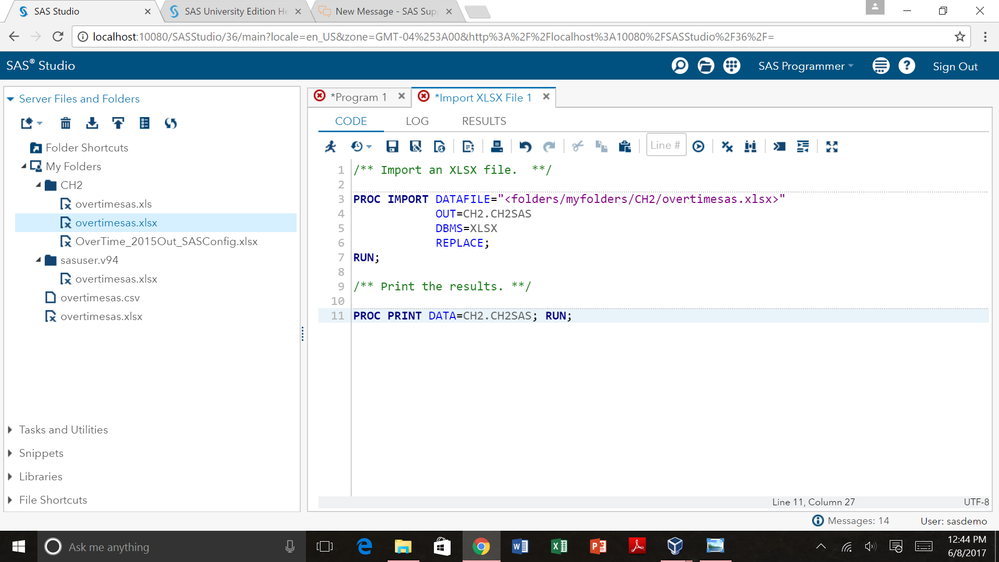
I have just started using SAS and tried to use the "Import XLSX" snippet to import my XLSX datafile. I have created a folder within "myfolders" called "CH2" and have uploaded my xlsx file there. I then filled in the relevant information using the tutorial on the SAS help website and then read a bunch of posts on here about similar problems. However, no matter what I do, I continue to get the same error. I'm including a screenshot of how I had the code set up and a PDF of the log after running the code. Any ideas how to fix this and get my data into SAS? Thank you in advance!


- Mark as New
- Bookmark
- Subscribe
- Mute
- RSS Feed
- Permalink
- Report Inappropriate Content
It is best to just post the log information in a code box using the {i} forum menu icon that attaching a file (unless it very long)
PROC IMPORT DATAFILE="<folders/myfolders/CH2/overtimesas.xlsx>"
where did the < and > characters come from? I would expect
PROC IMPORT DATAFILE="/folders/myfolders/CH2/overtimesas.xlsx"
Note the full error message
ERROR: Physical file does not exist, /opt/sasinside/SASConfig/Lev1/SASApp/<folders/myfolders/CH2//overtimesas.xlsx>.
If you use windows explorer to go to that location do you see anything named with <folders???
I would suggest exploring the TASKS for import data and see the code generated for comparison

- Mark as New
- Bookmark
- Subscribe
- Mute
- RSS Feed
- Permalink
- Report Inappropriate Content
You can right click a file in the Files/Folders Section, select properties and the exact path you will need to use is in that menu.
You can copy and use that.

- Mark as New
- Bookmark
- Subscribe
- Mute
- RSS Feed
- Permalink
- Report Inappropriate Content
You will VERY rarely find a '<' or '>' in a UNIX filename, as these characters have special meaning in the shell as in/output recdirectors.
So they were used to mean 'insert your path here' in the documentation.
Also keep in mind that any pathname that doesn't start with a forward slash is considered relative to the current working directory and will usually lead into the great nowhere.


- Mark as New
- Bookmark
- Subscribe
- Mute
- RSS Feed
- Permalink
- Report Inappropriate Content
Hi @rieckl,
There is a topic about importing data in the FAQ here: How do I import data from a raw data file, a Microsoft Excel worksheet, or a DBMS file?
Click on Snippets at the top to view instructions for using the Import XLSX File snippet. In Step 2 of the instructions, there is an explanation for Line 3 of the snippet that shows examples of how to specify the XLSX filename.
Hope that helps!
thanks,
Jennifer
Catch the SAS Global Forum keynotes, announcements, and tech content!
sasglobalforum.com | #SASGF

Catch up on SAS Innovate 2026
Nearly 200 sessions are now available on demand with the SAS Innovate Digital Pass.
Explore Now →Get started using SAS Studio to write, run and debug your SAS programs.

Find more tutorials on the SAS Users YouTube channel.
SAS Training: Just a Click Away
Ready to level-up your skills? Choose your own adventure.
-
4 replies
-
06-08-2017 12:48 PM
-
3949 views
-
0 likes
-
5 in conversation
-


