- Home
- /
- Programming
- /
- SAS Studio
- /
- Proc Transpose gives me a stepped table
- RSS Feed
- Mark Topic as New
- Mark Topic as Read
- Float this Topic for Current User
- Bookmark
- Subscribe
- Mute
- Printer Friendly Page


- Mark as New
- Bookmark
- Subscribe
- Mute
- RSS Feed
- Permalink
- Report Inappropriate Content
I proc transposed this:
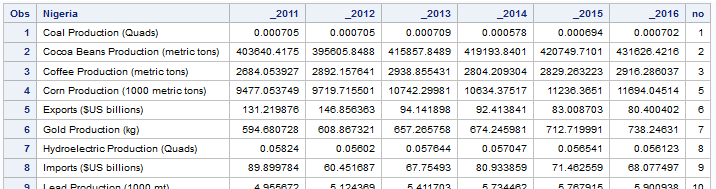
proc sort data=ngr2 out=ngr1;
by no;
run;

proc transpose data=Ngr1 out=ngr;
	by no;
	id nigeria;
	var _2011 _2012 _2013 _2014 _2015 _2016;
run;
and got this:
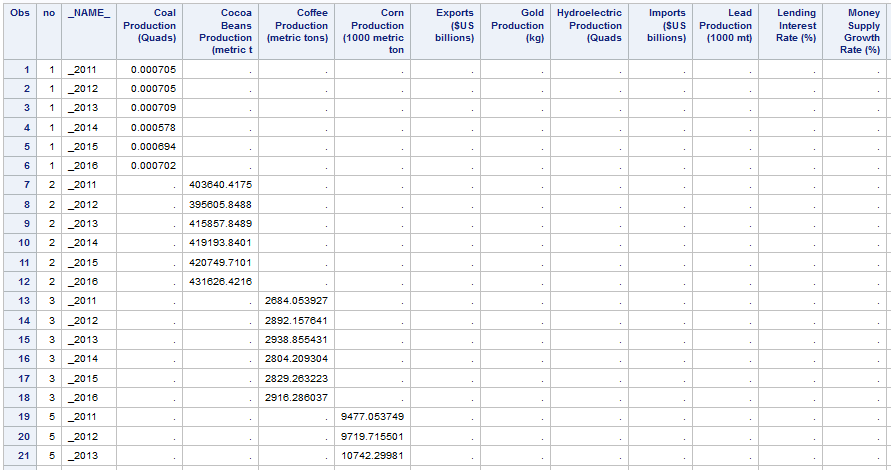
but I want something like this

Thanks in advance
Accepted Solutions


- Mark as New
- Bookmark
- Subscribe
- Mute
- RSS Feed
- Permalink
- Report Inappropriate Content
You don't need a BY statement, in fact a 'basic' proc transpose should get you much closer:
proc transpose data=have out=want;
run;
Add back portions of code until you get what you need with the minimal amount of code. You should end up with something similar to this:
proc transpose data=have out=want;
id var_name;
var _2011 _2012 _2013 _2014 _2015 _2016;
run;
- Mark as New
- Bookmark
- Subscribe
- Mute
- RSS Feed
- Permalink
- Report Inappropriate Content
You don't need a BY statement, in fact a 'basic' proc transpose should get you much closer:
proc transpose data=have out=want;
run;
Add back portions of code until you get what you need with the minimal amount of code. You should end up with something similar to this:
proc transpose data=have out=want;
id var_name;
var _2011 _2012 _2013 _2014 _2015 _2016;
run;
- Mark as New
- Bookmark
- Subscribe
- Mute
- RSS Feed
- Permalink
- Report Inappropriate Content


- Mark as New
- Bookmark
- Subscribe
- Mute
- RSS Feed
- Permalink
- Report Inappropriate Content
I assume that variable no is only there to set a column order in your transposed table. That's fine. But it shouldn't be involved in the transposition. Simply do:
proc transpose data=Ngr1 out=ngr name=Year;
	id Nigeria;
	var _2011 - _2016;
run;- Mark as New
- Bookmark
- Subscribe
- Mute
- RSS Feed
- Permalink
- Report Inappropriate Content

Catch up on SAS Innovate 2026
Nearly 200 sessions are now available on demand in the Innovate Hub.
Watch Now →Get started using SAS Studio to write, run and debug your SAS programs.

Find more tutorials on the SAS Users YouTube channel.
SAS Training: Just a Click Away
Ready to level-up your skills? Choose your own adventure.
-
4 replies
-
05-14-2016 04:24 PM
-
2249 views
-
0 likes
-
3 in conversation
-


