- Home
- /
- Programming
- /
- SAS Studio
- /
- Multiple types of ANALYSIS in PROC REPORT
- RSS Feed
- Mark Topic as New
- Mark Topic as Read
- Float this Topic for Current User
- Bookmark
- Subscribe
- Mute
- Printer Friendly Page


- Mark as New
- Bookmark
- Subscribe
- Mute
- RSS Feed
- Permalink
- Report Inappropriate Content
I am trying to create this output in my PROC REPORT:
Blood Pressure Summaries by Race
| Average Pressures | ||||
| Systolic | Diastolic | |||
Race Code | N | MEAN | STD | MEAN | STD |
Asian | 11 | 117.1 | 11.1 | 69.1 | 9.0 |
Black | 83 | 123.3 | 15.3 | 74.0 | 7.0 |
Other Race | 30 | 115.2 | 15.5 | 69.8 | 11.0 |
White | 449 | 120.8 | 15.5 | 70.0 | 7.6 |
| 573 | 120.8 | 15.4 | 70.6 | 7.8 |
*The format of this shows up kinda off. The systolic and diastolic labels are supposed to be over the Mean and STD variables.
So far I have this code:
options fmtsearch = (HypTabs.HypFormats WORK LIBRARY);
proc format;
value $RaceCd
' ' = 'Unknown'
'A' = 'Asian'
'B' = 'Black'
'O' = 'Other Race'
'W' = 'White'
other = 'Unexpected Value';
run;
title 1 "Blood Pressure Summaries By Race";
proc report
data = HypAnl.HypPrimAnl
nowindows
split = '/';
column RaceCd N ("Average Pressures" SBP DBP);
define RaceCd / groip 'Race Code';
define SBP / analysis mean format = 5.1 'MEAN' analysis std format =4.1 'STD';
define DBP / analysis mean format = 4.1 'MEAN' analysis std format =4.1 'STD';
rebreak after / summarize;
format RaceCd $RaceCd.;
run;
The issue is getting the MEAN and STD variables split up in the table, because now only one is showing up. Any ideas?
Accepted Solutions


- Mark as New
- Bookmark
- Subscribe
- Mute
- RSS Feed
- Permalink
- Report Inappropriate Content
Hi:
Your DEFINE statements are incorrect. Since you did not post data, I used SASHELP.HEART which has diastolic and systolic measurements, but there is no ethnicity variable in SASHELP.HEART, so I used CHOL_STATUS for categories/grouping. I imagine that you want something like this:
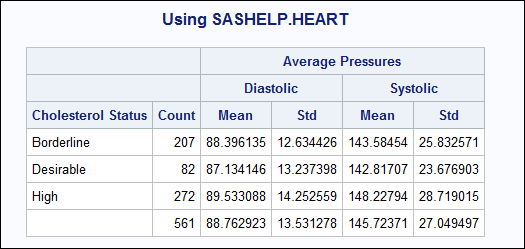
which I produced with this code (I added an overall summary line just in case you wanted something like that too):
title 'Using SASHELP.HEART';
proc report data=sashelp.heart;
where agechddiag gt 65;
column chol_status N
       ('Average Pressures' Diastolic,(mean std) Systolic,(mean std));
define chol_status / group;
define N / 'Count';
define Diastolic / analysis 'Diastolic';
define Systolic / analysis 'Systolic';
define Mean / 'Mean';
define std / 'Std';
rbreak after / summarize;
run;
PROC REPORT allows you to "cross" multiple statistics "under" an analysis variable as I show above. So when the COLUMN statement has this:
Diastolic,(mean std) or
Systolic,(mean std)
then I am asking for the MEAN and STD statistics to be calculated using the variable named DIASTOLIC and then again, calculated using the variable SYSTOLIC.
Hope this gives you a better idea of how to get what you want with PROC REPORT.
cynthia
- Mark as New
- Bookmark
- Subscribe
- Mute
- RSS Feed
- Permalink
- Report Inappropriate Content
Hi:
Your DEFINE statements are incorrect. Since you did not post data, I used SASHELP.HEART which has diastolic and systolic measurements, but there is no ethnicity variable in SASHELP.HEART, so I used CHOL_STATUS for categories/grouping. I imagine that you want something like this:
which I produced with this code (I added an overall summary line just in case you wanted something like that too):
title 'Using SASHELP.HEART';
proc report data=sashelp.heart;
where agechddiag gt 65;
column chol_status N
       ('Average Pressures' Diastolic,(mean std) Systolic,(mean std));
define chol_status / group;
define N / 'Count';
define Diastolic / analysis 'Diastolic';
define Systolic / analysis 'Systolic';
define Mean / 'Mean';
define std / 'Std';
rbreak after / summarize;
run;
PROC REPORT allows you to "cross" multiple statistics "under" an analysis variable as I show above. So when the COLUMN statement has this:
Diastolic,(mean std) or
Systolic,(mean std)
then I am asking for the MEAN and STD statistics to be calculated using the variable named DIASTOLIC and then again, calculated using the variable SYSTOLIC.
Hope this gives you a better idea of how to get what you want with PROC REPORT.
cynthia
- Mark as New
- Bookmark
- Subscribe
- Mute
- RSS Feed
- Permalink
- Report Inappropriate Content
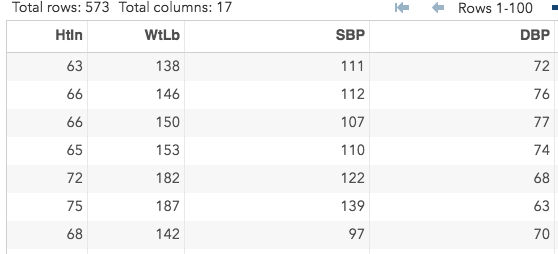
I tried this code based off of what you gave me, but it is not working. I get the error message listed below.
- Mark as New
- Bookmark
- Subscribe
- Mute
- RSS Feed
- Permalink
- Report Inappropriate Content
Figured out my problem. Was just referencing the variables wrong.

Catch up on SAS Innovate 2026
Nearly 200 sessions are now available on demand with the SAS Innovate Digital Pass.
Explore Now →Get started using SAS Studio to write, run and debug your SAS programs.

Find more tutorials on the SAS Users YouTube channel.
SAS Training: Just a Click Away
Ready to level-up your skills? Choose your own adventure.
-
3 replies
-
11-21-2017 11:49 AM
-
3831 views
-
0 likes
-
2 in conversation
-


