Turn on suggestions
Auto-suggest helps you quickly narrow down your search results by suggesting possible matches as you type.
Showing results for
- Home
- /
- Programming
- /
- Programming
- /
- Re: replicate values from column A_EXP_DT to other new_dt
Options
- RSS Feed
- Mark Topic as New
- Mark Topic as Read
- Float this Topic for Current User
- Bookmark
- Subscribe
- Mute
- Printer Friendly Page


Fluorite | Level 6
- Mark as New
- Bookmark
- Subscribe
- Mute
- RSS Feed
- Permalink
- Report Inappropriate Content
Posted 11-16-2021 06:37 AM
(2993 views)
5 REPLIES 5


Barite | Level 11
- Mark as New
- Bookmark
- Subscribe
- Mute
- RSS Feed
- Permalink
- Report Inappropriate Content
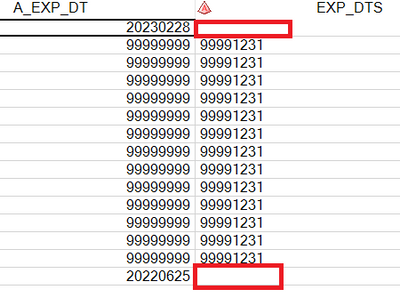
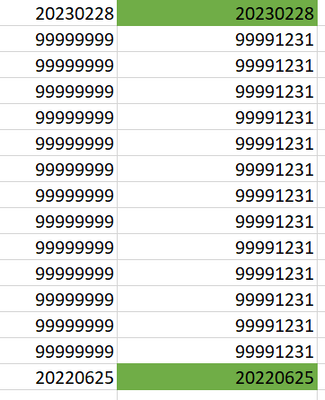
I think this is what you want:
data VIEW;
set TEST;
new_dt = A_EXP_DT;
if A_EXP_DT = '99999999' then new_dt = '99991231';
RUN;

Tourmaline | Level 20
- Mark as New
- Bookmark
- Subscribe
- Mute
- RSS Feed
- Permalink
- Report Inappropriate Content
How about
data VIEW;

   set TEST;

   new_dt = A_EXP_DT;
   if A_EXP_DT = '99999999' then new_dt = '99991231';

RUN;
Fluorite | Level 6
- Mark as New
- Bookmark
- Subscribe
- Mute
- RSS Feed
- Permalink
- Report Inappropriate Content
exactly what i want .thank you a lot

Fluorite | Level 6
- Mark as New
- Bookmark
- Subscribe
- Mute
- RSS Feed
- Permalink
- Report Inappropriate Content
This may help
data VIEW;
set TEST;
A_EXP_DT =new_dt ;
if A_EXP_DT = '99999999' then new_dt = '99991231';
RUN;


Rhodochrosite | Level 12
- Mark as New
- Bookmark
- Subscribe
- Mute
- RSS Feed
- Permalink
- Report Inappropriate Content
It is what COALESCE functions do.
As this column seems to hold what looks like a date but as a character string, the particular function might be
COALESCEC()
As this column seems to hold what looks like a date but as a character string, the particular function might be
COALESCEC()

Catch up on SAS Innovate 2026
Nearly 200 sessions are now available on demand with the SAS Innovate Digital Pass.
Explore Now →How to Concatenate Values
Learn how use the CAT functions in SAS to join values from multiple variables into a single value.

Find more tutorials on the SAS Users YouTube channel.
SAS Training: Just a Click Away
Ready to level-up your skills? Choose your own adventure.
Discussion stats
-
5 replies
-
11-16-2021 06:37 AM
-
2994 views
-
0 likes
-
5 in conversation
-


