- Home
- /
- Programming
- /
- Programming
- /
- Using SAS to Read the White House Visitors Log and Other Socrata-Hoste...
- RSS Feed
- Mark Topic as New
- Mark Topic as Read
- Float this Topic for Current User
- Bookmark
- Subscribe
- Mute
- Printer Friendly Page


- Mark as New
- Bookmark
- Subscribe
- Mute
- RSS Feed
- Permalink
- Report Inappropriate Content
In Analyzing Open Data with SAS, Socrata's Mark Silverberg explains how to use SAS code and the Socrata API to consume a Socrata-hosted open data dataset (the CDC's Behavioral Risk Factor Surveillance System health survey data).
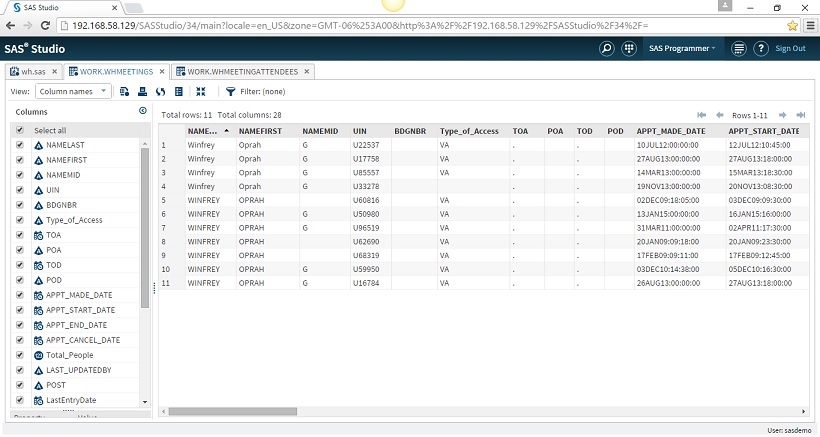
There's a wealth of Socrata-hosted datasets available on the web, including the White House Visitors Log. Below is a little SAS code that retrieves data from the WH Visitors Log. Plug in the name of your favorite public figure - the example uses Oprah - and see not only when they visited, but also with whom they met. Sure beats having to download 100+ MB of zipped .csv files!
*==> 1. Run request to retrieve White House Visitor Log meeting IDs (UINs) from Socrata;

filename whquery url 'http://open.whitehouse.gov/resource/p86s-ychb.csv?namelast=winfrey&namefirst=oprah&$limit=30000';

data whmeetings;
infile whquery dsd dlm=',' lrecl=2000 truncover firstobs=2;
input NAMELAST : $30. NAMEFIRST : $30. NAMEMID : $30. UIN : $30. BDGNBR : $30.
      Type_of_Access : $30. TOA : ANYDTDTM40. POA : $30. TOD : ANYDTDTM40.
      POD : $30. APPT_MADE_DATE : ANYDTDTM40. APPT_START_DATE : ANYDTDTM40.
      APPT_END_DATE : ANYDTDTM40. APPT_CANCEL_DATE : ANYDTDTM40. Total_People
      LAST_UPDATEDBY : $30. POST : $30. LastEntryDate : ANYDTDTM40.
      TERMINAL_SUFFIX : $30. visitee_namelast : $30. visitee_namefirst : $30.
      MEETING_LOC : $30. MEETING_ROOM : $30. CALLER_NAME_LAST : $30.
      CALLER_NAME_FIRST : $30. CALLER_ROOM : $30. Description : $255.
      RELEASE_DATE : MMDDYY10.;
FORMAT TOA TOD APPT_MADE_DATE APPT_START_DATE APPT_END_DATE APPT_CANCEL_DATE
       LastEntryDate DATETIME16. RELEASE_DATE MMDDYY10.;

proc sort data=whmeetings nodupkey; by uin;  * De-dupe;

*==> 2. Run request to retrieve meeting attendees from Socrata;

filename whquery2 url 'http://www.google.com';  * Placeholder URL initially;

data whattendees;
length whquery2 $255.;                     * Drop observations with no appointment ID;
set whmeetings(keep=UIN rename=(uin=inuin) where=(inuin^=''));
whquery2="http://open.whitehouse.gov/resource/p86s-ychb.csv?UIN="||trim(inuin);
do while(^eof);
  infile whquery2 url filevar=whquery2  dsd dlm=',' lrecl=2000 truncover firstobs=2 end=eof;
  input NAMELAST : $30. NAMEFIRST : $30. NAMEMID : $30. UIN : $30. BDGNBR : $30.
        Type_of_Access : $30. TOA : ANYDTDTM40. POA : $30. TOD : ANYDTDTM40.
        POD : $30. APPT_MADE_DATE : ANYDTDTM40. APPT_START_DATE : ANYDTDTM40.
        APPT_END_DATE : ANYDTDTM40. APPT_CANCEL_DATE : ANYDTDTM40. Total_People
        LAST_UPDATEDBY : $30. POST : $30. LastEntryDate : ANYDTDTM40.
        TERMINAL_SUFFIX : $30. visitee_namelast : $30. visitee_namefirst : $30.
        MEETING_LOC : $30. MEETING_ROOM : $30. CALLER_NAME_LAST : $30.
        CALLER_NAME_FIRST : $30. CALLER_ROOM : $30. Description : $255.
        RELEASE_DATE : MMDDYY10.;
  output;
end;
eof=0;
FORMAT TOA TOD APPT_MADE_DATE APPT_START_DATE APPT_END_DATE APPT_CANCEL_DATE
       LastEntryDate DATETIME16. RELEASE_DATE MMDDYY10.;

*==> 3. UINs are reused, so only select matches on UIN & appointment start time;

proc sql;
create table whmeetingattendees as select a.* from whmeetings m
left join whattendees a on m.uin=a.uin and m.APPT_START_DATE=a.APPT_START_DATE
order by a.APPT_START_DATE, uin, namelast, namefirst;

*==> 4. Export results to Excel;

proc export data=whmeetingattendees
            outfile='/folders/myfolders/whmeetingattendees.xlsx' dbms=xlsx replace;
sheet="whmeetingattendees";

proc sort data=whmeetings; by APPT_START_DATE uin;
proc export data=whmeetings
            outfile='/folders/myfolders/whmeetingattendees.xlsx' dbms=xlsx replace;
sheet="whmeetings";
run;


- Mark as New
- Bookmark
- Subscribe
- Mute
- RSS Feed
- Permalink
- Report Inappropriate Content
This is excellent @tc! Thanks for sharing!

Catch up on SAS Innovate 2026
Nearly 200 sessions are now available on demand with the SAS Innovate Digital Pass.
Explore Now →Learn how use the CAT functions in SAS to join values from multiple variables into a single value.

Find more tutorials on the SAS Users YouTube channel.
SAS Training: Just a Click Away
Ready to level-up your skills? Choose your own adventure.
-
1 reply
-
01-03-2016 11:32 AM
-
1902 views
-
5 likes
-
2 in conversation
-


