- Home
- /
- Programming
- /
- Programming
- /
- Proc Means
- RSS Feed
- Mark Topic as New
- Mark Topic as Read
- Float this Topic for Current User
- Bookmark
- Subscribe
- Mute
- Printer Friendly Page


- Mark as New
- Bookmark
- Subscribe
- Mute
- RSS Feed
- Permalink
- Report Inappropriate Content
Hello team,
I need the total rows for a dataset. I use proc means to get the count of a variable in a dataset,
The query gives errors: log says: Variable memberletter in list doesn't match type prescribed for this list.
I assume memberletter is a character and means requires data type as number.
I used proc freq and that gave me the memberletter broken by the values that exists in the variable.
I need a total line.
I appreciate your response.
Regards,
Blue blue
Accepted Solutions


- Mark as New
- Bookmark
- Subscribe
- Mute
- RSS Feed
- Permalink
- Report Inappropriate Content
Proc means will only do statistics for numeric variables. I have to assume you placed the name of a character variable on a VAR statement to generate that message.
And why are you using Proc means if you want a number of records in a data set? Proc Contents will do that.
Or you could use proc summary with the variable on a CLASS statement (NO var variables).
Or query sashelp.vtables.
Instead of piecemeal questions it might help to provide a description of where all this is going and some data.
- Mark as New
- Bookmark
- Subscribe
- Mute
- RSS Feed
- Permalink
- Report Inappropriate Content
Proc means will only do statistics for numeric variables. I have to assume you placed the name of a character variable on a VAR statement to generate that message.
And why are you using Proc means if you want a number of records in a data set? Proc Contents will do that.
Or you could use proc summary with the variable on a CLASS statement (NO var variables).
Or query sashelp.vtables.
Instead of piecemeal questions it might help to provide a description of where all this is going and some data.


- Mark as New
- Bookmark
- Subscribe
- Mute
- RSS Feed
- Permalink
- Report Inappropriate Content
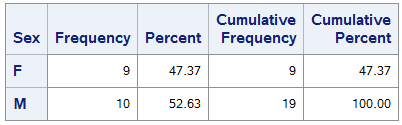
PROC FREQ does give the total. It is the cumulative value in the last row:
proc freq data=sashelp.class;
    tables sex;
run;
This produces the total value of N, which is the value of 19 in the cumulative frequency in the last line
Paige Miller

Call for content now open!
It's your turn to help shape SAS Innovate 2027. Share your expertise and inspire the SAS community.
Learn how use the CAT functions in SAS to join values from multiple variables into a single value.

Find more tutorials on the SAS Users YouTube channel.
SAS Training: Just a Click Away
Ready to level-up your skills? Choose your own adventure.
-
2 replies
-
06-30-2021 02:32 PM
-
1667 views
-
2 likes
-
3 in conversation
-


