- Home
- /
- Programming
- /
- SAS Procedures
- /
- Re: resetting or creating a new counter variable
- RSS Feed
- Mark Topic as New
- Mark Topic as Read
- Float this Topic for Current User
- Bookmark
- Subscribe
- Mute
- Printer Friendly Page


- Mark as New
- Bookmark
- Subscribe
- Mute
- RSS Feed
- Permalink
- Report Inappropriate Content
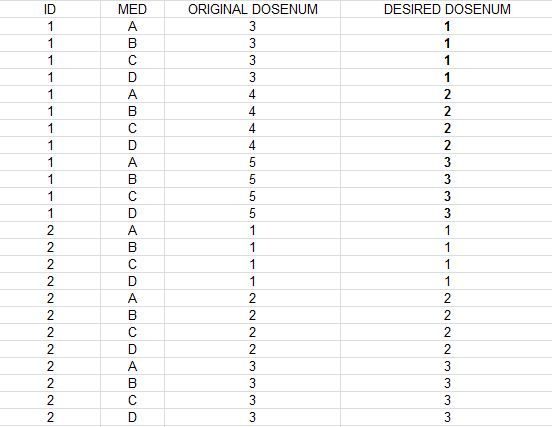
Hi, I have a dose number counter variable (ORIGINAL DOSENUM) that, for some, does not start at "1" (ID 1). I want to reset this (or create a new counter variable) where all DOSENUMs start at "1" for each ID (as is the case for ID 2), i.e., DESIRED DOSENUM. Some original DOSENUMs start at 3, or 4 or 5, etc. I was able to create a new counter using , in the data step: "by ID ORIGINAL DOSENUM" followed by "if first.original dosenum then count+1", but this does not start the counter for each ID. Hope this is clear. Thanks.
data TEST1; input USUBJID $ EXSPID; cards; 01 3 01 3 01 3 01 3 01 4 01 4 01 4 01 4 01 5 01 5 01 5 01 5 02 1 02 1 02 1 02 1 02 2 02 2 02 2 02 2 02 3 02 3 02 3 02 3 ; run; Proc Sort data=test1; by USUBJID EXSPID; run; data test2; set test1; by USUBJID EXSPID; if first.exspid then count+1; Proc Print; run;


- Mark as New
- Bookmark
- Subscribe
- Mute
- RSS Feed
- Permalink
- Report Inappropriate Content
Hi,
Well, formatting your code so I can read it would help :smileyshocked:
You may be missing a retain:
data want;
set have; /* Assuming sorted! */
by id;
retain new_id;
if first.id then new_id=1;
else new_id=new_id+1;
run;
- Mark as New
- Bookmark
- Subscribe
- Mute
- RSS Feed
- Permalink
- Report Inappropriate Content
hey thanks (sorry 1st time user here):smileyblush:
yes, I was thinking I needed a retain somewhere


- Mark as New
- Bookmark
- Subscribe
- Mute
- RSS Feed
- Permalink
- Report Inappropriate Content
Your problem isn't that you're missing a retain statement, as using the sum function like you did automatically retains the variable. I think you need an extra if statement like:
data test2;
set test1;
by USUBJID EXSPID;
if first.USUBJID then count=1;
else if first.exspid then count+1;
run;
- Mark as New
- Bookmark
- Subscribe
- Mute
- RSS Feed
- Permalink
- Report Inappropriate Content
aha perfect, thank you!

Catch up on SAS Innovate 2026
Nearly 200 sessions are now available on demand with the SAS Innovate Digital Pass.
Explore Now →Learn the difference between classical and Bayesian statistical approaches and see a few PROC examples to perform Bayesian analysis in this video.

Find more tutorials on the SAS Users YouTube channel.
SAS Training: Just a Click Away
Ready to level-up your skills? Choose your own adventure.
-
4 replies
-
11-20-2014 10:23 AM
-
15199 views
-
1 like
-
3 in conversation
-


